


 Log In












Scheduling has always been one of those problems that no-code platforms tend to avoid. Building something that checks real-time availability, prevents double-booking, and supports multiple providers and locations is a significant engineering lift — so most platforms leave you to bolt on a third-party scheduling tool and figure out the data sync yourself.
At Knack, we’ve listened to customer feedback and taken a different approach. Today we’re launching Knack Scheduling: a native scheduling product built directly into Knack. Patients and other end users can now book their own appointments from inside your app, based on real-time provider availability. It’s seamless, Calendly-like appointment booking that works without any third-party tools, additional integrations, or disconnected data stored on separate platforms.
What your users experience
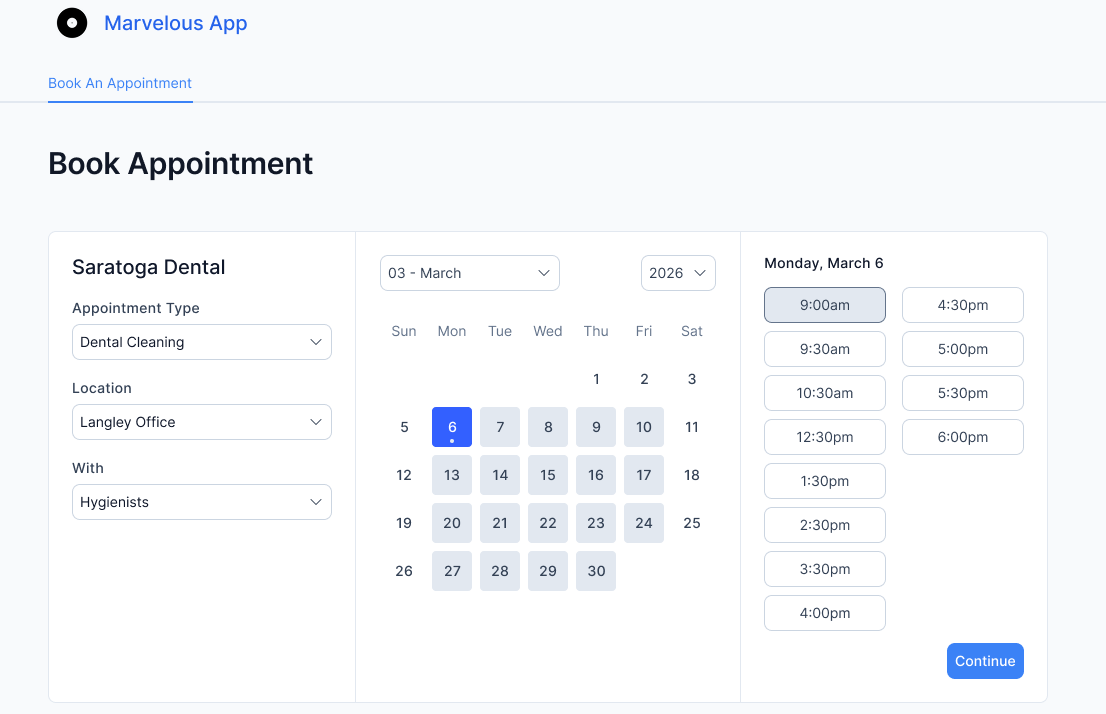
The booking flow is simple and intuitive; a user opens your scheduling page, selects an appointment type, chooses a provider, picks an available time, and confirms. The whole process takes a few moments.
A few things happen automatically along the way:
- Only available times are shown. Knack Scheduling checks real-time availability as users book, so double-booking is structurally impossible — taken slots simply don’t appear.
- The booking connects to your data. Because scheduling is native to Knack, every appointment links directly to the relevant records in your app. No exports, no syncing between systems, no manual data entry.
- The form adapts to your configuration. Set up different appointment types with different durations, providers, and locations. The scheduling form handles the rest automatically.
- No per-user fees. Unlike standalone scheduling tools that charge per seat, Knack Scheduling is included in your plan regardless of how many providers or staff members need access.
Getting set up
Enabling Knack Scheduling takes a few minutes to set up. Here’s the full process:
- Enable Scheduling in your app settings. Knack automatically generates the full data structure you need — Appointment Types, Bookable Resources, Locations, Booked Appointments, and Unavailable Dates — all connected with the right relationships. No schema design required.
- Configure your appointment types with durations, providers, and locations.
- Drag a Booking Form element onto any page in your app.
- Publish — your users can start booking immediately.
Want to learn more? Check out our full resource guide on getting set up with Knack Scheduling.
For healthcare teams and more
If you’re building on Knack Health, Scheduling is included with most HIPAA plans at no additional cost. See more on pricing here. Like everything in Knack, there’s no per-user pricing. Add providers, staff, and admin users without watching your bill go up. Appointment data stays inside your HIPAA-compliant Knack environment, without requiring additional vendors to evaluate or a separate BAA to sign.
For clinics, behavioral health practices, home care agencies, and other organizations handling PHI, this means patient self-scheduling that doesn’t create compliance exposure. One system, one BAA, everything connected.
Note: For non-HIPAA accounts, scheduling is also available as an add-on for Pro plans and above.
What’s coming next
Native email reminders and calendar integrations are on the roadmap. In the meantime, SMS reminders are available today via Twilio through Knack Flows, and calendar sync is achievable through Zapier or Make.
Already on Knack? Sign up for early access and enable Scheduling in your dashboard today.
New to Knack? See how native scheduling fits into a platform built for your operation. Explore Knack Scheduling →





