


 Log In












Introducing Knack 2.0 — Our New AI App Builder and Next-Gen Experience
For more than a decade, Knack has helped businesses build custom applications without code. Over that time, one thing has stayed constant: business users know what they need better than anyone else. The challenge has always been turning that knowledge into working software without waiting on developers or managing code.
For the past year at Knack, we’ve been working to solve that challenge with our biggest product innovation to date: A groundbreaking new AI app builder that allows anyone to create and manage robust, fully functional apps through simple AI conversations. This new functionality will transform the user experience, simplifying it tremendously and empowering businesses everywhere to unlock the full extent of Knack’s powerful no-code capabilities.
“We are revolutionizing the way businesses solve their problems,” says Derek Hutson, CEO of Knack. “With this AI launch, anyone can just describe what they need and get a live app in minutes, without worrying about backend hosting or maintaining code. That’s a differentiator for us; you don’t need to be a developer or have technical knowledge to build a working solution for your business.”
We’ve combined this milestone launch with the 100% rollout of Next-Gen Apps, which provides a modernized interface, more intuitive no-code builder, and enhanced app theming and design features. Even our homepage has gotten a makeover, reflecting our new app experience and updated positioning that emphasizes our focus on customer outcomes — i.e., businesses being able to solve their problems with a prompt.
Together, this represents a watershed moment for Knack, impacting how tens of thousands of users will experience our product: AI-first app creation, a modern builder, and a faster way to go from idea to live software. We’re calling it Knack 2.0.
How to use the new AI app builder
Our new AI app builder turns your ideas into working applications by chatting with AI. Think of it as having your own app developer you can talk to in plain language — no technical knowledge required.
Here’s how to get started.
1. Start from Knack.com or in your account
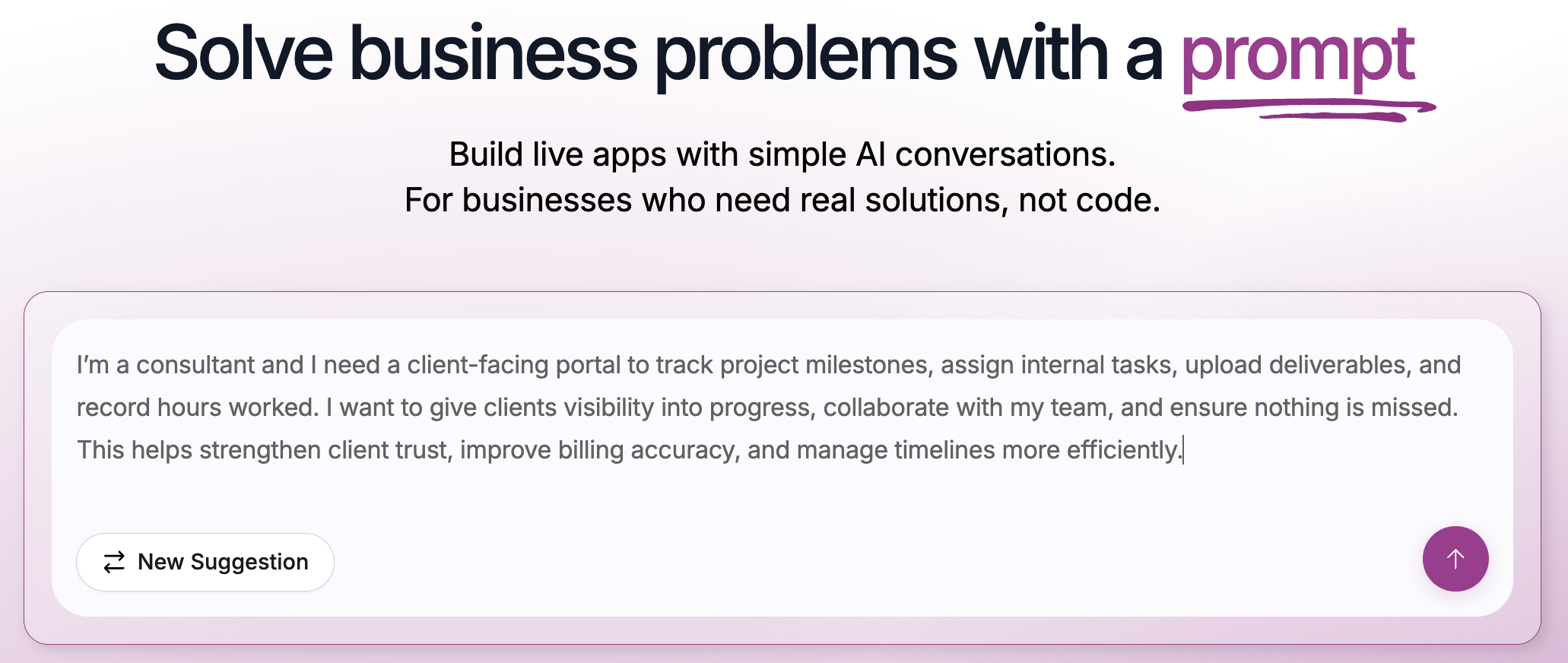
You can begin your journey from our new Knack homepage, or if you’ve already signed up, create a new app directly within your account dashboard. If you need some inspiration to kickstart the process, you’ll be able to auto-populate some prompt examples like Client Portal, Operations Dashboard, and Production Order Tracker as a starting point. For this example, we’ll click Client Portal to start our app. The prompt field will prefill with:
“I’m a consultant and I need a client-facing portal to track project milestones, assign internal tasks, upload deliverables, and record hours worked. I want to give clients visibility into progress, collaborate with my team, and ensure nothing is missed. This helps strengthen client trust, improve billing accuracy, and manage timelines more efficiently.”
You can use this text as-is or modify it with your own details — up to 3,000 characters if you need more context. When you’re ready, click the submit button.
2. Watch Knack assemble your app
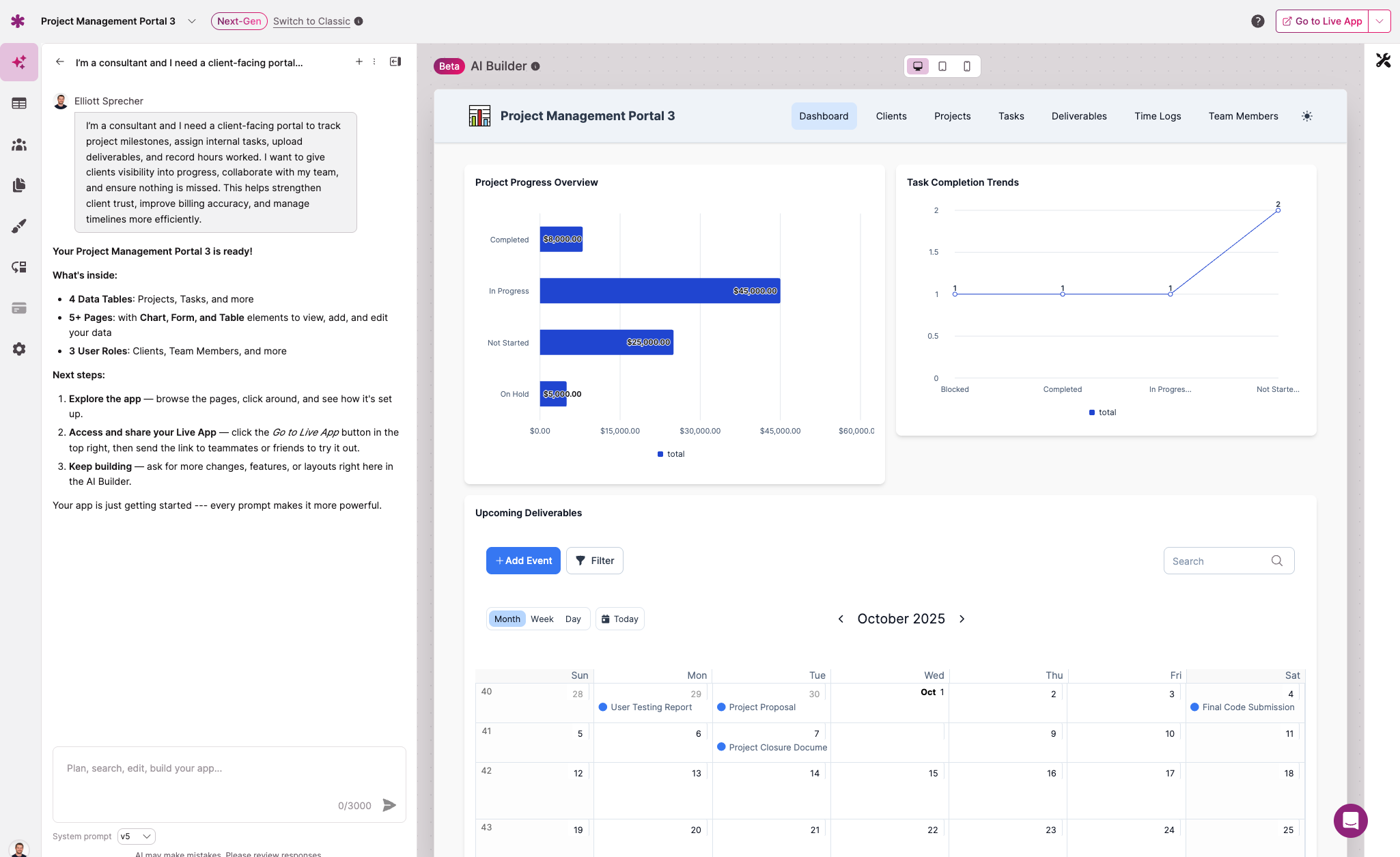
Our AI reviews your prompt and confirms what it’s about to create. Once you sign up or sign into your account, you’ll see a progress indicator as the builder gets to work.
Within 60 seconds, Knack generates the entire foundation of your app — tables, fields, connections, user roles, and pages — all preloaded with sample data so you can see how it functions right away.
Your app is live and fully hosted automatically, complete with a secure backend database and responsive design.
3. Chat to refine your app
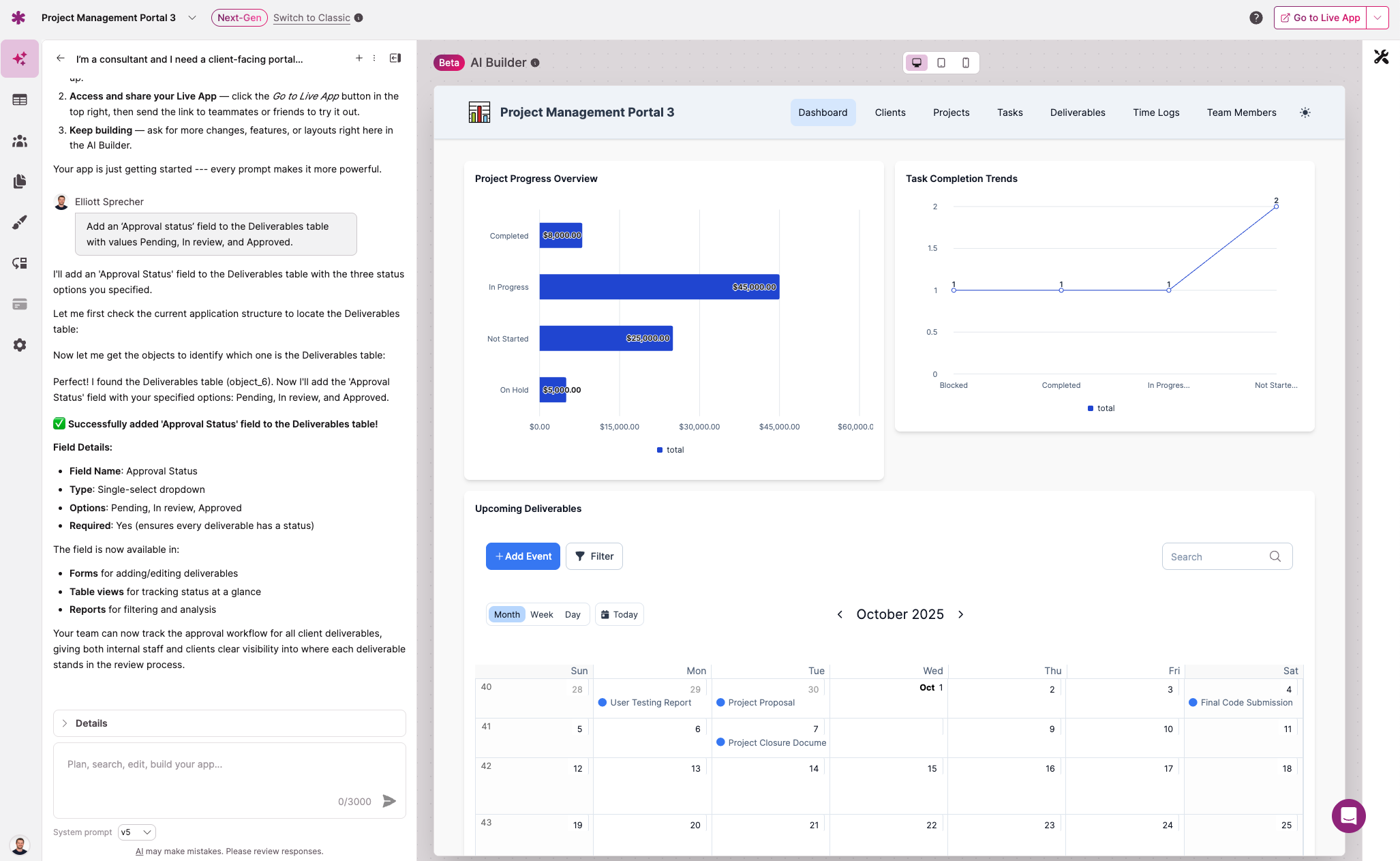
This is where the new AI builder shines, allowing you to continue evolving your app through natural conversation. Just chat with the AI to make changes and modifications to your app. You can try these kinds of examples:
- “Add a field called Approval status to the Deliverables table with values Pending, In Review, and Approved.”
- “Create a form so my clients can request updates or revisions to their project.”
- “Create a dashboard page for Clients showing project status, milestones, and latest deliverables.”
- “Update my app’s theme to green and yellow, to match my brand colors”
The AI will confirm each request before making the change. Once you approve, the update appears automatically in your app.
Note: Using the AI builder uses AI Credits; you’ll see your Credit usage transparently displayed within the AI builder conversation box. If you need more Credits than your plan allows, you can purchase additional Credits separately.
4. Move seamlessly into the visual builder
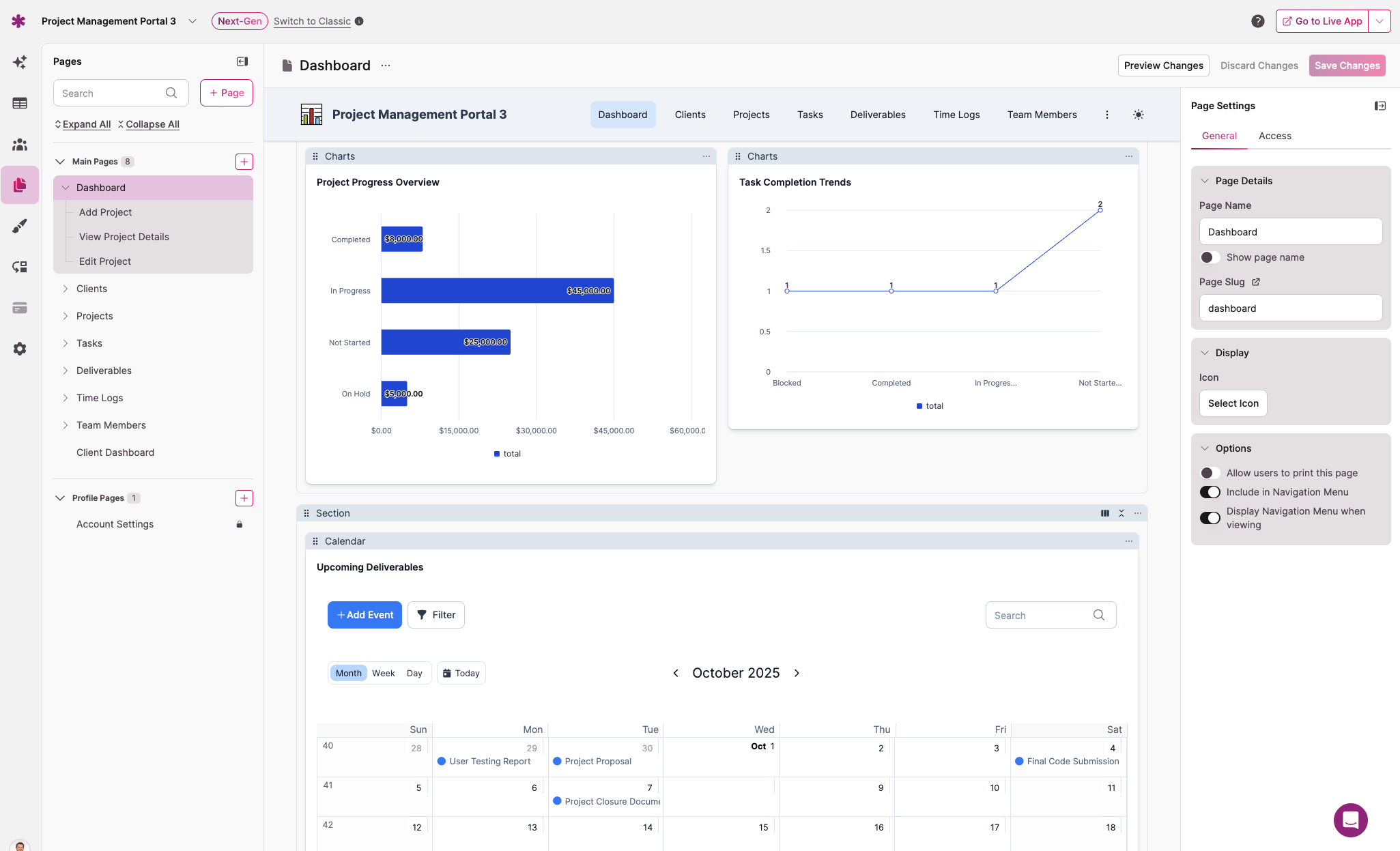
You can do many things through our AI builder, but if you want hands-on control and advanced editing — such as customizing filters, adding/changing Login pages for roles, or building new Flows — you can jump straight into Knack’s visual builder. It’s seamless to switch back and forth from the AI builder to the visual builder.
In the visual builder, you can select elements like Tables to manage fields and records, or Pages to update elements like lists, detail views, forms, and charts. Every change updates in real time, so you can see exactly how your app will look to users.
5. Share, test, and scale
Next, you can add team members or clients and assign roles for Admin, Team, or Client access. Knack’s role management ensures each user sees only what’s relevant. Note that as of this writing, user role and permission management requires manual configuration in the visual builder (it will be supported in the AI builder by the end of 2025).
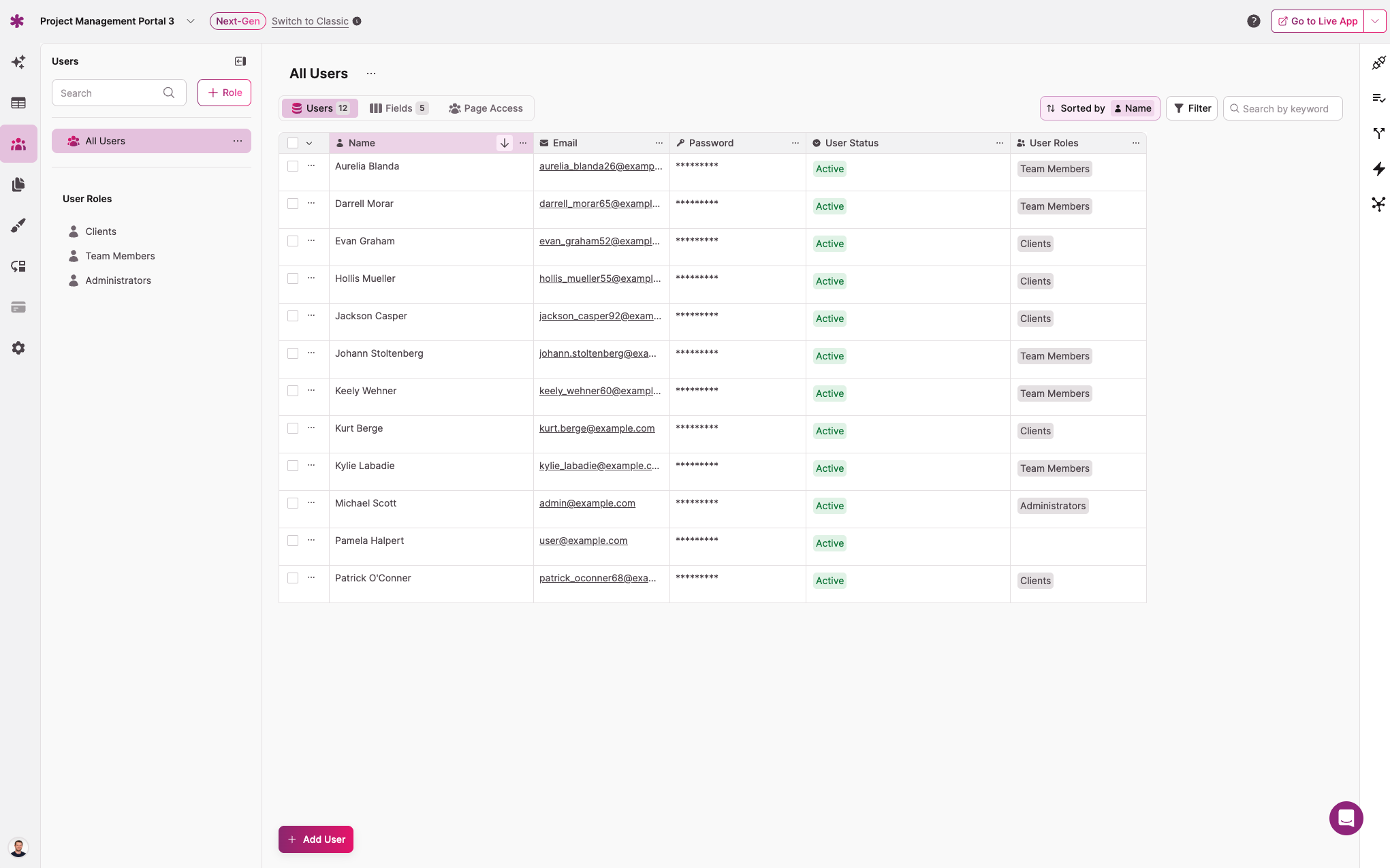
Remember to preview your live app at any time to see what it will look like to end-users. You can embed the app, add a custom domain, connect it to your existing tools, or extend it with automations — all without writing a single line of code.
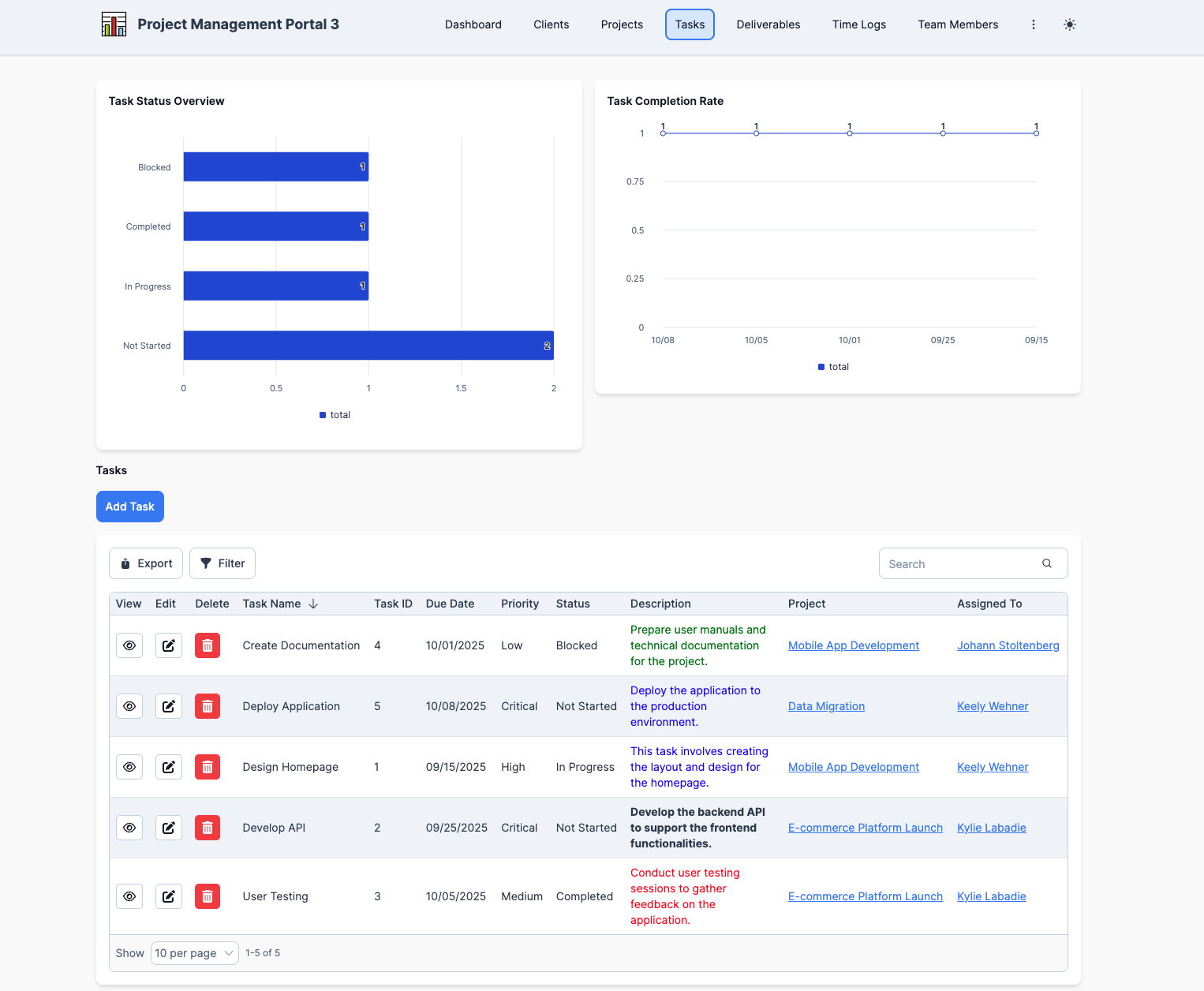
And that’s it! Congratulations for building your first fully hosted, live app with AI.
Tips for best results
- Be specific with your requests and name the table or page you want to edit.
- Use plain English; there’s no need for technical terminology.
- Make one clear request at a time for best accuracy.
- Switch between the AI builder and visual builder whenever you want direct control.
- If you ever need help, Knack’s live support is available from 8 a.m. to 8 p.m. ET, and the AI assistant is available 24/7.
You can also visit https://docs.knack.com/ for more help on any topics.
Next-Gen Apps: Rebuilt for modern businesses
Alongside the new AI builder, we’ve introduced Next-Gen Apps for all accounts, with a redesigned interface and builder that make app creation faster and more intuitive. It’s more than a new look — it’s a rebuild of the Knack experience. We kept the powerful capabilities that teams rely on, but rebuilt the foundation to be faster, more intuitive, and ready for the next decade of no-code development. Every improvement came from user feedback and real-world data, so Knack can continue to evolve with the businesses that depend on it.
1. Modern Live App Experience
The Live App has been reconstructed on a modern design system that improves clarity, accessibility, and consistency across every page. Users can personalize layout, color schemes, and typography through built-in design settings — creating branded, intentional experiences without relying on custom code.
2. Enhanced Page Building
The new Page Editor introduces a true drag-and-drop interface that mirrors the Live App. You can work directly with layout blocks, preview changes in real time, and design pages that behave exactly as end users will see them. The new editor offers greater layout flexibility and a faster, more intuitive building process.
3. Improved Core Features
Core builder functions have been refined for predictability and consistency. Users can:
- Add multiple records at once within Data Tables
- Clearly identify tables when creating connections
- Apply consistent logic across filters, display rules, and visibility settings
These updates make the builder more stable, with clearer outcomes and fewer surprises during setup.
4. Custom JavaScript, CSS Capabilities
For teams extending their apps with code, Next-Gen introduces custom JavaScript support built on modern, vanilla JavaScript standards. New CSS classes and navigation structures make it easier to target components, and the platform’s React-based architecture offers improved maintainability and performance for advanced use cases.
This is all only scratching the surface of our enhancements with Next-Gen Apps. To learn more, check out our blog or knowledge base.
Knack 2.0: The best Knack yet
Together, our new AI app builder and Next-Gen update mark a fundamental shift for Knack. They make our platform faster, stronger, and more adaptable — built for teams that need to move from idea to execution without friction.
Knack 2.0 unites everything we’ve been working toward: an AI-first way to build real web applications, and a modern platform designed to sustain it. Knack 2.0 removes technical barriers, streamlines app management, and empowers any business user, from operator to executive, to turn ideas into working software and evolve it as their business grows.
But don’t take our word for it. Try solving your business problems with a prompt today — start building for free at knack.com.





