Knack keeps record change logs so you can review edits made in your apps over time and see who changed what and when.
Explore Solutions
Read how you can revolutionize your operation with Knack.
Read Customer Stories
Knack builders are succeeding.
- Features & Benefits
- AI Powered App-Building
Build apps in minutes with AI
- Security and Infrastructure
Protect and control your data
- No-Code Database
Manage and connect your data
- Integrations
Connect tools and sync workflows
- Reports
Track and visualize performance
- User Access
Manage roles and permissions
- E-commerce
Run and automate online sales
- Scheduling
Real-time appointment booking
- Workflows
Streamline operations with automations
- MCP Server
Connect your AI tool to Knack
- AI Powered App-Building
- Platform Overview
Try Interactive Demo
Get a quick taste of Knack.
- Dive into Knack
- App Templates
Start fast with pre-built app templates
- Professional Services

Have a professional assist your build
- Blog
Read insights and practical tips
- Case Studies
See how others use Knack
- Videos
Watch tutorials and user stories
- Glossary
Look up common no-code terms
- App Templates
- Additional Resources
- Webinars
Discover recent and upcoming webinars
- News

The latest from Knack
- Compare Knack
See how Knack stacks up
- Hire an Expert Builder
Get hired to build or expand apps
- Help Center
Learn how to set up your app
- Developer Docs
Access technical guides and documents
- Community Forum
Connect with other Knack builders
- Webinars
- Partner Programs
- Become An Affiliate
Earn revenue by referring Knack
- Become an Expert Builder
Get hired to build apps
- Agency Program
Resell Knack to your clients
- Become An Affiliate

Template Marketplace
Expedite your app build with a pre-built template.
Bring Stedi Data into Your Billing Workflows
Connect Stedi to Knack Health to automate eligibility checks, claims submission, and remittance tracking. Give billing teams a working app, not just an API.
Why Connect Stedi and Knack Health
Stedi is an API-first healthcare clearinghouse. It handles eligibility checks, claims submission, claim status, and electronic remittances across thousands of payers through modern JSON APIs rather than legacy EDI portals.
But the people who act on that data, billing coordinators, front desk staff, and revenue cycle managers, do not work in APIs. They need dashboards, task queues, and alerts.
Knack Health sits between Stedi and your team. When a transaction fires in Stedi, Knack can update a record, alert a staff member, or open a task automatically, without anyone logging into a separate portal.
What You Can Build
Stedi’s trigger fires the moment a transaction is processed. Knack Health turns that event into a screen your billing or operations team can act on.
For example:
- Run a real time eligibility check the moment a new appointment is created in Knack
- Pull in ERA payment details automatically when a remittance arrives, no login needed
- Trigger an insurance discovery check when a patient’s coverage details are missing
- Check claim status on any claim that has not received a response within your expected timeframe
- Submit professional or institutional claims directly from a Knack billing record
Every one of these steps can run automatically based on data already in your Knack app.
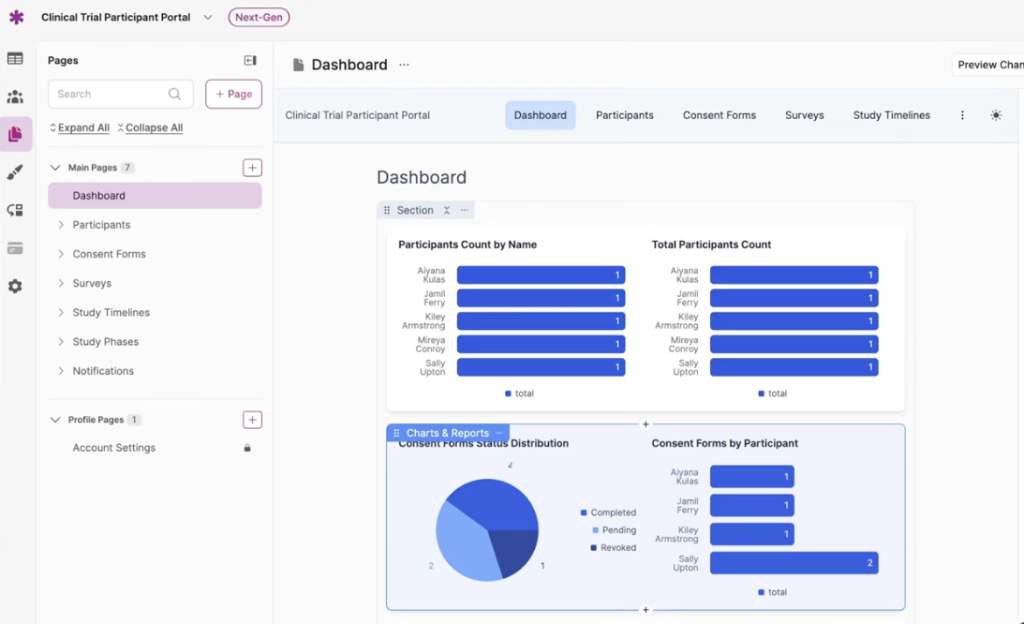
Clinical trial project managemet
Built for How Stedi Actually Works
Stedi connects to over 3,500 U.S. payers and returns clean JSON responses for every transaction. Knack Health reads those responses and puts them where your team needs them.
The connection is set up using your Stedi API key and a webhook that Knack Flows generates. Once that webhook is added to your Stedi dashboard, every processed transaction fires into your Flows automatically.
- No polling or scheduled jobs to maintain
- Transactions fire in real time as Stedi processes them
- Your billing logic lives in Knack, not in a separate script or spreadsheet
You control what happens next. Stedi handles the payer network. Knack handles the workflow.
Integration Approach
Stedi connects to Knack Health through Knack Flows, using an API key and webhook. Once connected, you get access to the following trigger and actions.
Stedi has one trigger and ten actions available in Flows. If you need an action that is not yet listed, you can use the Custom API Request action to reach any Stedi endpoint directly.
This lets you automate the full revenue cycle loop: check coverage before the visit, submit the claim after, track its status, and pull in the remittance when the payer responds.
Common Use Cases

Eligibility Check on Appointment Creation
When a new appointment record is created in Knack, trigger a real time eligibility check automatically so staff see coverage and copay details before the patient arrives.

Coverage Recovery for Incomplete Records
When an eligibility check fails because insurance details are missing, run an insurance discovery check using just the patient's name and date of birth to find their active coverage.
Automated Remittance Tracking
Use the new transaction processed trigger to fire a Flow when an ERA arrives, then pull in payment details and update the matching claim record in Knack automatically.
Claim Status Follow Up
Build a scheduled Flow that runs a claim status check on any claim that has not received a 277CA acknowledgment or ERA within your expected timeframe.
Straight Through Claims Submission
Submit professional or institutional claims directly from a Knack billing record without logging into a separate portal or re-entering data already in your app.
Why Knack Health
Stedi handles the payer network. Knack Health handles what your team does with the result.
Stedi’s APIs are powerful but they are built for developers. Knack Health gives billing coordinators, front desk staff, and revenue cycle managers an interface that matches how they actually work, without requiring them to understand JSON or API calls.
That means eligibility results that appear in a patient record the moment they come back, claim statuses that update a queue automatically, and ERA details that reconcile against your billing data without manual entry.
Implementation
The Stedi connection in Knack Flows requires a Stedi API key and a webhook added to your Stedi dashboard. Webhooks require a paid Stedi plan.
Once the connection is live, most workflows can be built without code using Knack’s visual Flow builder. Start with a single use case, confirm it runs correctly, then expand to the rest of your billing process.
Full setup instructions are available in the Knack Flows Stedi documentation.
Need a workflow that fits your Stedi setup?
Stedi Integration FAQs
What is Stedi and why would I connect it to Knack?
Stedi is an API-first healthcare clearinghouse. It handles eligibility checks, claims submission, claim status, and electronic remittances across over 3,500 payers. Connecting it to Knack lets your billing team act on that data inside an app built around their workflow, without logging into a separate clearinghouse portal.
What trigger and actions are available?
Stedi has one trigger in Knack Flows: new transaction processed, which fires when Stedi finishes processing any healthcare transaction. The available actions are: Real-Time Eligibility Check, Submit Professional Claim (837P), Submit Institutional Claim (837I), 835 ERA Report, Real-Time Claim Status (276/277), Insurance Discovery Check, MBI Lookup, Payer Search, Submit/Create Enrollment, and Custom API Request for anything not covered by the above.
Do I need a paid Stedi plan?
Yes. Adding the Knack Flows webhook to your Stedi dashboard requires a paid Stedi plan. Triggers will not fire without this webhook in place.
Does this work for both professional and institutional claims?
Yes. Knack Flows includes separate actions for 837P professional claims and 837I institutional claims, so you can automate submission for physician services, hospital billing, and dental claims from the same platform.
What if a patient cannot provide their insurance card?
The Insurance Discovery Check action can find a patient’s active coverage using just their name, date of birth, and address. This is especially useful for walk-in visits or urgent care situations where insurance details are incomplete.
Do we need developers to set this up?
For most workflows, no. You need to generate a Stedi API key and paste the Knack Flows webhook URL into your Stedi dashboard, then build your workflows visually in Flows. More advanced custom API calls may require some technical configuration.