


 Log In






- Features & Benefits
- AI Powered App-Building

Build apps in minutes with AI
- Security and Infrastructure

Protect and control your data
- No-Code Database

Manage and connect your data
- Integrations

Connect tools and sync workflows
- Reports

Track and visualize performance
- User Access

Manage roles and permissions
- E-commerce

Run and automate online sales
- Front-End Experience

Customize your user interface
- Workflows

Streamline operations with automations
- Forms

Collect and manage data easily
- AI Powered App-Building
- Dive into Knack
- App Templates

Start fast with pre-built app templates
- Blog

Read insights and practical tips
- Case Studies

See how others use Knack
- Videos

Watch tutorials and user stories
- Glossary

Look up common no-code terms
- App Templates
- Additional Resources
- Compare Knack

See how Knack stacks up
- Hire an Expert Builder

Get hired to build or expand apps
- Help Center

Learn how to set up your app
- Developer Docs

Access technical guides and documents
- Community Forum

Connect with other Knack builders
- Compare Knack
- Partner Programs
- Become An Affiliate

Earn revenue by referring Knack
- Become an Expert Builder

Get hired to build apps
- Agency Program

Resell Knack to your clients
- Become An Affiliate
Join the thousands of users who are building Work Order Systems with Knack






5 Reasons to Build Your Own Work Order Management System
01. No-Code Customization
Knack’s no-code platform allows you to tailor your work order management system with robust functionality without needing programming knowledge. You can customize fields, workflows, and user roles to suit your specific operational needs.
02. Improved Efficiency and Automation
Knack enables maintenance teams to automate repetitive tasks like work order assignments, notifications, and status updates. This reduces manual effort, speeds up processes, and minimizes human errors.
03. Centralized Data Management
With Knack, you can store all work order details, maintenance requests, maintenance history, and asset information in a centralized, cloud-based database. This ensures data consistency and easy access for teams, leading to more effective decision-making.
04. Real-Time Tracking
Knack’s system supports real-time updates and progress tracking for work orders throughout their lifecycle. This feature enhances communication and transparency, allowing teams to monitor the status of tasks and make timely adjustments if needed.
05. Scalability and Flexibility
Whether you’re managing a small operation or a growing business, Knack’s customizable structure scales with your needs. You can add new request forms, fields, or user roles as your requirements evolve, ensuring your work order management system adapts smoothly and prevents bottlenecks.
Build a Work Order Management System with Knack
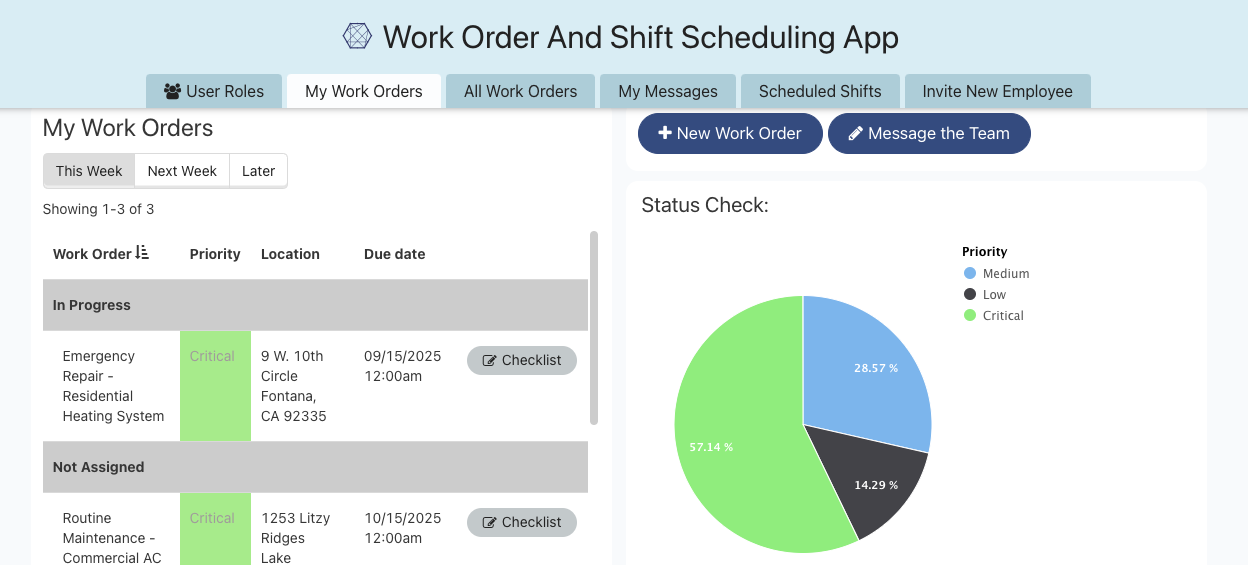


Start Building with Knack’s Work Order Template
This work order template will enable you to create a task management and maintenance operations solution in just a few minutes.
Seamlessly Customize the Template App
Use our interactive demo to see how easily you can create a custom work order app.
How Knack Compares to Other Work Order Software
Feature-by-Feature Comparison Table
When it comes to choosing the right work order management software, most tools lock you into rigid workflows and make you pay for features you’ll never use. Knack takes a different approach–letting you design an online work order system that fits your exact processes, without extra clutter or unnecessary costs.
Here’s how Knack compares to other popular platforms:
| Feature | Knack | MaintainX | Fiix |
|---|---|---|---|
| Custom Workflows | Fully customizable without code | Limited to predefined options | Only through advanced setup |
| No-Code Builder | Drag-and-drop interface | User-friendly, but not customizable | Requires developer setup |
| Work Order Templates | Fully editable, modular templates | Pre-set templates with parts pre-attached | Basic templates available |
| Work Order Commenting | Add fields or logic for technician feedback | Built-in, real-time chat in orders | Not a core feature |
| Photo Upload & Markup | Uploads supported; markup via third-party tools | Built-in markup tools | Upload Only |
| Messaging / Internal Chat | Can be built-in via integrations/custom fields | Native messaging by teams & topics | Not included |
| E-Signatures | Can be configured using form logic/integrations | Native e-signature w/ timestamps | Not widely advertised |
| Mobile/Desktop Flexibility | Fully responsive with cross-device access | Seamless switching between devices | Desktop-first design |
| Pricing Flexibility | Pay for what you build; scalable | Per-seat SaaS pricing | Tiered pricing for features |
Use Cases for a No-Code Work Order System

Preventative Maintenance Scheduling
Create automated work orders for scheduled maintenance tasks to prevent equipment failure and extend asset lifespan. Set up reminders, recurring tasks, and schedules for regular inspections and servicing to ensure operational efficiency.
Asset Management and Tracking
Manage and audit all assets, including equipment and machinery, by linking them to specific work orders. This enables easy access to asset history, maintenance logs, and performance metrics to inform decision-making and budget planning.
Work Order Tracking and Assignment
Prioritize work requests based on urgency and importance, ensuring that critical tasks are completed first. Use Knack’s workflow features to assign tasks to the appropriate personnel and balance the workload, and streamline communication for efficient task handling.
Maintenance History and Reporting
Keep comprehensive records of all completed service requests, including details on repairs, parts replaced, and time taken. Automate reports to analyze trends and identify areas for improvement by tracking key numbers, optimizing future maintenance strategies.
Automated Notifications and Status Updates
Set up automated notifications to alert team members and stakeholders about the status of work orders. This enhances transparency and keeps everyone informed, reducing downtime and improving response times.
Mobile Accessibility for Field Technicians
Equip field technicians with mobile access to the work order management system so they can update task statuses, attach photos, and submit reports directly from job sites. This increases productivity and ensures real-time data synchronization.





