Log In






Analyze new Knack form submissions with Claude and update records with insights
- Features & Benefits
- AI Powered App-Building

Build apps in minutes with AI
- Security and Infrastructure

Protect and control your data
- No-Code Database

Manage and connect your data
- Integrations

Connect tools and sync workflows
- Reports

Track and visualize performance
- User Access

Manage roles and permissions
- E-commerce

Run and automate online sales
- Front-End Experience

Customize your user interface
- Workflows

Streamline operations with automations
- Forms

Collect and manage data easily
- AI Powered App-Building
- Dive into Knack
- App Templates

Start fast with pre-built app templates
- Blog

Read insights and practical tips
- Case Studies

See how others use Knack
- Videos

Watch tutorials and user stories
- Glossary

Look up common no-code terms
- App Templates
- Additional Resources
- Compare Knack

See how Knack stacks up
- Hire an Expert Builder

Get hired to build or expand apps
- Help Center

Learn how to set up your app
- Developer Docs

Access technical guides and documents
- Community Forum

Connect with other Knack builders
- Compare Knack
- Partner Programs
- Become An Affiliate

Earn revenue by referring Knack
- Become an Expert Builder

Get hired to build apps
- Agency Program

Resell Knack to your clients
- Become An Affiliate
Integrate Knack with Claude
How Knack Flows Work
Seamlessly connect Claude to Knack with Flows to infuse advanced AI capabilities into your no-code applications and automate intelligent workflows. This integration lets you leverage Claude's natural language processing, code generation, and reasoning abilities directly within your Knack apps—no coding required. Build AI-powered chatbots, automate content generation, analyze complex data, provide intelligent customer support, and create smart decision-making workflows, all from within your custom Knack portal.

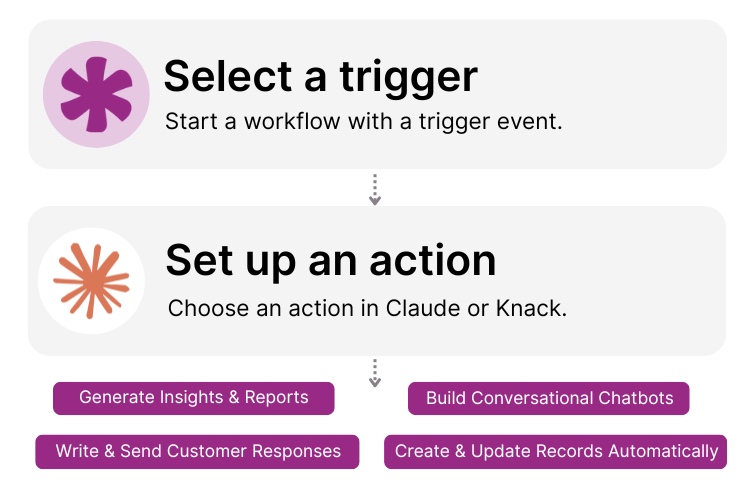
Step 1: Select a Trigger
A trigger is an event in your automation that starts your Flow. You can select a trigger event in Claude that will initiate your workflow. For example, you might choose "New AI Response Generated" or "Content Analysis Complete" as the trigger. Knack monitors Claude for the selected trigger.

Step 2: Set up an Action in Knack
When your Knack Flow is ready, you can add more actions or start running it right away. Your Claude and Knack apps are now seamlessly connected. Generate AI-powered insights for new Knack records, automate intelligent responses to customer inquiries, analyze uploaded documents for data extraction, and more right from your Knack app.

Step 3: Connect and Automate
When your Knack Flow is ready, you can add more actions or start running it right away. Your Claude and Knack apps are now seamlessly connected. Generate AI-powered insights for new Knack records, automate intelligent responses to customer inquiries, analyze uploaded documents for data extraction, and more right from your Knack app.
Popular Knack + Claude Automations
Effortlessly integrate Knack and Claude with pre-built templates. Save time while adding advanced AI capabilities to your no-code applications.


Generate AI-powered responses for customer support tickets in Knack
Create intelligent summaries of document uploads using Claude
Build conversational chatbots that interact with Knack data
Extract and structure data from unstructured text into Knack records
Top Use Cases for Integrating Knack with Claude

AI-Powered Reporting
Use Claude to automatically generate summaries, executive reports, and data insights based on Knack records. Turn raw data into readable narratives.

Automated Customer Communications
Respond to customer inquiries or form submissions instantly with Claude-generated replies that can be stored and tracked in your Knack app.

Data Categorization & Tagging
Automatically tag and classify records in Knack with Claude’s AI-driven text analysis to simplify search, organization, and reporting.

Knowledge Base Generation
Transform your Knack database into a searchable knowledge base by having Claude summarize and organize complex information into easy-to-understand entries.
Triggers and Actions
Knack Flows help you automate workflows by connecting your data and Actions. A Trigger starts a workflow, and an Action executes a task based on the Trigger.
About Claude
Claude is an advanced AI assistant developed by Anthropic that's built to understand and generate natural language with a focus on safety, reliability, and ethical alignment. Designed to be helpful, honest, and harmless, Claude’s family of AI models excels in reasoning, writing, coding, and data analysis. It can draft content, summarize complex documents, analyze information, assist with programming tasks, and even interpret visual data. With its strong contextual understanding and long-term memory, Claude helps individuals and organizations work smarter and communicate more effectively.