


 Log In






Send Discord notifications when Knack records change
- Features & Benefits
- AI Powered App-Building

Build apps in minutes with AI
- Security and Infrastructure

Protect and control your data
- No-Code Database

Manage and connect your data
- Integrations

Connect tools and sync workflows
- Reports

Track and visualize performance
- User Access

Manage roles and permissions
- E-commerce

Run and automate online sales
- Front-End Experience

Customize your user interface
- Workflows

Streamline operations with automations
- Forms

Collect and manage data easily
- AI Powered App-Building
- Dive into Knack
- App Templates

Start fast with pre-built app templates
- Blog

Read insights and practical tips
- Case Studies

See how others use Knack
- Videos

Watch tutorials and user stories
- Glossary

Look up common no-code terms
- App Templates
- Additional Resources
- Compare Knack

See how Knack stacks up
- Hire an Expert Builder

Get hired to build or expand apps
- Help Center

Learn how to set up your app
- Developer Docs

Access technical guides and documents
- Community Forum

Connect with other Knack builders
- Compare Knack
- Partner Programs
- Become An Affiliate

Earn revenue by referring Knack
- Become an Expert Builder

Get hired to build apps
- Agency Program

Resell Knack to your clients
- Become An Affiliate
Integrate Knack with Discord
How Knack Flows Work
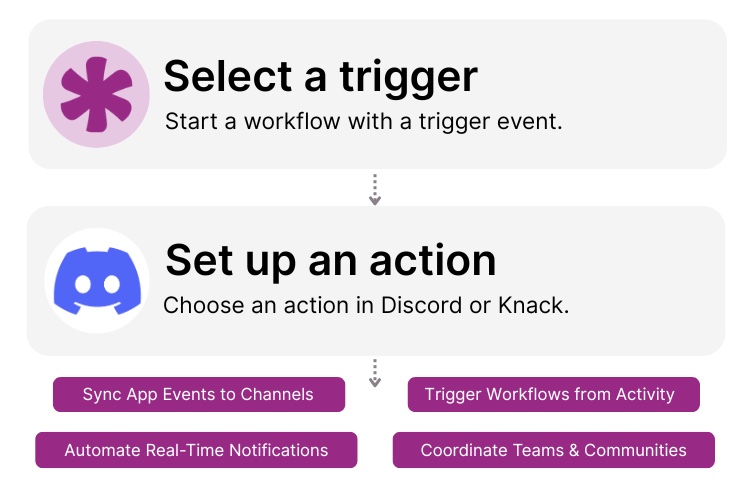
Connect Discord and Knack using Knack Flows to bring real-time communication and automation into your no-code applications. This integration allows you to send updates from Knack directly to Discord channels, trigger workflows from Discord activity, and keep teams or communities informed the moment something changes. You can use Knack to power the data and logic behind your workflows, while Discord acts as the live communication layer. The integration is ideal for internal teams, customer communities, operations alerts, or creator-led groups.

Step 1: Select a Trigger
A trigger is an event that starts your automation workflow. In the Discord and Knack integration, triggers often originate in Knack, such as a record being created, updated, or reaching a specific status. Or, they can start from Discord activity, like a message posted or command issued. Knack Flows listens for these events and prepares the associated data for downstream actions.

Step 2: Set up an Action in Knack
Once a trigger occurs, actions define what happens next in your Flow. Knack actions may include creating or updating records, applying conditions, or assigning tasks. Discord actions can include sending messages to channels, posting alerts, or notifying specific users or roles. You can map Knack data into formatted Discord messages to provide context-rich updates.

Step 3: Connect and Automate
When your Flow is ready, you can activate it immediately or expand it with additional steps and logic. Your Knack app and Discord server are now connected. Data-driven events in Knack can trigger instant communication in Discord, while Discord interactions can drive updates inside your Knack database, keeping everyone aligned in real time.
Popular Knack + Discord Automations
Connect Knack and Discord with pre-built workflows to automate notifications, coordinate teams, and link community activity to your data.
Top Use Cases for Integrating Knack with Discord

Real-Time Operational Alerts
Send instant Discord messages when key events happen in Knack, such as failed processes, approvals needed, or critical status changes.

Team & Project Coordination
Keep teams aligned by syncing Knack workflow updates into dedicated Discord channels for projects, releases, or operations.

Community & Membership Automation
Use Knack data to manage community activity, trigger announcements, or respond automatically to Discord interactions.

Command-Driven Workflows
Trigger Knack workflows from Discord slash commands or messages, enabling lightweight interaction with your app without switching tools.

Event & Activity Monitoring
Broadcast activity from Knack into Discord to create visibility around system usage, submissions, or milestones.
Triggers and Actions
Knack Flows help you automate workflows by connecting your data and actions. A trigger starts a workflow, and an action executes a task based on the trigger.
About Discord
Discord is a real-time communication platform that enables communities and teams to connect through text channels, voice, and integrations. Originally popular with gaming communities, Discord is now widely used by businesses, creators, and organizations for collaboration, support, and community engagement.
When integrated with Knack, Discord becomes a live communication layer for your applications. Knack provides the structured data, logic, and automation, while Discord delivers immediate visibility and interaction. This helps teams and communities respond faster and stay connected without leaving their workflow.


15 Best No-Code Automation Software To Supercharge Your Workflows
Here are the best no-code automation software options to supercharge...
Read
More
25 Marketing Agency Tools You Can Build with Knack in Minutes
Marketing agencies encounter many challenges while striving to provide exemplary...
Read
More
9 Ways to Use No Code for Marketing Automation
Are you ready to level up your marketing game without...
Read
More





