


 Log In






Create Knack records for new Google Forms submissions
- Features & Benefits
- AI Powered App-Building

Build apps in minutes with AI
- Security and Infrastructure

Protect and control your data
- No-Code Database

Manage and connect your data
- Integrations

Connect tools and sync workflows
- Reports

Track and visualize performance
- User Access

Manage roles and permissions
- E-commerce

Run and automate online sales
- Front-End Experience

Customize your user interface
- Workflows

Streamline operations with automations
- Forms

Collect and manage data easily
- AI Powered App-Building
- Dive into Knack
- App Templates

Start fast with pre-built app templates
- Blog

Read insights and practical tips
- Case Studies

See how others use Knack
- Videos

Watch tutorials and user stories
- Glossary

Look up common no-code terms
- App Templates
- Additional Resources
- Compare Knack

See how Knack stacks up
- Hire an Expert Builder

Get hired to build or expand apps
- Help Center

Learn how to set up your app
- Developer Docs

Access technical guides and documents
- Community Forum

Connect with other Knack builders
- Compare Knack
- Partner Programs
- Become An Affiliate

Earn revenue by referring Knack
- Become an Expert Builder

Get hired to build apps
- Agency Program

Resell Knack to your clients
- Become An Affiliate
Integrate Knack with Google Forms
How Knack Flows Works
Connect Google Forms to Knack using Flows to automate data collection, sync submissions instantly, and streamline form-driven operations without writing a line of code. This integration lets you capture Google Forms responses and feed them directly into your Knack app in real time. Create records, enrich data, trigger notifications, assign tasks, update workflows, and orchestrate next steps using Knack’s AI-powered automation tools. With Google Forms and Knack working together, you can power everything from lead intake and event registrations to surveys, hiring pipelines, volunteer applications, and more — all managed from your custom Knack dashboard.

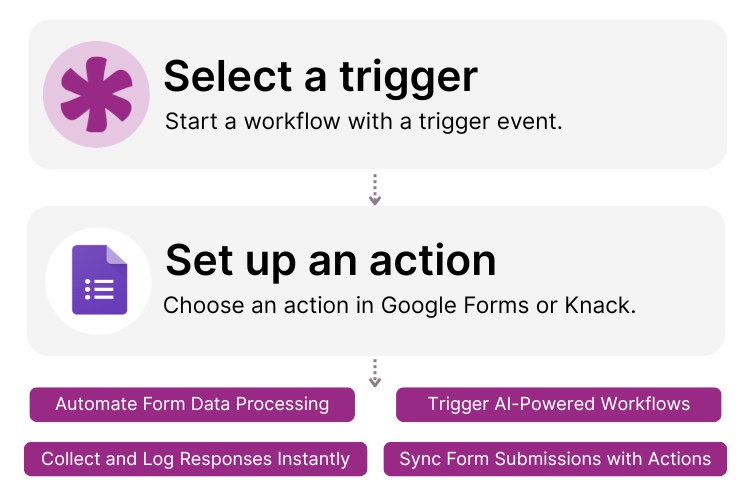
Step 1: Select a Trigger
A trigger is an event that starts your workflow. Google Forms or Knack can each initiate a Flow depending on your setup. For example, you might choose a “New Form Response” in Google Forms or “New Record Created” in Knack. Knack monitors Google Forms for new submissions, and Google Forms can be paired with Knack via webhooks or connected services to send data directly into Knack the moment it arrives.

Step 2: Set up an Action in Knack
Once a Trigger occurs, actions execute the tasks within your Flow. In Knack, actions can create records, update fields, send alerts, or route data to the correct team. A Flow may contain one action or a full sequence with conditions and branching logic. For example, you could “Create a Knack Record” when a new Google Forms submission is received, then use additional steps to assign leads, categorize responses, or trigger automated follow-up workflows.

Step 3: Connect and Automate
After your Flow is configured, you can add more automation steps or run it right away. Your Google Forms and Knack apps are now fully connected. Sync form data instantly into your Knack databases, automate review processes, trigger downstream workflows, and build live dashboards — all from your AI-powered Knack environment.
Popular Knack + Google Forms Automations
Connect Knack and Google Forms using pre-built templates or custom Flows. Save time while transforming manual form submissions into automated, actionable workflows.
Top Use Cases for Integrating Knack with Google Forms

Automated Data Collection and Syncing
Streamline intake processes by sending all Google Forms responses, including surveys, applications, and signups, directly into your Knack database in real time.

Lead Capture and Qualification
Turn Google Forms into a seamless lead-generation system. Automatically create Knack CRM records, enrich data, and trigger AI-driven lead routing workflows.

Event Registration and Attendance Tracking
Capture event registrations via Google Forms and auto-create Knack records to manage attendance lists, communications, follow-ups, and logistics.

Survey Reporting and Insights
Push survey responses into Knack to build dashboards, analyze trends, and trigger follow-up actions based on sentiment, scoring, or response types.
Triggers and Actions
Knack Flows help you automate workflows by connecting your data and actions. A trigger starts a workflow, and an action executes a task based on the trigger.
About Google Forms
Google Forms is a widely used online form builder that enables individuals and organizations to create surveys, questionnaires, registrations, and intake forms with ease. Part of the Google Workspace suite, it offers simple form creation, real-time collaboration, automatic data collection, and seamless syncing with Google Sheets. Businesses rely on Google Forms for lead capture, feedback collection, event registration, workflow intake, and more. Its accessibility, ease of use, and powerful data-handling capabilities make it a trusted tool for streamlining information gathering across teams of all sizes.

10 No-Code Apps for Sales & Marketing Teams
In the fast-paced world of sales and marketing, agility and...
Read
More
25 Marketing Agency Tools You Can Build with Knack in Minutes
Marketing agencies encounter many challenges while striving to provide exemplary...
Read
More
21 Apps You Can Build with Knack’s No-Code AI Solution
The demand for agile and efficient application development solutions has...
Read
More





