


 Log In






Schedule Google Meet sessions when forms are submitted
- Features & Benefits
- AI Powered App-Building

Build apps in minutes with AI
- Security and Infrastructure

Protect and control your data
- No-Code Database

Manage and connect your data
- Integrations

Connect tools and sync workflows
- Reports

Track and visualize performance
- User Access

Manage roles and permissions
- E-commerce

Run and automate online sales
- Front-End Experience

Customize your user interface
- Workflows

Streamline operations with automations
- Forms

Collect and manage data easily
- AI Powered App-Building
- Dive into Knack
- App Templates

Start fast with pre-built app templates
- Blog

Read insights and practical tips
- Case Studies

See how others use Knack
- Videos

Watch tutorials and user stories
- Glossary

Look up common no-code terms
- App Templates
- Additional Resources
- Compare Knack

See how Knack stacks up
- Hire an Expert Builder

Get hired to build or expand apps
- Help Center

Learn how to set up your app
- Developer Docs

Access technical guides and documents
- Community Forum

Connect with other Knack builders
- Compare Knack
- Partner Programs
- Become An Affiliate

Earn revenue by referring Knack
- Become an Expert Builder

Get hired to build apps
- Agency Program

Resell Knack to your clients
- Become An Affiliate
Integrate Knack with Google Meet
How Knack Flows Work
Connect Google Meet with Knack using Knack Flows to automate meeting scheduling, manage video appointments, and streamline collaboration workflows. This integration allows you to schedule Google Meet sessions directly from your Knack app based on record updates, form submissions, or workflow milestones. Whether you're booking client consultations, internal reviews, onboarding sessions, or project meetings, Knack can trigger meeting creation automatically and store meeting details inside your database. Eliminate manual scheduling steps and align video conferencing with your structured application workflows.

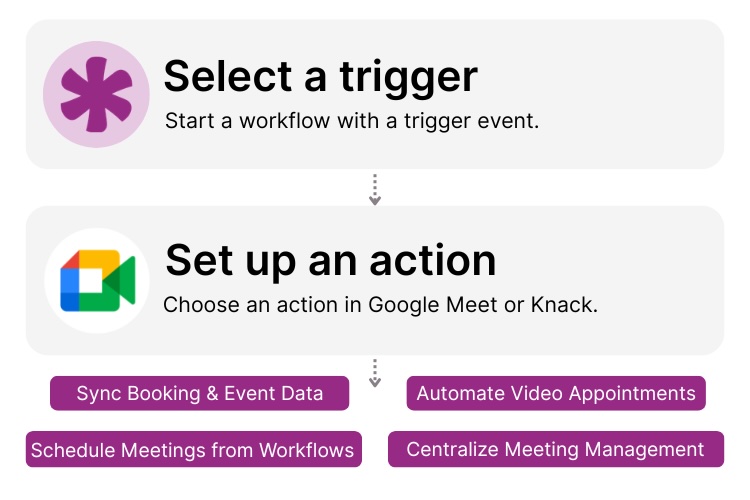
Step 1: Select a Trigger
A trigger is an event that starts your automation workflow. In a Knack and Google Meet integration, triggers typically originate in Knack, such as when a new booking form is submitted, a record status changes to “Approved,” or a workflow milestone is reached. These events signal when a Google Meet session should be scheduled.

Step 2: Set up an Action in Knack
Once a trigger occurs, actions define what happens next in your Flow. A Google Meet action can schedule a meeting automatically using event details stored in Knack, including participants, timing, and context. Knack can also update records with meeting information, store links, assign follow-up tasks, or notify participants.

Step 3: Connect and Automate
When your Flow is activated, your Knack and Google Meet systems work together seamlessly. Meetings are created automatically at key workflow moments, and links or event details can be tracked inside Knack for reporting, coordination, and visibility. This turns video scheduling into a repeatable, automated process connected directly to your business logic.
Popular Knack + Google Meet Automations
Connect Knack and Google Meet to automate meeting scheduling and integrate video calls into structured application workflows.
Top Use Cases for Integrating Knack with Google Meet

Automated Appointment Scheduling
Schedule video meetings automatically when users submit booking forms or when records reach specific workflow states.

Client Consultations & Sales Calls
Automatically create Google Meet sessions for sales consultations, demos, or onboarding conversations directly from Knack workflows.

Internal Collaboration & Reviews
Trigger project review meetings or approval calls when task statuses change in your Knack app.

Workflow-Driven Event Coordination
Integrate video conferencing into operational processes like onboarding, interviews, compliance checks, or project milestones.

Centralized Meeting Tracking
Store and track meeting details inside Knack to maintain visibility over scheduled sessions and follow-up actions.
Triggers and Actions
Knack Flows help you automate workflows by connecting your data and actions. A trigger starts a workflow, and an action executes a task based on the trigger.
About Google Meet
Google Meet is a secure video conferencing platform that enables teams, clients, and organizations to connect through high-quality virtual meetings. As part of Google Workspace, it integrates with calendars and collaboration tools to simplify scheduling and remote communication.
When integrated with Knack, Google Meet becomes part of an automated workflow system. Knack handles the data and business logic, while Google Meet provides seamless video connectivity that allows organizations to schedule and manage meetings directly from their no-code applications.

10 No-Code Apps for Sales & Marketing Teams
In the fast-paced world of sales and marketing, agility and...
Read
More
50 Best Web App Ideas to Launch in 2026 (AI, Fintech, SaaS & More)
In today’s quickly changing digital landscape, there’s a constant demand...
Read
More
21 Apps You Can Build with Knack’s No-Code AI Solution
The demand for agile and efficient application development solutions has...
Read
More





