


 Log In






Enrich new Knack prospect records using Clay data
- Features & Benefits
- AI Powered App-Building

Build apps in minutes with AI
- Security and Infrastructure

Protect and control your data
- No-Code Database

Manage and connect your data
- Integrations

Connect tools and sync workflows
- Reports

Track and visualize performance
- User Access

Manage roles and permissions
- E-commerce

Run and automate online sales
- Front-End Experience

Customize your user interface
- Workflows

Streamline operations with automations
- Forms

Collect and manage data easily
- AI Powered App-Building
- Dive into Knack
- App Templates

Start fast with pre-built app templates
- Blog

Read insights and practical tips
- Case Studies

See how others use Knack
- Videos

Watch tutorials and user stories
- Glossary

Look up common no-code terms
- App Templates
- Additional Resources
- Compare Knack

See how Knack stacks up
- Hire an Expert Builder

Get hired to build or expand apps
- Help Center

Learn how to set up your app
- Developer Docs

Access technical guides and documents
- Community Forum

Connect with other Knack builders
- Compare Knack
- Partner Programs
- Become An Affiliate

Earn revenue by referring Knack
- Become an Expert Builder

Get hired to build apps
- Agency Program

Resell Knack to your clients
- Become An Affiliate
Integrate Knack with Clay
How Knack Flows Work
Connect Clay with Knack using Knack Flows to automate data enrichment, power outbound workflows, and centralize prospect intelligence inside your application. This integration allows you to pull enriched data from Clay into Knack, trigger outbound research workflows, and send structured updates back to Clay via webhooks. Whether you're managing sales prospecting, recruiting pipelines, partnership sourcing, investor research, or account-based marketing, Knack helps turn Clay-powered intelligence into organized, actionable business processes.

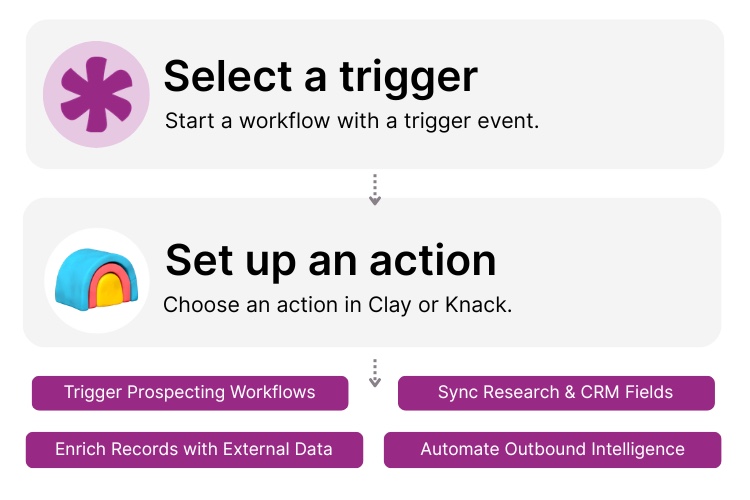
Step 1: Select a Trigger
A trigger is an event that starts your automation workflow. In a Clay and Knack integration, triggers can originate in Clay, such as when enriched data is available using “Get Data from Clay.” Triggers can also originate in Knack, such as when a new prospect record is created, a field requires enrichment, or a record matches specific qualification criteria.

Step 2: Set up an Action in Knack
Once a trigger occurs, actions determine what happens next in your Flow. In Knack, actions might include creating or updating prospect records, applying lead scores, assigning account owners, tagging enriched fields, or sending notifications. In Clay, actions can include sending a webhook from Knack to trigger additional enrichment, outbound research, or automated prospect workflows inside Clay.

Step 3: Connect and Automate
After your Flow is configured, activate it immediately or expand it with additional steps. Your Clay and Knack systems are now connected in a dynamic loop. Prospect records in Knack can trigger enrichment in Clay, and Clay results can automatically update structured database fields. This creates a powerful system for managing outbound intelligence without manual research or spreadsheet tracking.
Popular Knack + Clay Automations
Connect Knack and Clay to automate enrichment, prospecting, and outbound intelligence workflows.
Top Use Cases for Integrating Knack with Clay

Automated Data Enrichment
Automatically pull enriched contact and company data into Knack records to improve accuracy and completeness.

Outbound Sales Acceleration
Trigger enrichment and research workflows in Clay when new leads are added to Knack.

Lead Qualification & Scoring
Use enriched data fields inside Knack to calculate scores, apply tags, and route leads to appropriate teams.

Recruiting & Candidate Sourcing
Enrich candidate data and update hiring pipelines automatically through structured workflows.

Account-Based Marketing Support
Combine prospect intelligence with internal CRM workflows to power targeted outreach campaigns.
Triggers and Actions
Knack Flows help you automate workflows by connecting your data and actions. A trigger starts a workflow, and an action executes a task based on the trigger.
About Clay
Clay is a data enrichment and outbound automation platform designed to help teams gather, structure, and activate external data for prospecting and research workflows. It enables businesses to automate enrichment pipelines, build outbound campaigns, and consolidate intelligence from multiple data sources.
When integrated with Knack, Clay becomes part of a structured operational database. Prospect enrichment, outreach triggers, and research outputs can automatically update records and drive workflows inside Knack. This helps sales, recruiting, and growth teams operate with accurate, actionable intelligence without manual data entry.

10 No-Code Apps for Sales & Marketing Teams
In the fast-paced world of sales and marketing, agility and...
Read
More
15 Amazing Benefits of Business Process Automation
Let’s explore the extensive benefits of business process automation (BPA)...
Read
More
12 Ways to Improve Customer Experience via CRM
In the ever-evolving landscape of modern business, the ability to...
Read
More





