


 Log In






Send Knack form submissions to external CRMs via POST requests
- Features & Benefits
- AI Powered App-Building

Build apps in minutes with AI
- Security and Infrastructure

Protect and control your data
- No-Code Database

Manage and connect your data
- Integrations

Connect tools and sync workflows
- Reports

Track and visualize performance
- User Access

Manage roles and permissions
- E-commerce

Run and automate online sales
- Front-End Experience

Customize your user interface
- Workflows

Streamline operations with automations
- Forms

Collect and manage data easily
- AI Powered App-Building
- Dive into Knack
- App Templates

Start fast with pre-built app templates
- Blog

Read insights and practical tips
- Case Studies

See how others use Knack
- Videos

Watch tutorials and user stories
- Glossary

Look up common no-code terms
- App Templates
- Additional Resources
- Compare Knack

See how Knack stacks up
- Hire an Expert Builder

Get hired to build or expand apps
- Help Center

Learn how to set up your app
- Developer Docs

Access technical guides and documents
- Community Forum

Connect with other Knack builders
- Compare Knack
- Partner Programs
- Become An Affiliate

Earn revenue by referring Knack
- Become an Expert Builder

Get hired to build apps
- Agency Program

Resell Knack to your clients
- Become An Affiliate
Integrate HTTP Requests with Knack
How Knack Flows Work
You can easily connect Knack to any external application using HTTP requests in Knack Flows. With this integration, you can send structured data from your Knack app to virtually any API-powered system, including CRMs, ERPs, email tools, messaging services, ad platforms, AI APIs, internal databases, and more! Use Knack Flows to make outbound POST, PUT, PATCH, or GET requests triggered by real-time events in your Knack app. Automatically push form submissions, updated records, or business logic outcomes to external platforms without manual data entry. Whether you're triggering a workflow in another system, updating external contact records, sending notifications, or syncing databases, Knack gives you full control and flexibility through simple, no-code automation.

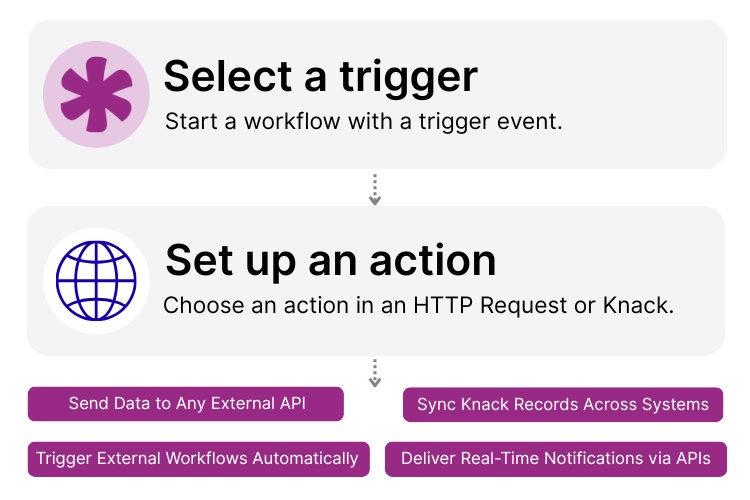
Step 1: Select a Trigger
A trigger is an event inside Knack that starts your Flow. You choose which Knack event will initiate your outbound HTTP request. For example, you might trigger a request when a “New Lead” is created, when an “Order Status” changes, or when a user submits a form. Knack detects the selected event and launches the workflow that sends data to your external API.

Step 2: Set up an Action in Knack
Once a trigger fires, actions execute the tasks inside your Flow. With the HTTP Request action, you can send data from Knack to any external system. For example, you can “POST New Customer Data,” “PATCH an Updated Ticket,” or “Send an Alert to Slack.” Actions can be conditional, chained, or built into advanced multi-step flows that integrate Knack seamlessly with your third-party tools.

Step 3: Connect and Automate
After your Flow is ready, you can add additional actions or turn it on immediately. Your external application and Knack are now connected through a fully automated outbound data pipeline. Push new records, sync updates, trigger external workflows, and connect Knack to any API-driven service right from your Knack app.
Popular Knack + HTTP Request Automations
Connect Knack to any API-powered platform via HTTP request with pre-built automation templates. Save time while keeping your data in sync across systems.
Top Use Cases for Integrating HTTP Requests in Knack

Automated Data Syncing
Send new or updated Knack records to any CRM, database, or operational platform to ensure every system stays aligned in real time.

Triggering External Workflows
Use outbound HTTP requests to start workflows in other platforms, such as project creation, task assignment, order processing, or lead routing.

Real-Time Notifications & Alerts
Trigger alerts in Slack, Teams, SMS gateways, or email services whenever key activity occurs in your Knack app.

Connecting Knack to AI and Automation Tools
Send prompts or structured data to AI APIs, automation engines, or internal systems that process information and return insights to Knack if needed.
Triggers and Actions
Knack Flows help you automate workflows by connecting your data and actions. A trigger starts a workflow, and an action executes a task based on the trigger.
About HTTP Requests
HTTP Requests are a universal method of sending data between applications using the standard web protocols that power modern APIs. With methods like POST, PUT, PATCH, and GET, HTTP Requests allow one system to transmit structured information to another—creating powerful, flexible connections between tools. Most SaaS applications, automation platforms, and internal systems support API endpoints, making HTTP Requests one of the most widely used ways to automate workflows and sync data across your tech stack. Integrating Knack with HTTP Requests enables you to build custom automations and connect with virtually any application.

7 Knack Apps for SMB Owners
As a small or medium-sized business leader, you constantly juggle...
Read
More
25 Marketing Agency Tools You Can Build with Knack in Minutes
Marketing agencies encounter many challenges while striving to provide exemplary...
Read
More
Never Miss Another Task Assignment: Integrate Bird with Knack
Integrating Bird with Knack saves managers headaches. After all, assigning...
Read
More





