


 Log In






Publish LinkedIn posts automatically from Knack campaign records
- Features & Benefits
- AI Powered App-Building

Build apps in minutes with AI
- Security and Infrastructure

Protect and control your data
- No-Code Database

Manage and connect your data
- Integrations

Connect tools and sync workflows
- Reports

Track and visualize performance
- User Access

Manage roles and permissions
- E-commerce

Run and automate online sales
- Front-End Experience

Customize your user interface
- Workflows

Streamline operations with automations
- Forms

Collect and manage data easily
- AI Powered App-Building
- Dive into Knack
- App Templates

Start fast with pre-built app templates
- Blog

Read insights and practical tips
- Case Studies

See how others use Knack
- Videos

Watch tutorials and user stories
- Glossary

Look up common no-code terms
- App Templates
- Additional Resources
- Compare Knack

See how Knack stacks up
- Hire an Expert Builder

Get hired to build or expand apps
- Help Center

Learn how to set up your app
- Developer Docs

Access technical guides and documents
- Community Forum

Connect with other Knack builders
- Compare Knack
- Partner Programs
- Become An Affiliate

Earn revenue by referring Knack
- Become an Expert Builder

Get hired to build apps
- Agency Program

Resell Knack to your clients
- Become An Affiliate
Integrate Knack with LinkedIn
How Knack Flows Work
Connect LinkedIn with Knack using Knack Flows to automate post publishing, track audience engagement, and integrate marketing insights into your operational workflows. This integration allows you to publish posts directly to LinkedIn pages, capture follower and organization statistics, and turn social engagement into structured business data. Whether you're managing brand marketing, thought leadership, recruiting campaigns, or corporate communications, Knack helps centralize LinkedIn activity into dashboards and workflows that support marketing and sales teams.

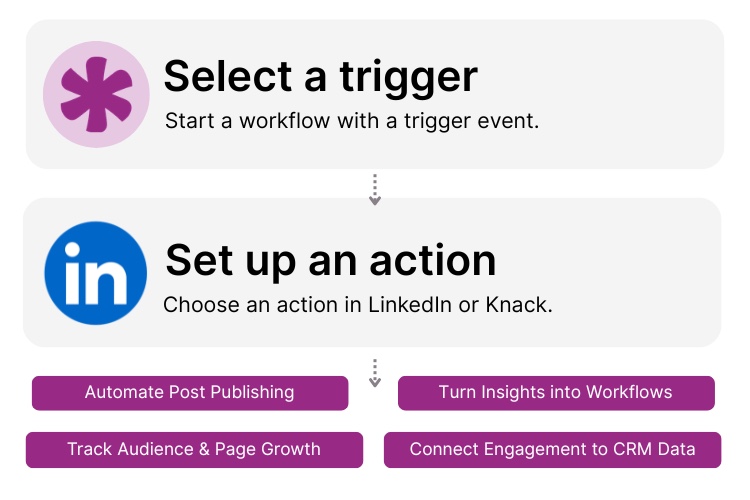
Step 1: Select a Trigger
A trigger is an event that starts your automation workflow. In a LinkedIn and Knack integration, triggers often originate in Knack when records are created or updated. For example, a marketing campaign record in Knack might trigger a LinkedIn post, or a content calendar update might automatically publish a scheduled update to your company page.

Step 2: Set up an Action in Knack
Once a trigger occurs, actions execute the tasks within your Flow. In Knack, actions might include logging engagement metrics, updating campaign dashboards, or assigning follow-up tasks. In LinkedIn, actions can include publishing posts to personal or organization pages, creating comments or reactions on posts, and retrieving follower or organization statistics for reporting.

Step 3: Connect and Automate
When your Flow is ready, you can activate it immediately or expand it with additional automation steps. Your LinkedIn and Knack platforms are now connected. Social media activity can feed directly into your database, content publishing can be automated from internal workflows, and engagement insights can power marketing dashboards and strategic decision-making.
Popular Knack + LinkedIn Automations
Connect Knack and LinkedIn to automate content publishing, track engagement metrics, and manage social media workflows.
Top Use Cases for Integrating Knack with LinkedIn

Automated Social Publishing
Automatically publish LinkedIn posts when campaign records or content approvals are created in Knack.

Centralized Social Media Analytics
Retrieve follower and organization statistics and display them inside Knack dashboards for marketing reporting.

Campaign Workflow Automation
Trigger LinkedIn posts, engagement actions, or follow-up workflows directly from Knack campaign records.

Audience Growth Monitoring
Track follower growth trends and engagement metrics over time to evaluate social media performance.

Marketing Operations Integration
Align social media publishing with broader marketing operations managed inside your Knack application.
Triggers and Actions
Knack Flows help you automate workflows by connecting your data and actions. A trigger starts a workflow, and an action executes a task based on the trigger.
About LinkedIn
LinkedIn is the world’s leading professional networking platform, helping businesses and individuals share content, build professional relationships, and reach targeted audiences. Companies use LinkedIn to publish updates, engage with followers, recruit talent, and run marketing campaigns.
When integrated with Knack, LinkedIn becomes part of a structured marketing and operational system. Content publishing, engagement tracking, and audience analytics can be managed alongside other business workflows inside your Knack database, enabling teams to coordinate marketing activities and measure performance more effectively.


10 No-Code Apps for Sales & Marketing Teams
In the fast-paced world of sales and marketing, agility and...
Read
More
9 Ways to Use No Code for Marketing Automation
Are you ready to level up your marketing game without...
Read
More
From Idea to Implementation: How to Create a Web App
Web applications have become integral to our daily lives, transforming...
Read
More





