


 Log In






Create new Knack records from incoming order or purchase events
- Features & Benefits
- AI Powered App-Building

Build apps in minutes with AI
- Security and Infrastructure

Protect and control your data
- No-Code Database

Manage and connect your data
- Integrations

Connect tools and sync workflows
- Reports

Track and visualize performance
- User Access

Manage roles and permissions
- E-commerce

Run and automate online sales
- Front-End Experience

Customize your user interface
- Workflows

Streamline operations with automations
- Forms

Collect and manage data easily
- AI Powered App-Building
- Dive into Knack
- App Templates

Start fast with pre-built app templates
- Blog

Read insights and practical tips
- Case Studies

See how others use Knack
- Videos

Watch tutorials and user stories
- Glossary

Look up common no-code terms
- App Templates
- Additional Resources
- Compare Knack

See how Knack stacks up
- Hire an Expert Builder

Get hired to build or expand apps
- Help Center

Learn how to set up your app
- Developer Docs

Access technical guides and documents
- Community Forum

Connect with other Knack builders
- Compare Knack
- Partner Programs
- Become An Affiliate

Earn revenue by referring Knack
- Become an Expert Builder

Get hired to build apps
- Agency Program

Resell Knack to your clients
- Become An Affiliate
Integrate Outgoing Webhooks with Knack
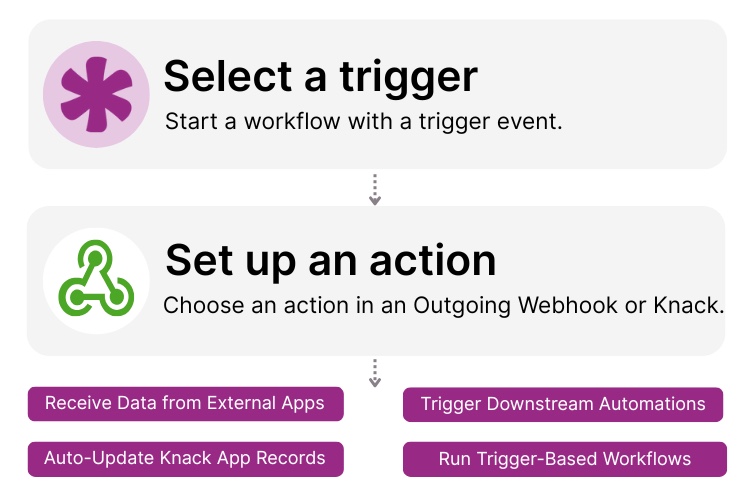
How Knack Flows Work
You can easily connect external applications to Knack using outgoing webhooks in Knack Flows. With this integration, you can receive structured data from virtually any platform that can send webhook events, including CRMs, ecommerce tools, marketing platforms, AI services, messaging apps, automation tools, internal systems, and more. When an external system sends a webhook to Knack, Knack can instantly use that data to create new records, update existing ones, trigger downstream automations, or run decision-based workflows without manual intervention. Whether your webhook sends new orders, ticket updates, customer actions, processed results, or status changes, Knack gives you full control and flexibility to automate your processes through simple, no-code event handling.

Step 1: Select a Trigger
A trigger is an incoming event that starts your Flow. With Outgoing Webhooks, external systems send data to Knack whenever something important happens, such as a “New Order,” “Updated Contact,” “Ticket Closed,” or “Subscription Renewal.” Knack receives the webhook payload and immediately begins the associated workflow.

Step 2: Set up an Action in Knack
Once a trigger fires, actions execute the tasks inside your Flow. You can create records, update fields, apply conditional logic, send notifications, or chain additional automation steps. For example, a webhook from a CRM may update a customer’s status in Knack, or a webhook from a support tool may create a new ticket in your Knack dashboard. Actions can be used individually or as part of advanced multi-step workflows.

Step 3: Connect and Automate
After your Flow is ready, you can add additional actions or activate it immediately. Your external systems and Knack are now connected through a real-time, event-driven automation pipeline. Each incoming webhook can instantly update data, trigger logic, and keep your Knack app closely synchronized with the rest of your tools.
Popular Knack + Webhook Automations
Connect an external platform to Knack using outgoing webhooks to capture real-time events and keep your data synced across systems.
Top Use Cases for Integrating Outgoing Webhooks in Knack

Real-Time Data Processing
Receive orders, contact updates, ticket changes, AI results, or status messages directly into Knack the moment an external system sends them.

Automatic Record Creation & Updates
Use incoming webhook data to create new entries or update existing records. Keep your Knack database aligned with external platforms.

Event-Driven Workflows
Trigger powerful automation chains inside Knack whenever external events occur, such as customer activity, platform changes, or workflow progressions.

Cross-Platform Process Coordination
Use webhooks to orchestrate processes across systems, such as creating a Knack record from an ecommerce event and then triggering an outbound API call for fulfillment.

Connecting Knack to AI and Automation Tools
Send prompts or structured data to AI APIs, automation engines, or internal systems that process information and return insights to Knack.
Triggers and Actions
Knack Flows help you automate workflows by connecting your data and actions. A trigger starts a workflow, and an action executes a task based on the trigger.
About Outgoing Webhooks
Outgoing webhooks are a standard way for external systems to send real-time data to an application. When an event occurs in a third-party system, such as a new order, updated contact, workflow change, or automated process, it sends a structured JSON payload to the webhook URL. Knack can receive this data immediately and use it to start workflows, create records, update fields, or trigger downstream automations.
Because nearly all modern SaaS tools and internal systems support sending webhooks, it’s easy to connect Knack with every part of your tech stack. Outgoing Webhooks enable event-driven automation so you can keep your Knack data synchronized and responsive to what’s happening across your external platforms.

5 Benefits of Creating No-Code Workflow Automations in Your Business
Repetitive tasks can drain your team’s energy and slow down...
Read
More
10 No-Code Apps for Sales & Marketing Teams
In the fast-paced world of sales and marketing, agility and...
Read
More
Mastering Enterprise Workflow Management
In today’s dynamic business environment, efficient enterprise workflow management is...
Read
More





