


 Log In






Add new Knack form submissions as Mailchimp subscribers
- Features & Benefits
- AI Powered App-Building

Build apps in minutes with AI
- Security and Infrastructure

Protect and control your data
- No-Code Database

Manage and connect your data
- Integrations

Connect tools and sync workflows
- Reports

Track and visualize performance
- User Access

Manage roles and permissions
- E-commerce

Run and automate online sales
- Front-End Experience

Customize your user interface
- Workflows

Streamline operations with automations
- Forms

Collect and manage data easily
- AI Powered App-Building
- Dive into Knack
- App Templates

Start fast with pre-built app templates
- Blog

Read insights and practical tips
- Case Studies

See how others use Knack
- Videos

Watch tutorials and user stories
- Glossary

Look up common no-code terms
- App Templates
- Additional Resources
- Compare Knack

See how Knack stacks up
- Hire an Expert Builder

Get hired to build or expand apps
- Help Center

Learn how to set up your app
- Developer Docs

Access technical guides and documents
- Community Forum

Connect with other Knack builders
- Compare Knack
- Partner Programs
- Become An Affiliate

Earn revenue by referring Knack
- Become an Expert Builder

Get hired to build apps
- Agency Program

Resell Knack to your clients
- Become An Affiliate
Integrate Knack with Mailchimp
How Knack Flows Work
Manually syncing contacts between your email marketing platform and your database can waste time and cause errors. When you integrate Mailchimp with Knack, you can eliminate manual data entry entirely. Knack Flows automatically syncs your contacts in real time with accuracy. So, your lists stay clean, compliant, and up to date. With the Mailchimp and Knack integration, you can add new subscribers, update existing contacts, manage audience tags, and trigger automated workflows whenever data changes in Knack. You can also start workflows from Mailchimp, such as creating new Knack records the moment someone joins your list. Whether you're managing a small list or syncing tens of thousands of contacts, Knack’s no-code automation makes setup fast and scalable.

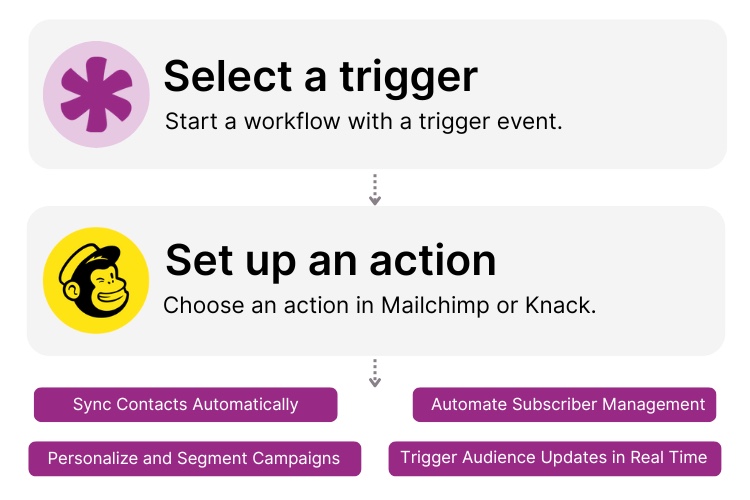
Step 1: Select a Trigger
A trigger is an event in your automation that starts your Flow. You can choose a trigger in either Knack or Mailchimp. For example, you might initiate a Mailchimp sync when a new contact form is submitted in Knack, when a record is updated, or when a new subscriber joins a Mailchimp list. Knack Flows detects the selected event instantly and starts the workflow.

Step 2: Set up an Action in Knack
Once a Trigger occurs, actions execute your automation tasks. In Knack, this could mean “Create Record,” “Update Record,” or “Find Record.” For Mailchimp, actions can include “Add Subscriber to List,” “Update Subscriber,” “Add Tag,” or other audience management tasks. You can map Knack fields to Mailchimp fields, personalize subscriber data, and even use conditional logic, such as only syncing contacts who opted in to receive your messages.

Step 3: Connect and Automate
After you configure your Flow, you can test it, add more steps, or activate it immediately. Knack and Mailchimp are now connected with a real-time, bi-directional sync that keeps your audiences updated without any manual effort. Launch campaigns faster, ensure perfect data accuracy, and automate your marketing operations directly from your Knack app.
Popular Knack + Mailchimp Automations
Connect Knack and Mailchimp with pre-built automation templates to sync audiences, personalize campaigns, and eliminate manual updates.
Top Use Cases for Integrating Mailchimp and Knack

Real-Time Audience Syncing
Automatically add or update Mailchimp subscribers whenever new records are created or updated in Knack, eliminating manual data entry forever.

Form-to-Campaign Automation
Trigger audience updates or campaign workflows whenever someone submits a form in your Knack app. This is ideal for contact forms, events, registrations, and lead capture.

Two-Way Contact Creation
Create or update Knack records instantly when new Mailchimp subscribers join your audience, keeping both systems aligned at all times.

Conditional and Compliant Syncing
Use built-in filtering to sync only contacts who opted into marketing campaigns or who meet specific criteria. Ensure list hygiene for all campaigns.
Triggers and Actions
Knack Flows help you automate workflows by connecting your data and actions. A trigger starts a workflow, and an action executes a task based on the trigger.
About Mailchimp
Mailchimp is a leading marketing automation and email platform used by millions of businesses to manage audiences, send email campaigns, and build customer relationships. With tools for email marketing, audience segmentation, tagging, automated journeys, analytics, and more, Mailchimp gives organizations a flexible and powerful way to connect with their audience. When integrated with Knack, it becomes a fully automated pipeline for real-time contact syncing, campaign readiness, and personalized marketing at scale.


12 Ways to Improve Customer Experience via CRM
In the ever-evolving landscape of modern business, the ability to...
Read
More
9 Ways to Use No Code for Marketing Automation
Are you ready to level up your marketing game without...
Read
More
25 Marketing Agency Tools You Can Build with Knack in Minutes
Marketing agencies encounter many challenges while striving to provide exemplary...
Read
More





