


 Log In






Send WhatsApp notifications when new Knack records are created
- Features & Benefits
- AI Powered App-Building

Build apps in minutes with AI
- Security and Infrastructure

Protect and control your data
- No-Code Database

Manage and connect your data
- Integrations

Connect tools and sync workflows
- Reports

Track and visualize performance
- User Access

Manage roles and permissions
- E-commerce

Run and automate online sales
- Front-End Experience

Customize your user interface
- Workflows

Streamline operations with automations
- Forms

Collect and manage data easily
- AI Powered App-Building
- Dive into Knack
- App Templates

Start fast with pre-built app templates
- Blog

Read insights and practical tips
- Case Studies

See how others use Knack
- Videos

Watch tutorials and user stories
- Glossary

Look up common no-code terms
- App Templates
- Additional Resources
- Compare Knack

See how Knack stacks up
- Hire an Expert Builder

Get hired to build or expand apps
- Help Center

Learn how to set up your app
- Developer Docs

Access technical guides and documents
- Community Forum

Connect with other Knack builders
- Compare Knack
- Partner Programs
- Become An Affiliate

Earn revenue by referring Knack
- Become an Expert Builder

Get hired to build apps
- Agency Program

Resell Knack to your clients
- Become An Affiliate
Integrate Knack with Notion
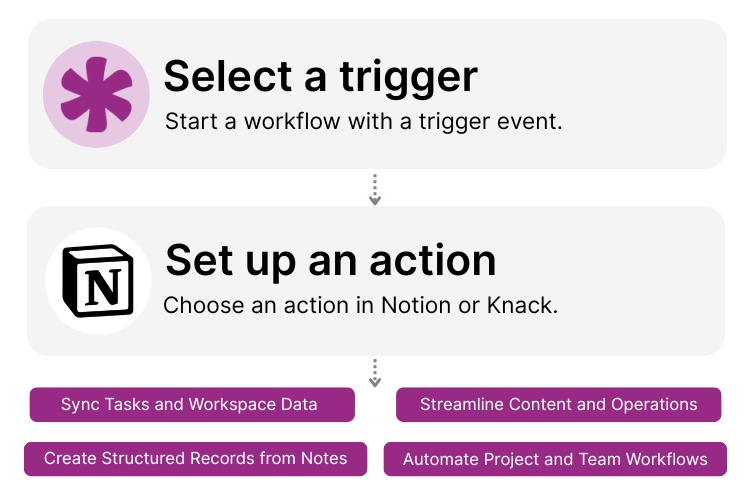
How Knack Flows Works
Connect Notion with Knack using Flows to sync pages, databases, and tasks with your custom AI-powered applications. Automate project workflows, turn unstructured notes into structured records, and bridge collaborative workspaces with powerful business logic—no coding required. This integration lets you log Notion updates into Knack, create Notion pages from Knack records, streamline project and content pipelines, and synchronize team tasks across systems. Build dashboards, trigger automations, track deliverables, and manage end-to-end operations from within your custom Knack portal while your team collaborates in Notion.

Step 1: Select a Trigger
A trigger is an event that starts your Flow. Notion or Knack can each initiate workflows depending on how you set up the integration. For instance, you might choose a Notion event like “Database Item Created,” or a Knack event such as “New Record Submitted.” Knack can monitor Notion API activity, and Notion can respond to updates pushed from Knack.

Step 2: Set up an Action in Knack
Once a trigger fires, actions execute tasks inside your Flow. In Knack, actions might include creating or updating structured records, sending notifications, or enriching project data. In Notion, actions can create pages, update database items, append content blocks, or change task statuses. A Flow can run a single action or an entire automated multi-step sequence with conditions and logic.

Step 3: Connect and Automate
When your Knack Flow is ready, you can run it immediately or continue adding additional steps. Your Notion and Knack environments are now seamlessly connected. Automatically sync tasks, content, notes, and project updates between Notion and Knack, build structured business processes from collaborative Notion workspaces, and manage operational workflows at scale—all from your custom Knack application.
Popular Knack + Notion Automations
Create Knack records from new Notion database items.
Top Use Cases for Integrating Knack with Notion

Structured Data Syncing for Collaborative Workspaces
Turn Notion’s notes, meeting summaries, and brainstorming docs into structured Knack records automatically. Build CRM entries, project tickets, deliverables, or operational workflows directly from Notion content.

Project and Task Automation Across Systems
Sync Notion tasks into Knack pipelines to automate assignments, due dates, notifications, and workflow logic. Keep collaboration in Notion while Knack handles process automation, dependencies, and approvals.

Content and Knowledge Management Workflows
Use Knack to organize content calendars, approval steps, and production workflows, while teams draft, research, and collaborate in Notion. Sync statuses, contributors, and timelines between platforms.

Client Portals and Secure Data Layers
Push sanitized workspace data from Notion into secure Knack portals. Knack’s role-based access, field permissions, and granular privacy controls let you share structured updates with clients—something Notion cannot natively support.

Form, Intake, and Operational Automations
Use Knack forms to collect data, then push updates into Notion pages or databases for team collaboration. Or reverse the workflow by capturing ideas, requests, and tasks in Notion and sending them into Knack for automated processing.
Triggers and Actions
Knack Flows help you automate workflows by connecting your data and actions. A trigger starts a workflow, and an action executes a task based on the trigger.
About Notion
Notion is a popular all-in-one workspace for teams to write, plan, collaborate, and organize information. Combining documents, databases, wikis, and task management into a single flexible environment, Notion helps teams share knowledge, track projects, document processes, and collaborate in real time. With its powerful editing tools, customizable page structures, and API support, Notion is widely used for content management, project workflows, notes, and operational documentation.
Find Inspiration on the Knack Blog

Never Miss Another Task Assignment: Integrate Bird with Knack
Integrating Bird with Knack saves managers headaches. After all, assigning...
Read
More
10 No-Code SaaS Ideas to Start Today
The rise of no-code SaaS businesses is transforming the entrepreneurial...
Read
More
15 Amazing Benefits of Business Process Automation
Let’s explore the extensive benefits of business process automation (BPA)...
Read
More





