


 Log In






Create Knack records for new Salesforce leads
- Features & Benefits
- AI Powered App-Building

Build apps in minutes with AI
- Security and Infrastructure

Protect and control your data
- No-Code Database

Manage and connect your data
- Integrations

Connect tools and sync workflows
- Reports

Track and visualize performance
- User Access

Manage roles and permissions
- E-commerce

Run and automate online sales
- Front-End Experience

Customize your user interface
- Workflows

Streamline operations with automations
- Forms

Collect and manage data easily
- AI Powered App-Building
- Dive into Knack
- App Templates

Start fast with pre-built app templates
- Blog

Read insights and practical tips
- Case Studies

See how others use Knack
- Videos

Watch tutorials and user stories
- Glossary

Look up common no-code terms
- App Templates
- Additional Resources
- Compare Knack

See how Knack stacks up
- Hire an Expert Builder

Get hired to build or expand apps
- Help Center

Learn how to set up your app
- Developer Docs

Access technical guides and documents
- Community Forum

Connect with other Knack builders
- Compare Knack
- Partner Programs
- Become An Affiliate

Earn revenue by referring Knack
- Become an Expert Builder

Get hired to build apps
- Agency Program

Resell Knack to your clients
- Become An Affiliate
Integrate Knack with Salesforce
How Knack Flows Work
Connect Salesforce to Knack using Knack Flows to automate your CRM operations and keep your customer data in sync. Knack gives you a suite of customization options. This integration lets you instantly log new leads, contacts, accounts, opportunities, and case updates from Salesforce into your Knack-built app with no manual entry required. Build custom unified dashboards, track sales funnels, monitor support tickets, and gain full visibility into your customer lifecycle all from within your custom Knack portal.

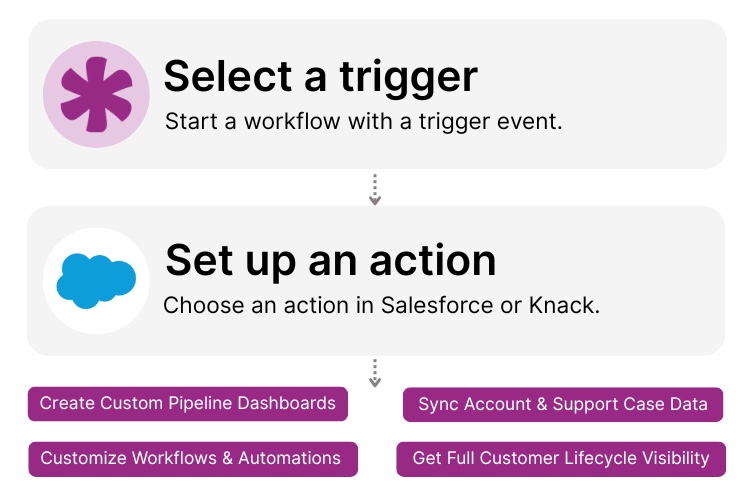
Step 1: Select a Trigger
A trigger is an event in your automation that starts your Flow. You can select a trigger event in Salesforce that will initiate your workflow. For example, you might choose “New Lead” or “Updated Opportunity” as the trigger. Knack monitors Salesforce for the selected event.

Step 2: Set up an Action in Knack
Once a trigger has occurred, actions execute the tasks within your Flow. For example, in Knack it could be: “Create Record – Lead” or “Update Account Record.” You determine what happens in your Knack app once the Salesforce trigger is activated. A Flow may contain one action, a sequence of actions, or actions based on rules or conditions.

Step 3: Connect and Automate
When your Knack Flow is ready, you can add more actions or start running it immediately. Salesforce and Knack are now seamlessly connected. For example: every time a new opportunity is created in Salesforce, a corresponding record is created in Knack. And your team can review it in your Knack custom CRM dashboard.
Popular Knack + Salesforce Automations
Integrate Knack and Salesforce with Knack’s pre-built templates and workflows. Save time while keeping your lead, account, opportunity, and support data synchronized across systems.
Top Use Cases for Integrating Knack with Salesforce

Lead & Contact Sync
Automatically push leads and contact details from Salesforce into your customized Knack CRM so your team always sees the most up-to-date information.

Pipeline & Opportunity Management
Feed opportunities from Salesforce into Knack to build custom dashboards in Knack, monitor stages, and automate follow-ups or tasks when opportunities advance.

Support & Case Tracking
When a case is created or updated in Salesforce, log it in Knack so you can surface support tickets in your custom portal and correlate them with contacts and accounts.

Custom CRM Workflow Automation
Leverage Knack’s no-code CRM capabilities (contacts, tasks, dashboards) and link them with Salesforce data so you get a tailored CRM environment that aligns with your actual processes rather than forcing you into out-of-the-box workflows.
Triggers and Actions
Knack Flows help you automate workflows by connecting your data and actions. A trigger starts a workflow, and an action executes a task based on the trigger.
About Salesforce
Salesforce is a leading cloud-based CRM platform that helps businesses of all sizes manage sales, marketing, and customer service activities. It offers robust tools for lead and opportunity management, account tracking, support cases, and analytics, plus a powerful ecosystem of integrations. With its extensive APIs and iPaaS connectors, Salesforce enables companies to integrate and extend their CRM workflows across their tech stacks.


12 Ways to Improve Customer Experience via CRM
In the ever-evolving landscape of modern business, the ability to...
Read
More
5 Reasons Your Business Needs a Pipeline
Whether you know it or not, you probably use pipelines...
Read
More
15 Amazing Benefits of Business Process Automation
Let’s explore the extensive benefits of business process automation (BPA)...
Read
More





