


 Log In






Send WhatsApp notifications when new Knack records are created
- Features & Benefits
- AI Powered App-Building

Build apps in minutes with AI
- Security and Infrastructure

Protect and control your data
- No-Code Database

Manage and connect your data
- Integrations

Connect tools and sync workflows
- Reports

Track and visualize performance
- User Access

Manage roles and permissions
- E-commerce

Run and automate online sales
- Front-End Experience

Customize your user interface
- Workflows

Streamline operations with automations
- Forms

Collect and manage data easily
- AI Powered App-Building
- Dive into Knack
- App Templates

Start fast with pre-built app templates
- Blog

Read insights and practical tips
- Case Studies

See how others use Knack
- Videos

Watch tutorials and user stories
- Glossary

Look up common no-code terms
- App Templates
- Additional Resources
- Compare Knack

See how Knack stacks up
- Hire an Expert Builder

Get hired to build or expand apps
- Help Center

Learn how to set up your app
- Developer Docs

Access technical guides and documents
- Community Forum

Connect with other Knack builders
- Compare Knack
- Partner Programs
- Become An Affiliate

Earn revenue by referring Knack
- Become an Expert Builder

Get hired to build apps
- Agency Program

Resell Knack to your clients
- Become An Affiliate
Integrate Knack with the WhatsApp Business API
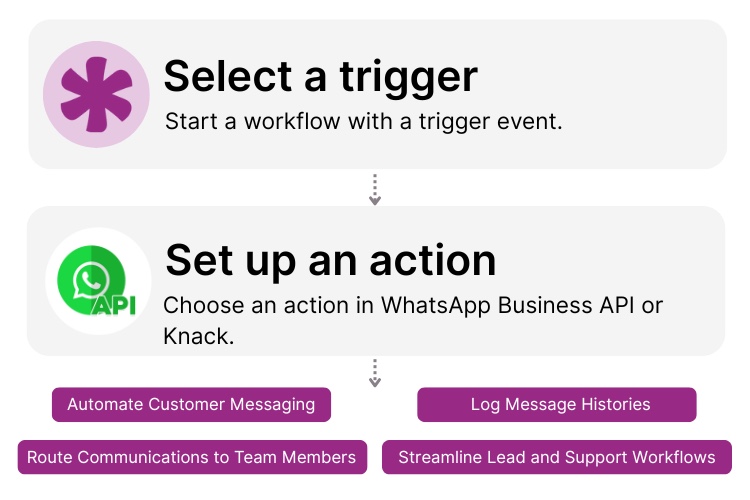
How Knack Flows Works
Connect the WhatsApp Business API (via the Meta Cloud API) with Knack using Flows to automate messaging, sync conversations, and route customer communication in real time. No coding required. This integration lets you send WhatsApp notifications, capture inbound messages through webhooks, update Knack records instantly, log full conversation histories, trigger automated responses, and build complete customer engagement workflows. From support and sales to marketing and lead capture, you can manage every WhatsApp interaction directly inside your custom Knack app.

Step 1: Select a Trigger
A trigger is an event that starts your Flow. WhatsApp or Knack can each initiate workflows depending on your setup. For example, you might choose “New Incoming Message” from WhatsApp or “New Record in Knack” as the trigger. Knack can monitor WhatsApp webhook events, and WhatsApp can respond based on updates in Knack.

Step 2: Set up an Action in Knack
Once a trigger has occurred, actions execute the tasks within your Flow. In Knack, actions can create or update records, send notifications, or enrich customer data. With WhatsApp, actions can send templated messages, reply to customer inquiries, or initiate follow-up messages. A Flow can include one action or a full multi-step sequence with rules, logic, and conditional branching.

Step 3: Connect and Automate
When your Knack Flow is ready, you can add more actions or start running it immediately. Your Knack and WhatsApp Business API environments are now seamlessly connected. Send automated WhatsApp messages from Knack, generate or update records from WhatsApp inbound messages, sync conversations to your CRM, and manage customer communication at scale right from your AI-powered Knack workspace.
Popular Knack + WhatsApp Business API Automations
Integrate Knack with the WhatsApp Business API using pre-built templates or custom Flows. Save time while streamlining customer messaging, support, and lead capture.
Top Use Cases for Integrating Knack with the WhatsApp Business API

Automated Customer Messaging
Send WhatsApp notifications, confirmations, reminders, alerts, and follow-ups directly from your Knack workflows. Keep customers updated without manual messaging.

Two-Way Chat Syncing
Log WhatsApp conversations into Knack automatically using webhook triggers. Build CRM-style message histories that help teams track support or sales interactions.

Lead Capture and Routing
Create Knack records instantly when users message your WhatsApp number from ads, QR codes, or website widgets. Automatically route those leads for sales follow-up.

Customer Support Workflow Automation
Assign inbound WhatsApp inquiries to the right team members, trigger automated replies, escalate priority issues, and update case statuses inside Knack.

Ecommerce and Transactional Messaging
Send order updates, shipping confirmations, payment notifications, or cart recovery prompts from Knack through WhatsApp to keep customers engaged in real time.
Triggers and Actions
Knack Flows help you automate workflows by connecting your data and actions. A trigger starts a workflow, and an action executes a task based on the trigger.
About the WhatsApp Business API
The WhatsApp Business API (via the Meta Cloud API) enables businesses to communicate with customers at scale through automated messaging, templated notifications, and two-way conversations. Designed for reliability and security, the API supports customer service, marketing, lead capture, and transactional messaging across one of the world’s most widely used communication channels. With webhook-based event delivery and powerful messaging features, the WhatsApp Business API helps companies deliver real-time, personalized interactions that enhance support, drive conversions, and deepen customer engagement.

Find Inspiration on the Knack Blog

Never Miss Another Task Assignment: Integrate Bird with Knack
Integrating Bird with Knack saves managers headaches. After all, assigning...
Read
More
Build an Efficient Work Order System to Power Your Business (Tutorial)
When you’re in field services, you need a work order...
Read
More
Build a Customer Support Portal with a Ticketing System Using No Code AI
Your customers deserve top notch support and the ability to...
Read
More





