


 Log In






Send DocuSign signature requests based on Knack records
- Features & Benefits
- AI Powered App-Building

Build apps in minutes with AI
- Security and Infrastructure

Protect and control your data
- No-Code Database

Manage and connect your data
- Integrations

Connect tools and sync workflows
- Reports

Track and visualize performance
- User Access

Manage roles and permissions
- E-commerce

Run and automate online sales
- Front-End Experience

Customize your user interface
- Workflows

Streamline operations with automations
- Forms

Collect and manage data easily
- AI Powered App-Building
- Dive into Knack
- App Templates

Start fast with pre-built app templates
- Blog

Read insights and practical tips
- Case Studies

See how others use Knack
- Videos

Watch tutorials and user stories
- Glossary

Look up common no-code terms
- App Templates
- Additional Resources
- Compare Knack

See how Knack stacks up
- Hire an Expert Builder

Get hired to build or expand apps
- Help Center

Learn how to set up your app
- Developer Docs

Access technical guides and documents
- Community Forum

Connect with other Knack builders
- Compare Knack
- Partner Programs
- Become An Affiliate

Earn revenue by referring Knack
- Become an Expert Builder

Get hired to build apps
- Agency Program

Resell Knack to your clients
- Become An Affiliate
Integrate Knack with DocuSign
How Knack Flows Work
Seamlessly connect DocuSign and Knack using Knack Flows to automate document sending, signature tracking, and agreement workflows. This integration allows you to send agreements and documents from Knack to DocuSign for signatures, track signing status in real time, and automatically update Knack records as documents are signed, declined, or completed. Eliminate manual sending and status checks: sync signature workflows with your internal processes, trigger downstream tasks when agreements are finalized, and centralize signed documents and metadata within your Knack app.

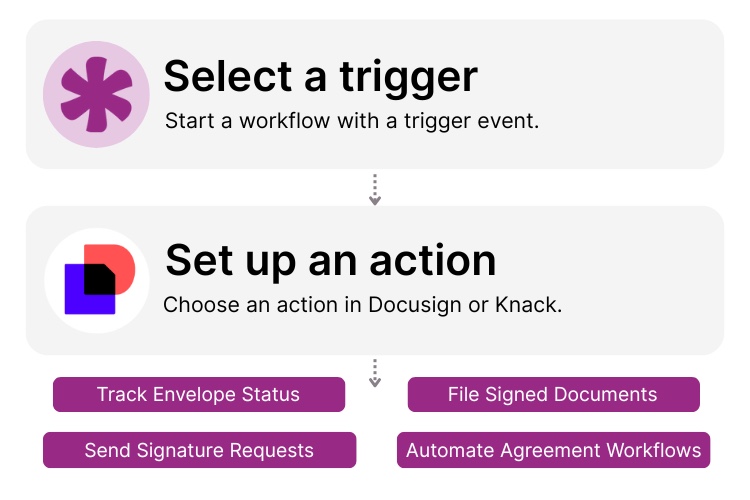
Step 1: Select a Trigger
A trigger is an event in your automation that starts your Flow. You can select a trigger in either Knack or DocuSign. For example, you might initiate a workflow when a Knack record is created or updated, when a document needs a signature, or when a DocuSign envelope status changes. Knack Flows detects the selected event and begins processing the associated document or signature data.

Step 2: Set up an Action in Knack
Once a trigger occurs, actions define what happens next in your Flow. In Knack, actions might include creating or updating records, sending notifications, or applying conditional logic. On the DocuSign side, actions can include sending an envelope for signature, requesting a signature on specific fields, or tagging recipients. You can map Knack data into DocuSign templates, personalize documents, and build multi-step workflows that span both systems.

Step 3: Connect and Automate
When your Knack Flow is ready, you can activate it immediately or expand it with additional steps. Your Knack and DocuSign systems are now seamlessly connected. Signed documents and envelope statuses flow back into Knack automatically, letting you trigger follow-ups, update workflows, notify teams, or store signed copies with the right records without manual intervention.
Popular Knack + DocuSign Automations
Connect Knack and DocuSign with pre-built workflows to automate signature requests, monitor signing status, and manage signed documents.
Top Use Cases for Integrating Knack with DocuSign

Automated Signature Requests
Automatically send agreements, contracts, waivers, or NDAs for signature when form data is submitted or a record reaches a milestone.

Real-Time Signature Status Updates
Track the progress of signatures in real time inside Knack. Know when an envelope is sent, viewed, signed, or completed.

Follow-Up Workflow Automation
Trigger downstream workflows, notifications, or conditional logic when agreements are signed, declined, or late.

Centralized Document Storage
Store signed documents, envelope IDs, and metadata directly in Knack so every record contains the right files and status history.
Triggers and Actions
Knack Flows help you automate workflows by connecting your data and actions. A trigger starts a workflow, and an action executes a task based on the trigger.
About DocuSign
DocuSign is a leading electronic signature and agreement cloud platform that helps individuals and organizations send, sign, and manage digital agreements securely and efficiently. With tools for preparing documents, adding recipients, setting signature fields, tracking status, and storing completed agreements, DocuSign is trusted by millions of users across industries.
When integrated with Knack, DocuSign becomes part of a no-code automation ecosystem. Signature workflows can be triggered by your business processes, and the results of those workflows, such as signed documents and status updates, are synced back into Knack to power operational follow-up, compliance, and reporting.

A Comprehensive Guide to Understanding and Optimizing the Approval Process
Creating an efficient approval process is crucial for organizations aiming...
Read
More
7 Knack Apps for SMB Owners
As a small or medium-sized business leader, you constantly juggle...
Read
More
Build a Client Document Portal (Guide)
Looking to streamline how you store, share, and manage client...
Read
More





