


 Log In






Create Google Calendar events from new Knack records
- Features & Benefits
- AI Powered App-Building

Build apps in minutes with AI
- Security and Infrastructure

Protect and control your data
- No-Code Database

Manage and connect your data
- Integrations

Connect tools and sync workflows
- Reports

Track and visualize performance
- User Access

Manage roles and permissions
- E-commerce

Run and automate online sales
- Front-End Experience

Customize your user interface
- Workflows

Streamline operations with automations
- Forms

Collect and manage data easily
- AI Powered App-Building
- Dive into Knack
- App Templates

Start fast with pre-built app templates
- Blog

Read insights and practical tips
- Case Studies

See how others use Knack
- Videos

Watch tutorials and user stories
- Glossary

Look up common no-code terms
- App Templates
- Additional Resources
- Compare Knack

See how Knack stacks up
- Hire an Expert Builder

Get hired to build or expand apps
- Help Center

Learn how to set up your app
- Developer Docs

Access technical guides and documents
- Community Forum

Connect with other Knack builders
- Compare Knack
- Partner Programs
- Become An Affiliate

Earn revenue by referring Knack
- Become an Expert Builder

Get hired to build apps
- Agency Program

Resell Knack to your clients
- Become An Affiliate
Integrate Knack with Google Calendar
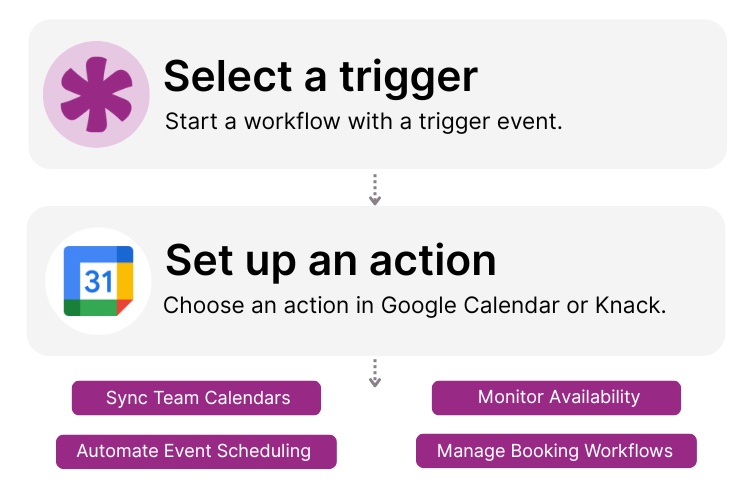
How Knack Flows Works
Connect Google Calendar to Knack and use Knack Flows to automate scheduling and keep calendar events in sync. This integration lets you create events instantly, update bookings, manage team availability, and log meeting details directly into your Knack app, no manual entry required. Build custom booking portals, track resource usage, and gain full visibility into every appointment and project timeline, all from within your custom Knack portal.

Step 1: Select a Trigger
A trigger is an event that starts your Flow. You can select a trigger event in Google Calendar or Knack that will initiate your workflow. For example, you might choose “New Event” in Google Calendar or “New Appointment Record” in Knack as the trigger. Knack monitors these scheduling changes to start the workflow.

Step 2: Set up an Action
Once a trigger has occurred, actions execute the tasks within your Flow. In Knack, actions can create or update records based on calendar data. In Google Calendar, actions can create detailed events, update times, or delete cancellations. A Flow can contain one action, a sequence of custom actions, or logic-based rules. For example, you could set up an action to “Create Detailed Event” in Google Calendar whenever a “New Project” record is approved in Knack.

Step 3: Connect and Automate
When your Knack Flow is ready, you can add more actions or start running it right away. Your Google Calendar and Knack apps are now seamlessly connected. Create a new event in Google Calendar every time a job is scheduled in Knack, manage staff shifts, and handle appointment bookings automatically right from your AI-powered Knack workspace.
Popular Knack + Google Calendar Automations
Integrate Knack and Google Calendar with a prompt using Knack’s AI app builder. Save time while keeping schedules, appointments, and event details synchronized.
Top Use Cases for Integrating Knack with Google Calendar

Appointment and Booking Management
Sync your Knack app with Google Calendar to automatically block off times, create appointments, and prevent double-booking.

Resource and Facility Scheduling
Manage schedules and rentals in Knack and instantly reflect availability on a shared Google Calendar to keep operations running smoothly.

Project Timeline Tracking
Visualize project milestones and deadlines by pushing dates from your Knack project management app directly to team calendars.

Staff and Shift Coordination
Log employee time-off requests or shift assignments in Knack and automatically populate them on a master Google Calendar for company-wide visibility.
Triggers and Actions
Knack Flows help you automate workflows by connecting your data and actions. A trigger starts a workflow, and an action executes a task based on the trigger.
About Google Calendar
Google Calendar is a time-management and scheduling calendar service developed by Google. It allows users to create and edit events, set reminders, and share schedules with others efficiently. As part of the Google Workspace ecosystem, it integrates seamlessly with Gmail, Drive, and Meet, making it an essential tool for personal organization and business collaboration across teams and organizations globally.

Benefits of Using an Inventory Management System
Inventory management is the art and science of overseeing and...
Read
More
7 Knack Apps for SMB Owners
As a small or medium-sized business leader, you constantly juggle...
Read
More
3 Steps to Create Your Website-Based Database With No-Code Builders
Asking how to create an online database for my website?...
Read
More





