


 Log In






Create new Google Doc from Knack records
- Features & Benefits
- AI Powered App-Building

Build apps in minutes with AI
- Security and Infrastructure

Protect and control your data
- No-Code Database

Manage and connect your data
- Integrations

Connect tools and sync workflows
- Reports

Track and visualize performance
- User Access

Manage roles and permissions
- E-commerce

Run and automate online sales
- Front-End Experience

Customize your user interface
- Workflows

Streamline operations with automations
- Forms

Collect and manage data easily
- AI Powered App-Building
- Dive into Knack
- App Templates

Start fast with pre-built app templates
- Blog

Read insights and practical tips
- Case Studies

See how others use Knack
- Videos

Watch tutorials and user stories
- Glossary

Look up common no-code terms
- App Templates
- Additional Resources
- Compare Knack

See how Knack stacks up
- Hire an Expert Builder

Get hired to build or expand apps
- Help Center

Learn how to set up your app
- Developer Docs

Access technical guides and documents
- Community Forum

Connect with other Knack builders
- Compare Knack
- Partner Programs
- Become An Affiliate

Earn revenue by referring Knack
- Become an Expert Builder

Get hired to build apps
- Agency Program

Resell Knack to your clients
- Become An Affiliate
Integrate Knack with Google Docs
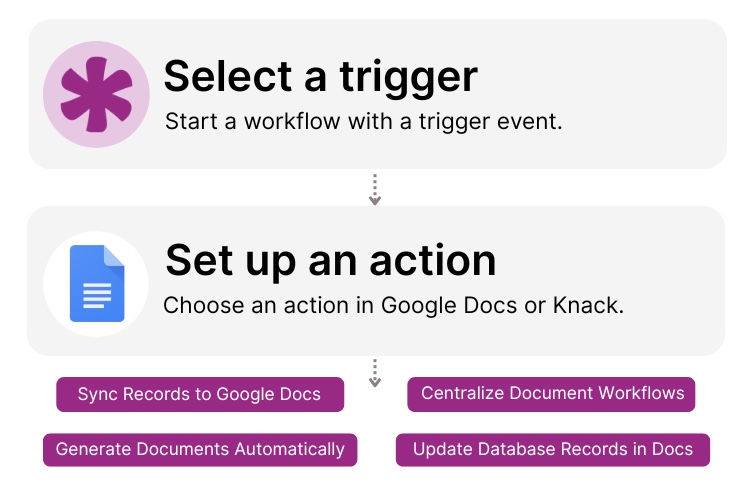
How Knack Flows Works
Seamlessly connect Google Docs to Knack with Knack Flows to automate document creation, make updates, collaborate, and sync live application data. This integration lets you generate Google Docs from Knack records, populate documents with real-time field data, update existing files automatically, and keep document links synced inside your Knack app. Create reports, proposals, contracts, onboarding documents, meeting notes, and more while maintaining a centralized, searchable document hub powered by your Knack workflows.

Step 1: Select a Trigger
A trigger is an event in your automation that starts your Flow. You can select a trigger event in Knack that initiates a Google Docs workflow. For example, you might choose “New Record Created,” “Form Submitted,” or “Record Updated” as the trigger. Knack monitors your app for the selected event and prepares the associated data for document creation or updates.

Step 2: Set up an Action
Once a trigger occurs, actions define what happens next in your Flow. You can create a new Google Doc, insert Knack data into a document template, update existing document content, or store the document URL in Knack. Actions can be chained together with conditions, approvals, or notifications to support complex document-driven workflows.

Title Step 3: Connect and Automate
When your Knack Flow is ready, you can activate it immediately or expand it with additional actions. Your Knack apps and Google Docs are now seamlessly connected. Automatically generate and manage documents as your data changes, collaborate in real time, and keep every document tied to the correct record inside your Knack app.
Popular Knack + Google Docs Automations
Automate document creation and collaboration by connecting Knack and Google Docs with flexible, no-code workflows.
Top Use Cases for Integrating Knack with Google Docs

Automated Document Creation
Generate Google Docs automatically using Knack data to create reports, proposals, agreements, and internal documentation.

Dynamic Content Updates
Keep documents up to date by syncing Knack record changes directly into Google Docs without manual edits.

Collaborative Workflows
Combine Knack automations with Google Doc collaborations so teams can review, comment, and edit documents together in real-time.

Centralized Document Tracking
Store document URLs, ownership, and statuses in Knack to maintain a searchable, organized document organization system tied to your app data.
Triggers and Actions
Knack Flows help you automate workflows by connecting your data and actions. A trigger starts a workflow, and an action executes a task based on the trigger.
About Google Docs
Google Docs is a cloud-based word processing platform that enables users to create, edit, and collaborate on documents in real time. As part of Google Workspace, it allows teams to work together seamlessly from any device while maintaining version history, comments, and sharing controls.
When integrated with Knack, Google Docs becomes a powerful document automation layer. Live application data can be used to generate and update documents automatically, helping teams reduce manual work, improve accuracy, and manage documents more efficiently across their workflows.

Benefits of Using an Inventory Management System
Inventory management is the art and science of overseeing and...
Read
More
7 Knack Apps for SMB Owners
As a small or medium-sized business leader, you constantly juggle...
Read
More
3 Steps to Create Your Website-Based Database With No-Code Builders
Asking how to create an online database for my website?...
Read
More





