


 Log In






Generate AI summaries for new Knack records using Gemini
- Features & Benefits
- AI Powered App-Building

Build apps in minutes with AI
- Security and Infrastructure

Protect and control your data
- No-Code Database

Manage and connect your data
- Integrations

Connect tools and sync workflows
- Reports

Track and visualize performance
- User Access

Manage roles and permissions
- E-commerce

Run and automate online sales
- Front-End Experience

Customize your user interface
- Workflows

Streamline operations with automations
- Forms

Collect and manage data easily
- AI Powered App-Building
- Dive into Knack
- App Templates

Start fast with pre-built app templates
- Blog

Read insights and practical tips
- Case Studies

See how others use Knack
- Videos

Watch tutorials and user stories
- Glossary

Look up common no-code terms
- App Templates
- Additional Resources
- Compare Knack

See how Knack stacks up
- Hire an Expert Builder

Get hired to build or expand apps
- Help Center

Learn how to set up your app
- Developer Docs

Access technical guides and documents
- Community Forum

Connect with other Knack builders
- Compare Knack
- Partner Programs
- Become An Affiliate

Earn revenue by referring Knack
- Become an Expert Builder

Get hired to build apps
- Agency Program

Resell Knack to your clients
- Become An Affiliate
Integrate Knack with Google Gemini
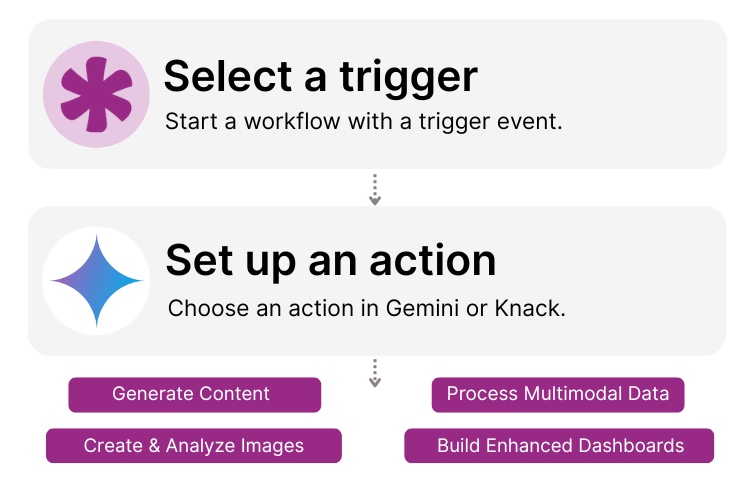
How Knack Flows Work
Connect Google’s Gemini to Knack Flows to harness the power of Knack’s AI app builder with Google's most advanced AI models for custom applications. This integration lets you generate content, create images, extract insights from documents, create intelligent summaries, and build conversational AI features in your Knack app—no coding required. Build AI-enhanced dashboards, automate content production, process multimodal data, and transform your operations with Knack’s and Google's generative AI technology.

Step 1: Select a Trigger
A trigger is an event in your automation that starts your Flow. You can select a trigger event in Knack that will initiate your workflow. For example, you might choose "New Record" or "Form Submission" as the trigger. Knack monitors your app for the selected trigger and prepares data to send to Gemini.

Step 2: Set up an Action in Knack
Once a Trigger has occurred, actions execute the tasks within your Flow. For example in Gemini it could be: "Generate content" or "Analyze image." You can determine what happens with Gemini's AI response once the Knack trigger is activated. A Flow can contain one action, a sequence of custom actions, actions based on rules or conditions, and more. For example, you could set up an action to "Generate a summary" in Gemini when a new customer feedback record is created, then automatically update the Knack record with AI-generated insights.

Step 3: Connect and Automate
When your Knack Flow is ready, you can add more actions or start running it right away. Your Gemini and Knack apps are now seamlessly connected. Create content for new records in your Knack app every time data changes or process images and documents with multimodal AI. You can also create intelligent summaries and more right from your Knack app.
Popular Knack + Google Gemini Automations
Integrate Knack and Google Gemini with ease using pre-built templates. Save time while leveraging Google's most powerful AI models for your projects.
Top Use Cases for Integrating Knack with Gemini

Content Generation & Enhancement
Automatically generate product descriptions, blog posts, email templates, and marketing copy using Gemini’s advanced language models directly from data in your Knack app. Ensure quality is consistent and compliance standards are met.

Multimodal Data Processing
Leverage Gemini’s ability to understand text, images, and documents simultaneously. Analyze uploaded images, extract information from PDFs, and process visual data alongside text entries in your Knack database for comprehensive insights.

Intelligent Document Analysis
Transform unstructured documents into actionable data by using Gemini to extract key information, summarize lengthy reports, classify documents, and identify important patterns within your Knack-stored files.

Conversational AI & Customer Support
Build intelligent chatbots and automated response systems that understand context and provide personalized answers to customer inquiries by combining Knack’s database with Gemini’s conversational AI capabilities.
Triggers and Actions
Knack Flows help you automate workflows by connecting your data and Actions. A Trigger starts a workflow, and an Action executes a task based on the Trigger.
About Gemini
Gemini is Google's most advanced family of multimodal AI models, designed to understand and generate human-like text, analyze images, process documents, and even generate code. Built on breakthrough research from Google DeepMind, Gemini models offer state-of-the-art performance across a wide range of tasks including content creation, translation, summarization, and complex reasoning. With models ranging from the lightweight Gemini Flash for high-speed tasks to the powerful Gemini Pro for sophisticated applications, the Gemini API provides developers with flexible, scalable AI capabilities through Google AI Studio and Google Cloud, making it accessible for businesses of all sizes to integrate cutting-edge AI into their applications.

How to Use ChatGPT with No-Code Tools (AI + Automation Guide)
As artificial intelligence continues to reshape the way we work...
Read
More
How to Create an App with AI
The integration of AI (Artificial Intelligence) is revolutionizing the landscape,...
Read
More
Top 23 ChatGPT Prompts for Marketing (2026 Guide)
AI tools like ChatGPT have grown to play an increasingly...
Read
More





