


 Log In









Managing health and safety across construction projects is notoriously complex, time-consuming, and high-risk, with manual processes often leading to gaps in compliance and unnecessary exposure to hazards.
Fortunately, construction safety management software has emerged as a modern solution, acting as a digital, cloud-based, and mobile-enabled platform designed to centralize critical safety functions into one streamlined system. For construction managers and safety officers, adopting this type of software means more than just checking regulatory boxes—it reduces risk, ensures better compliance, and provides actionable insights that drive safer, more efficient project outcomes.
Quick Summary: Benefits of Safety Management Software
- Manual safety management can create delays, inconsistencies, and limited visibility.
- Dedicated software centralizes compliance, reporting, and field access for stronger safety outcomes.
- Failing to leverage the right digital tools can lead to fines, incidents, and rising costs.
- Core features of digital safety management software include incident reporting, audits, hazard tracking, compliance records, contractor oversight, analytics, mobile use, integrations, and automation.
- Choosing the right solution for your specific needs involves identifying your requirements, usability testing, ROI evaluation, and strong vendor support.
- Successful implementation is often reliant on phased rollouts, training, data migration, and continuous feedback.
- With Knack’s no-code platform, construction teams can quickly build custom safety apps that automate workflows and scale across projects.
The Challenges of Manual Safety Management
Safety management is always a chief concern at construction sites, but relying on manual processes takes valuable time away from completing the project and, more critically, can result in oversight of essential safety measures.
A few of the challenges presented by manual safety management include:
- Paper forms, spreadsheets, and fragmented record keeping – Storing safety data in disconnected formats makes it difficult to access, update, and share critical information across teams.
- Delays in incident reporting – Relying on manual submission slows down the reporting process, which can delay investigations and corrective actions.
- Limited visibility across sites – Without centralized tracking, managers lack real-time insight into safety performance and compliance across multiple job sites.
- Difficulty enforcing standard processes – Manual systems make it harder to ensure consistent safety procedures are followed across projects and crews.
- Higher risk of human error – Manual data entry and communication increase the chance of mistakes, oversights, and misinterpretation of safety requirements.
Why Use Construction Safety Software: Core Benefits
Leveraging a digital safety management solution can eliminate or significantly reduce the impact of manual challenges while offering added benefits like streamlined processes, real-time visibility, and stronger attention to detail. These tools have become an industry standard, so if your team is still relying on paper forms and spreadsheets, it’s time to consider making the jump to a dedicated platform.
Some key benefits of digital safety management software include:
- Real-time reporting & alerts – Capture incidents, hazards, and near misses instantly, with automated notifications to ensure timely response and corrective action.
- Centralized compliance documentation – Store permits, training records, certifications, and audit logs in one secure, easily accessible location for improved regulatory readiness.
- Standardized workflows – Streamline inspections, audits, and corrective actions with consistent processes that reduce errors and ensure accountability across projects.
- Analytics, trend tracking, and predictive insight – Turn safety data into actionable insights that help identify patterns, forecast risks, and prevent incidents before they occur.
- Mobile/field access for front-line teams – Empower workers to log reports, access safety checklists, and complete compliance tasks directly from the job site via mobile devices.
- Integration with other systems – Connect seamlessly with HR, project management, and BIM tools to align safety data with broader operational workflows.
3 Easy Ways to Start Building For Free
1. Generate an App with AI
2. Use one of our templates
3. Import your own data

Free 14-Day Trial. No Credit Card Required
Risks of Not Using Construction Safety Software
Bypassing digital solutions not only slows efficiency and raises the likelihood of incidents but also leaves construction companies vulnerable to non-compliance with strict industry regulations. The consequences of lacking the right safety measures can be severe and far-reaching, including outcomes such as:
- Regulatory fines and audit failures – Without proper documentation and compliance tracking, companies risk costly penalties and failed safety audits.
- Increased incident frequency – Gaps in reporting and oversight can lead to more frequent accidents, injuries, and project delays.
- Poor reputation and higher insurance costs – A history of safety issues damages trust with clients and partners while driving up liability insurance premiums.
- Inefficiency and administrative burden – Manual record-keeping wastes valuable time on paperwork instead of focusing on proactive safety management.
- Legal and financial liability – In the event of serious incidents, companies may face lawsuits and compensation claims.
Core Features of Construction Health and Safety Management Software
To choose the right safety management software for your operation, it’s essential to first identify your biggest pain points and challenges, and then look for a solution that directly addresses them. While every business will have unique requirements, any reliable platform should include core features like incident reporting, compliance management, and contractor modules.
With that in mind, we recommend seeking out the following key features when evaluating your options.
Feature: Incident and Near-Miss Reporting
Digital safety management software makes it simple for workers to quickly report safety events and near misses directly from the field—with the ability to attach photos, videos, or other supporting evidence. These reports are then automatically routed to the appropriate supervisor or safety officer, triggering an investigation workflow that ensures corrective actions are assigned and tracked to completion.
For instance, if a worker identifies unstable scaffolding, they can submit a report with images from their phone, which is immediately shared with the safety team. This process speeds up response times, helps prevent accidents, and creates a valuable data trail that supports stronger safety protocols and long-term risk reduction.
Feature: Inspections, Audits, and Checklists
Inspection and audit capabilities in modern safety management software streamline the process by providing customizable checklists that guide teams through each step, ensuring no safety requirement is overlooked. Teams can tailor these checklists, set schedules, and configure automated reminders to match the specific needs of each project, thereby improving consistency and accountability across all sites.
Relying on software that lacks these features—or on manual practices—can result in missed hazards and compliance gaps, increasing the likelihood of incidents and costly project delays.
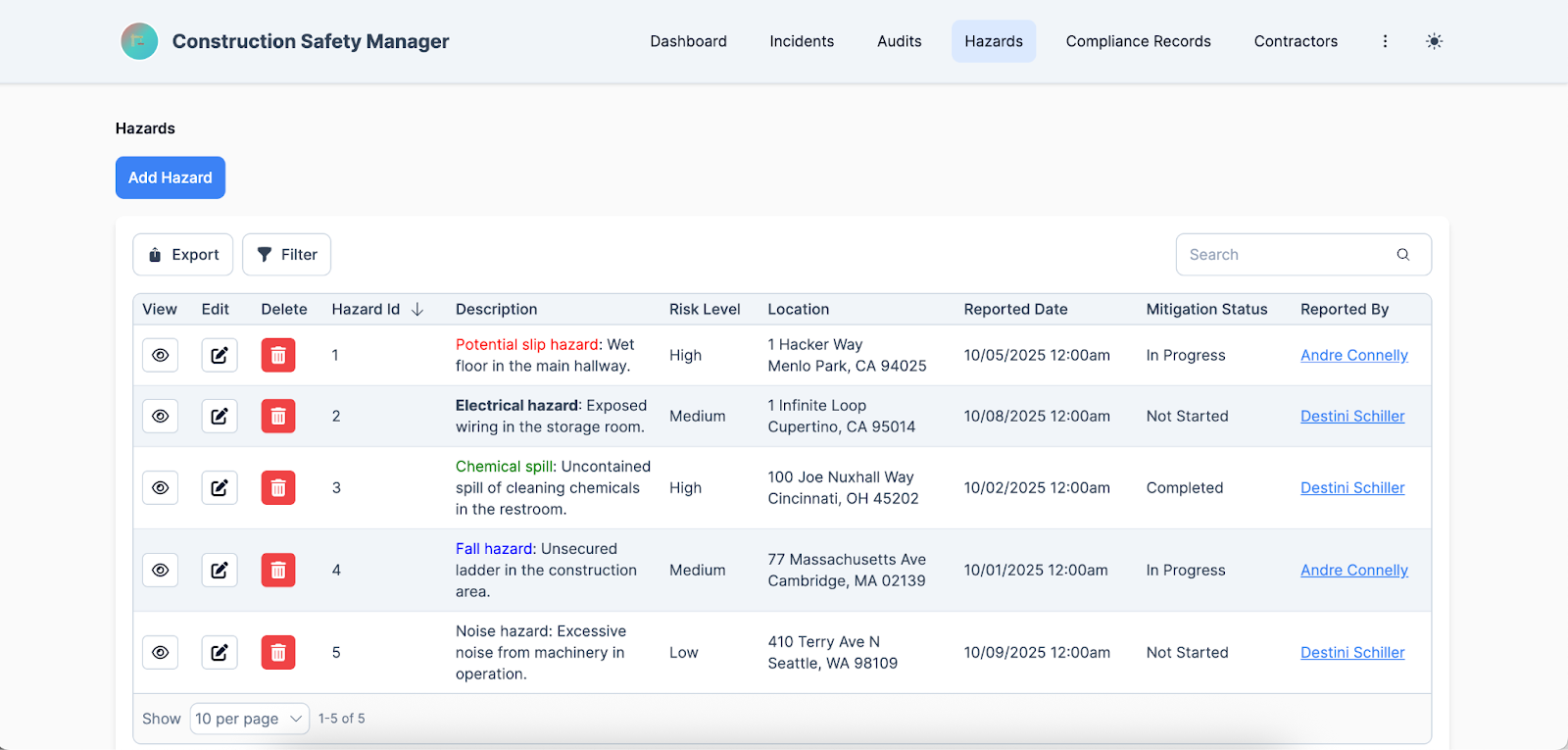
Feature: Risk / Hazard Management and Corrective Actions
By providing robust monitoring tools, safety management software enhances site safety and enables teams to efficiently identify potential hazards and implement corrective actions.
When a hazard is logged, these systems can assign a risk score based on severity and likelihood, helping prioritize the most critical issues first. Once identified, the platform makes it easy to assign a team member to address the issue, set deadlines, and track progress in real time—all within a centralized, easily accessible location—ensuring accountability and reducing the likelihood of incidents.
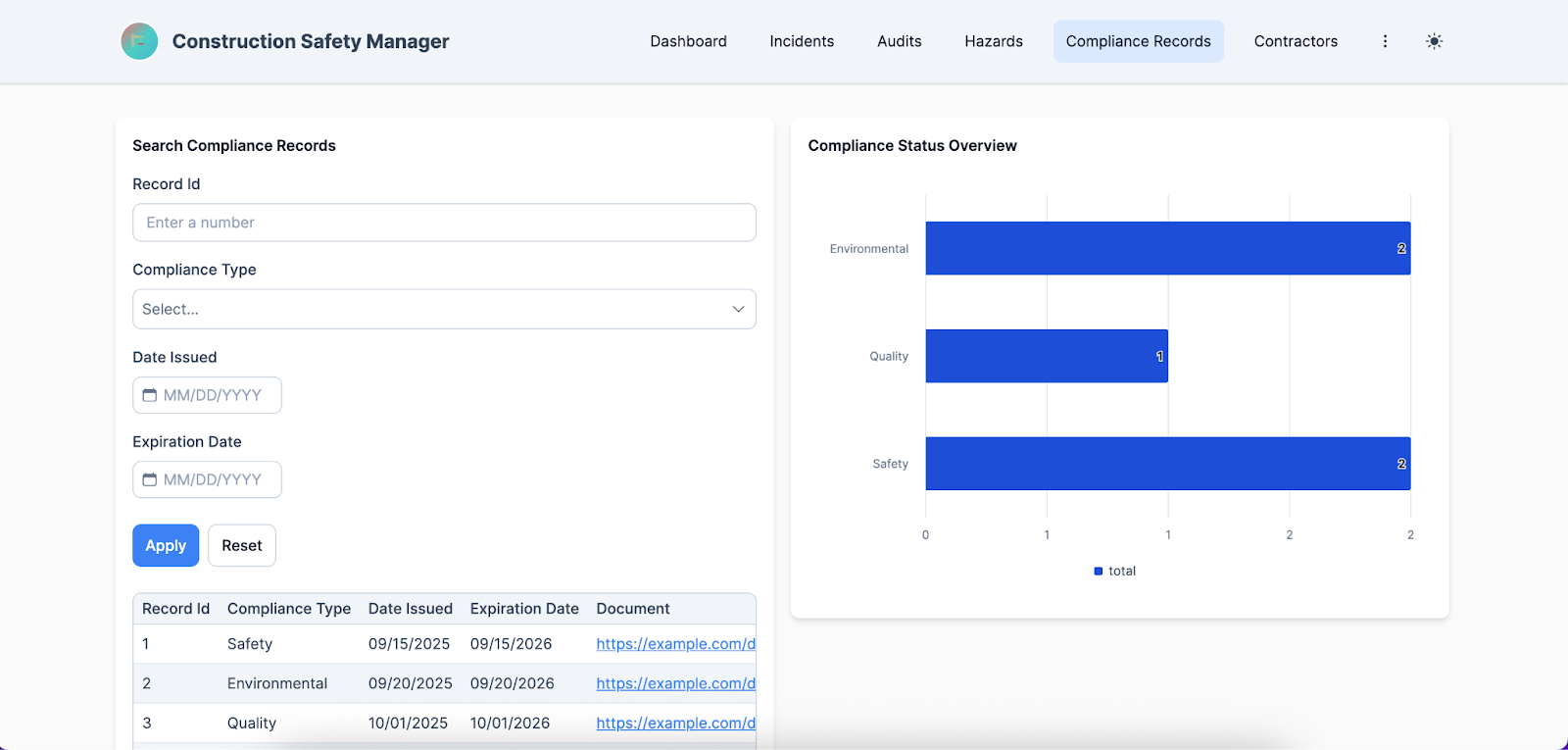
Feature: Compliance and Document Management
Keeping compliance and documentation organized is a major challenge on construction sites, and digital safety management platforms make it much easier to handle.
These solutions serve as a unified location to store permits, certifications, training records, and other critical documents, while automated alerts notify teams of upcoming expirations or renewals to prevent lapses. Additionally, detailed audit trails track all updates and access, ensuring transparency and accountability.
This significantly reduces the risk of non-compliance, saving time on administrative tasks and giving managers confidence that their teams are always meeting safety and regulatory standards.
Feature: Contractor / Subcontractor Module
Many construction sites involve contractors and subcontractors, making it essential that a safety management solution includes features specifically for managing these external teams.
Modern software often handles prequalifications, onboarding, and credential tracking, ensuring that every contractor meets required safety standards before stepping on site. It can also monitor contractor safety performance and provide oversight, helping identify trends or areas for improvement.
Unlike standard team members, contractors may rotate between projects or companies, making consistent compliance and accountability more challenging, but digital safety management platforms expedite this process by centralizing records and automating reminders and approvals tailored to their unique workflows.
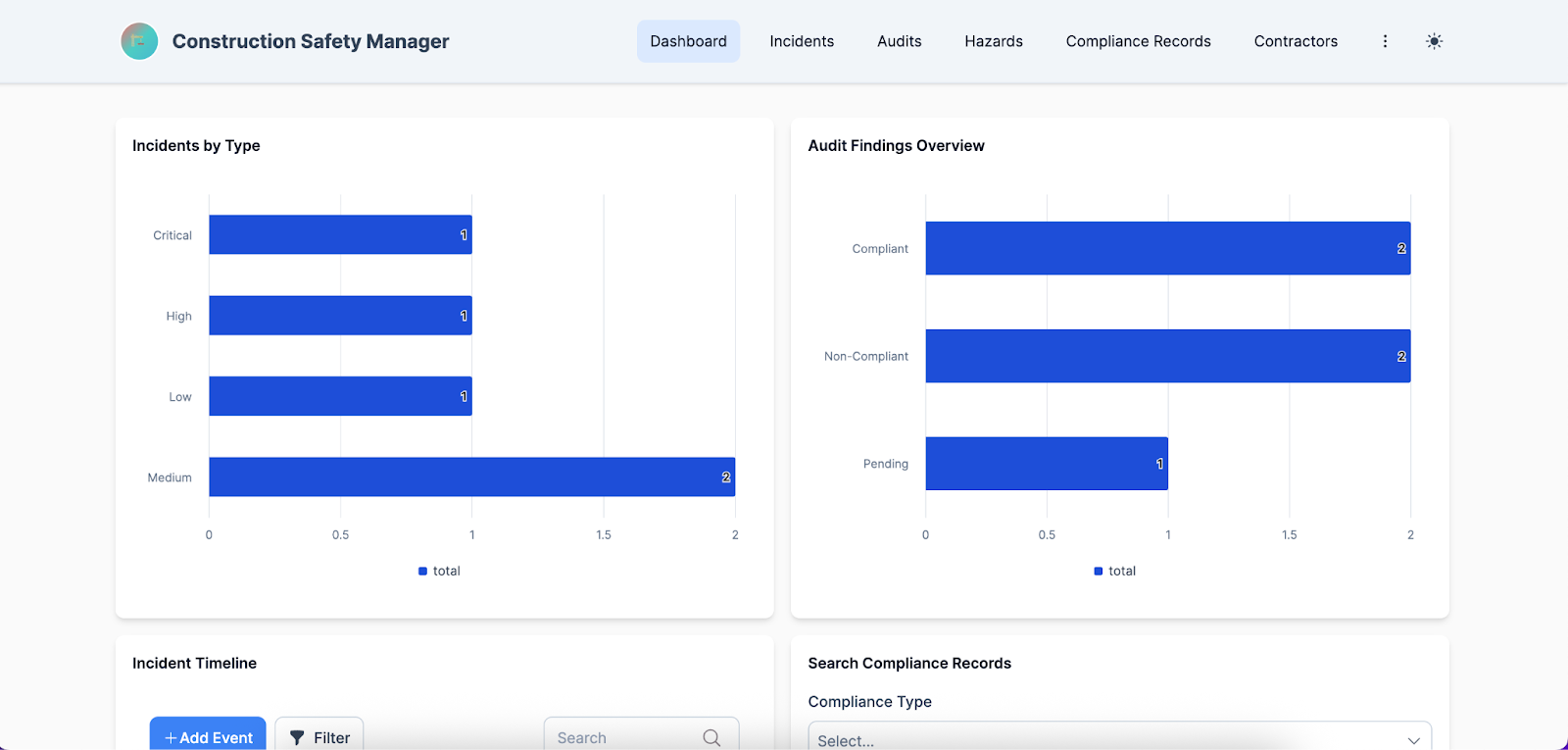
Feature: Reporting, Dashboards, and Analytics
Reporting is another crucial feature in safety management solutions, as it transforms raw data into actionable insights that drive safer and more efficient operations.
These tools often offer trend analysis, allowing teams to track injuries, incident types, and safety performance by site, as well as KPI dashboards that give management a clear overview of overall safety metrics. Reports are typically exportable as well, making it simple to provide regulators with evidence of compliance and maintain transparency.
Neglecting reporting can lead to missed patterns, poor decision-making, and increased risk of incidents and regulatory penalties.
Feature: Mobile and Offline Functionality
Construction teams spend most of their time on-site, often in remote locations, making mobile and offline functionality an essential feature of any worthwhile solution. This allows field teams to access checklists, log incidents, and record observations without needing constant connectivity, then automatically sync the data once back online.
A worker inspecting a scaffold, for example, can immediately note a loose platform and attach photos from their device, ensuring the issue is documented and assigned for corrective action right away—avoiding the risk that the hazard might be forgotten or details lost if they had to wait until returning to the office.
Feature: Integrations and Scalability
A competent digital safety management solution should seamlessly integrate with the systems your organization already uses, including HR, payroll, ERP, and project management software.
Connecting with these platforms ensures that safety data aligns with workforce information, project schedules, and operational workflows, reducing duplication and improving overall efficiency. Integration also supports scaling across multiple sites and regions, allowing organizations to maintain consistent safety standards, track compliance centrally, and manage a growing workforce without losing oversight or control.
Feature: Automation of Safety Processes
Automating safety management streamlines the entire process, freeing up valuable time for teams to focus on core project tasks while reducing the potential for human error, ultimately making sites safer.
Most solutions provide automated reminders for inspections, audits, and training renewals, ensuring nothing is overlooked, and automatically route incident reports to the appropriate managers for timely response. When a hazard is logged, the system can also trigger corrective actions by assigning responsibility to a team member, setting deadlines, and tracking progress until resolution, creating a structured workflow that ensures issues are addressed promptly and consistently.
How to Evaluate and Select the Right Construction Health and Safety Management Software
When choosing your digital safety management platform, it’s crucial to follow a series of proven steps to ensure you select the right solution. This process starts with assessing your internal needs and is followed by thorough research to identify software that is secure, functional, user-friendly, and tailored to your organization’s unique requirements.
Establish Your Requirements
First things first: You’ll need to identify your main challenges, evaluate your existing workflows, and clarify your safety and operational goals. This assessment serves as the foundation for defining the features and capabilities you need in a new digital safety management solution.
Things to consider include:
- Number of sites and users – Ensure the platform can scale to accommodate all locations and team members, including contractors and subcontractors.
- Regulatory jurisdictions – The software should support compliance with the specific safety regulations and standards relevant to each region or country where you operate.
- Mobile vs. desktop needs – Consider whether your team requires mobile access on-site, offline functionality, or primarily desktop-based management.
- Integration requirements – Check if the software can connect with existing systems such as HR, payroll, ERP, project management, or BIM tools to streamline workflows.
- Customization and workflow flexibility – Evaluate whether the platform allows tailoring of checklists, reports, notifications, and approval processes to match your organization’s specific safety protocols.
Vendor Comparison and Demos
Once you’ve narrowed your options to a shortlist of solutions that meet your requirements, it’s time to dive deeper into evaluations.
Here, you’ll compare vendors side by side to identify where each excels and where they may fall short, using a feature checklist to confirm all critical capabilities are included. Don’t forget to examine use-case scenarios to ensure the software can handle your specific workflows, and consider requesting a sandbox, trial, or field-team test to experience the solution in a real-world environment before making a final commitment.
Usability, Onboarding, and Training
Another critical consideration is how user-friendly the platform is for your team and the level of support provided by the vendor.
Ease of adoption by field personnel ensures the software is utilized to its fullest potential, allowing you to take full advantage of the features prioritized during your selection process. Equally important is the vendor’s training support and documentation—having access to a dedicated account manager, training sessions, and self-paced resources like videos and manuals provides personalized guidance when needed and allows users to learn at their own pace.
Total Cost and ROI
Evaluating the total cost and ROI of a safety management platform involves more than just comparing upfront prices. While more expensive solutions may seem costly initially, they often pay for themselves through advanced functionality, improved efficiency, and risk reduction, whereas cheaper options can sometimes create hidden costs that outweigh initial savings.
Teams should carefully assess license or subscription fees, implementation and maintenance expenses, as well as the potential costs of switching platforms and any downtime during adoption. Considering both direct and indirect costs helps ensure you select a solution that delivers long-term value and measurable returns for your organization.
Data Security and Compliance
Security is a critical consideration in any industry, and construction is no exception, as sensitive data about projects, personnel, and compliance must be protected. Features such as access controls, encryption, automated backups, and audit logging help safeguard this information from unauthorized access or loss, while also supporting compliance with GDPR and other local data regulations.
Without a secure system, organizations risk legal penalties, reputational damage, and operational disruptions, including data breaches and compromised safety reporting—all of which can have serious financial and regulatory consequences.
Support, Updates, and Roadmap
Construction requirements are constantly evolving, so your digital safety management solution needs to be adaptable as well. A reliable vendor should provide regular software updates while minimizing system downtime during normal work hours to avoid disruptions and maintain a clear feature roadmap that helps new users navigate the system efficiently.
Prompt and helpful support is also essential, as delays in responding to issues can slow project progress. For example, if a critical reporting feature stops working and the vendor is unresponsive, teams may be unable to log incidents or track corrective actions, creating compliance gaps and putting safety at risk.
How to Implement Construction Safety Management Software
After you’ve chosen a safety management solution, the next step is to implement it properly to set both the system and your team up for success. This involves gradually integrating the platform into your workflows, providing thorough training for your team, and continuously monitoring its performance and usage to ensure it delivers the intended benefits.
Phased Rollout Approach
A controlled rollout is crucial for safety management software because it allows teams to learn the system, optimize workflows, and identify any errors or inefficiencies before they impact multiple projects.
By deploying the platform at pilot site(s) first, organizations can test processes, gather feedback, and make necessary adjustments in a manageable environment. Once the system is running smoothly, it can then be gradually expanded to other projects, ensuring a smoother transition and minimized disruption across the organization.
Training and Adoption Strategies
Hands-on field training is essential because vendor support and documentation can only go so far in helping teams fully adopt a new safety management solution.
Designating superusers or champions—team members who are highly knowledgeable and enthusiastic about the platform—can guide their peers and encourage consistent use, increasing overall buy-in. Incentivizing usage is also important to drive engagement and reinforce adoption; this might include recognizing high-performing teams, offering small rewards for consistent reporting, or showcasing improvements in safety metrics that result from proper system use.
Data Migration and Cleanup
Teams will also need to transfer data from their old system and ensure that it translates accurately into the new platform, which often includes historical records, audits, forms, and other critical safety documentation.
Proper migration is crucial for maintaining continuity, compliance, and the integrity of safety insights, as incomplete or incorrect data can lead to gaps in reporting or decision-making. Cleaning and standardizing data involves reviewing existing records to remove duplicates, correct errors, and ensure consistent formatting so that the new system can interpret and utilize the information effectively, setting a solid foundation for accurate tracking and analysis.
Feedback Loops and Continuous Improvement
Once your new system is in place and being used regularly, the work doesn’t stop there.
Monitoring usage and collecting feedback helps identify how effectively the platform is being adopted and highlights areas where improvements may be needed. Based on this data, workflows, templates, and processes can be adjusted to optimize efficiency and ensure the system fully supports your safety goals.
For instance, if usage data shows that certain inspection checklists are consistently skipped or misunderstood, refining those templates and providing additional training can improve compliance, reduce missed hazards, and enhance overall site safety.
Monitoring Success and Tracking KPIs
In addition to gathering team member feedback, evaluating metrics like incident rates, reporting times, and corrective action closure times can provide valuable insight into how effectively your new safety management platform is performing.
Tracking user adoption metrics alongside these operational indicators helps distinguish between system errors and low engagement, allowing you to take the appropriate actions—whether refining processes, providing additional training, or adjusting workflows—to optimize the platform’s functionality and ensure it delivers maximum safety benefits.
Build Your Own Safety App with Knack (No-Code Guide)
Construction teams also have the option to build their own safety management solution if existing platforms don’t meet all their needs or if they want greater control. This approach allows operations to create a tailored system that addresses their specific challenges, and the rise of no-code builders has made custom solutions more accessible than ever before.
Why No-Code is a Game Changer
No-code solutions have become increasingly popular for building safety management platforms because they overcome the limitations of traditional software, which can be costly, rigid, and slow to adapt to changing workflows.
With no-code tools, safety teams can create and customize workflows, checklists, and reporting processes without relying on developers, giving them the flexibility to adjust the system as needs evolve. This puts control directly into the hands of safety managers and project leads, enabling faster implementation and greater responsiveness to on-site challenges.
Steps to Building Your Own Safety App in Knack
Does building your own no-code safety management solution sound like the right approach for your team? The process is easier than it sounds—simply follow the steps below, and you can have a fully tailored system up and running in no time:
- Define requirements – Identify the core functionalities you need, such as incident reporting, inspections, contractor management, and compliance tracking.
- Choose templates or start from scratch – Use pre-built app templates like those offered by Knack for a faster setup, or build entirely custom solutions tailored to your workflows.
- Build workflows visually – Drag-and-drop fields to create forms, automate notifications, and set up dashboards for easy monitoring and reporting.
- Enable mobile access – Ensure field workers can log hazards, complete checklists, and upload photos or documents from any device, even offline.
- Integrate with your existing systems – Connect the platform with HR, project management, or reporting tools to streamline operations and maintain data consistency.
- Test & iterate – Pilot the solution with a small group, gather feedback, and refine forms, workflows, and automations before full deployment.
Key Benefits of Using Knack for Construction Health and Safety Management
Using any digital safety management platform provides a wide range of benefits, but creating your own no-code system takes it a step further. Instead of adapting a general solution, teams of any technical skill level can quickly build a customized platform that directly meets their unique safety and operational requirements.
The main advantages of building your own system include:
- Full customization to match your exact safety processes – Design workflows, forms, and dashboards that align perfectly with your team’s unique requirements.
- Fast deployment without waiting on IT or coding teams – Implement the system quickly without delays caused by traditional software development cycles.
- Automation of reminders, escalations, and compliance checks – Set up automated notifications and workflows to ensure tasks are completed on time and compliance is maintained.
- Scalable from a single job site to multiple regions – Easily expand the platform as your operations grow, maintaining consistency and oversight across all locations.
- Centralized, real-time data for smarter decision-making – Access up-to-date safety insights in one place to make informed decisions and quickly respond to hazards or trends.
Why Choose Knack for Construction Safety Management
A digital safety management system is essential for meeting modern safety regulations and ensuring workers are protected while performing their duties. These powerful platforms reduce human error, improve efficiency, simplify compliance reporting, and can even help lower operational costs.
Building your own no-code solution has become an increasingly viable option in recent years, offering teams an accessible way to create a fully customized system that fits their exact safety and operational requirements.
Among the options available to you, Knack stands out for its unique combination of customization, scalability, and user-friendliness, making it an ideal choice for projects of all sizes and complexities.
Ready to experience the power of Knack for yourself? Sign up for your free, no-risk trial today!
FAQs About Construction Health and Safety Management Software
What exactly is construction health and safety management software?
Construction health and safety management software is a digital system that centralizes safety processes like incident reporting, audits, and contractor management, providing a faster, more accurate alternative to manual methods like paper forms and spreadsheets.
Will my field teams adopt it, or resist it?
Adoption can be challenging due to habits and resistance to change, but emphasizing usability, mobile access, incentives, and appointing champion users can greatly increase engagement.
Can it help with regulatory compliance (OSHA, local rules)?
Yes—these platforms store permits and certifications, track audit trails, send alerts for renewals, and generate reports that make it easy to demonstrate compliance to regulators.
Do I need reliable internet on every job site?
Not necessarily, as most systems offer offline functionality that lets field teams log data and sync automatically when connectivity is restored.
How long does it take to implement across a company?
Implementation typically follows phases like pilot testing, full rollout, and adoption, with timelines depending on data migration, training, and workflow customization.
How secure is the data?
Data is protected through encryption, access controls, regular backups, and adherence to vendor security policies and certifications.
Can it scale across projects, regions, and multiple users?
Yes—modern platforms support multi-site deployment, configurable user permissions, scalable user limits, and integration with existing systems to accommodate growth.
How do you measure success post-implementation?
Success can be tracked using KPIs like incident rates, response times, audit readiness, and user adoption or engagement metrics.





