


 Log In









Insurance agents juggle a complex mix of responsibilities—managing leads, tracking policies, handling renewals, identifying cross-sell opportunities, and delivering excellent client service—all while keeping up with compliance and documentation. A purpose-built Customer Relationship Management (CRM) system can bring order to that chaos by centralizing client data, automating workflows, and improving follow-up consistency.
In this guide, we’ll explore what to look for in a CRM designed for insurance professionals, how to implement it effectively, and how using custom, no-code like Knack can help create a solution that fits your exact needs.
TL;DR – What You Need to Know
- Insurance agents benefit from specialized CRMs that address policy lifecycle management, compliance tracking, renewals, commissions, and sales growth.
- CRM platforms for insurance should offer tailored workflows, automation, carrier integrations, and support across different policy types (life, health, P&C).
- Choosing the right CRM involves evaluating off-the-shelf, generic, or custom no-code options based on integration needs, ROI, and long-term scalability.
Why Insurance Agents Need a Specialized CRM
While general CRMs work well for industries like retail, marketing, and consulting, the insurance industry’s unique demands call for a more specialized approach. From tracking policy lifecycles and renewal dates to managing commissions and integrations, a CRM built specifically for insurance agents offers the tools and workflows that traditional software simply can’t match.
CRM for Insurance Agents vs. Generic CRMs
It’s the combined strength of specialized features—like policy tracking, commission management, and automated renewal reminders—that makes insurance CRMs so invaluable for agents.
Key attributes of these powerful systems include:
- Policy Lifecycle Tracking: Enables agents to manage every stage of a policy’s journey in one place, ensuring nothing falls through the cracks from initial quote to claim resolution.
- Compliance, Licensing, and Regulatory Audit Trails: Keeps detailed records of client interactions, documentation, and licensing to simplify audits and ensure adherence to industry regulations.
- Commission, Carrier Integrations, and Carrier Portals: Connects directly with carriers to streamline commission tracking, data syncing, and policy updates across multiple insurance providers.
- Cross-Selling, Upsell, and Multi-Line Relationships: Identifies opportunities to offer clients additional or complementary coverage, helping agents grow revenue while deepening client relationships.
- Renewal Reminders and Service Renewal Workflows: Automates notifications and tasks around policy renewals, ensuring timely follow-ups and improved retention rates.
CRM vs. AMS: What’s the Difference?
A customer relationship management system focuses primarily on managing client interactions, tracking leads, and nurturing relationships throughout the sales cycle. In contrast, an Agency Management System (AMS) is built specifically for insurance operations, helping agencies manage policies, claims, commissions, and back-office workflows.
While a CRM excels at organizing customer data and automating marketing or sales activities, an AMS specializes in handling the technical and administrative aspects of insurance management.
For example, an AMS provides additional tools for policy lifecycle management, claims processing, and carrier reporting that go beyond what a typical CRM offers. Together, these systems complement each other—CRMs driving growth and engagement, and AMS platforms ensuring efficient, compliant insurance operations.
Problems a CRM Solves for Insurance Agents
Unique challenges require equally unique solutions—and for insurance agents, a specialized CRM delivers the precision and functionality that manual methods or generic CRMs often lack.
These purpose-built systems help mitigate many common pain points, including:
- Fragmented Systems (Spreadsheets, Carrier Portals, Email): A specialized CRM consolidates client data, communications, and carrier information into one centralized platform, eliminating the inefficiency of juggling multiple tools.
- Missed Renewals or Client Follow-Ups: Automated reminders and workflow triggers ensure agents never overlook policy renewals, client touchpoints, or follow-up opportunities.
- Low Visibility into Pipeline and Sales Metrics: Built-in dashboards and reporting tools give agents and managers clear insights into leads, conversions, and performance metrics in real time.
- Difficulty Scaling Processes Across Agents in an Agency: Standardized workflows, role-based permissions, and automation make it easy to maintain consistency and efficiency as the agency grows.
3 Easy Ways to Start Building For Free
1. Generate an App with AI
2. Use one of our templates
3. Import your own data

Free 14-Day Trial. No Credit Card Required
Must-Have CRM Features for Insurance Agents
The rich feature set found in most insurance CRMs is purpose-built to streamline workflows, reduce administrative errors, and simplify management of the entire policy lifecycle from quote to renewal. To ensure your system can meet the unique demands of the insurance industry, it’s essential to verify that your chosen solution includes the following key functionalities.
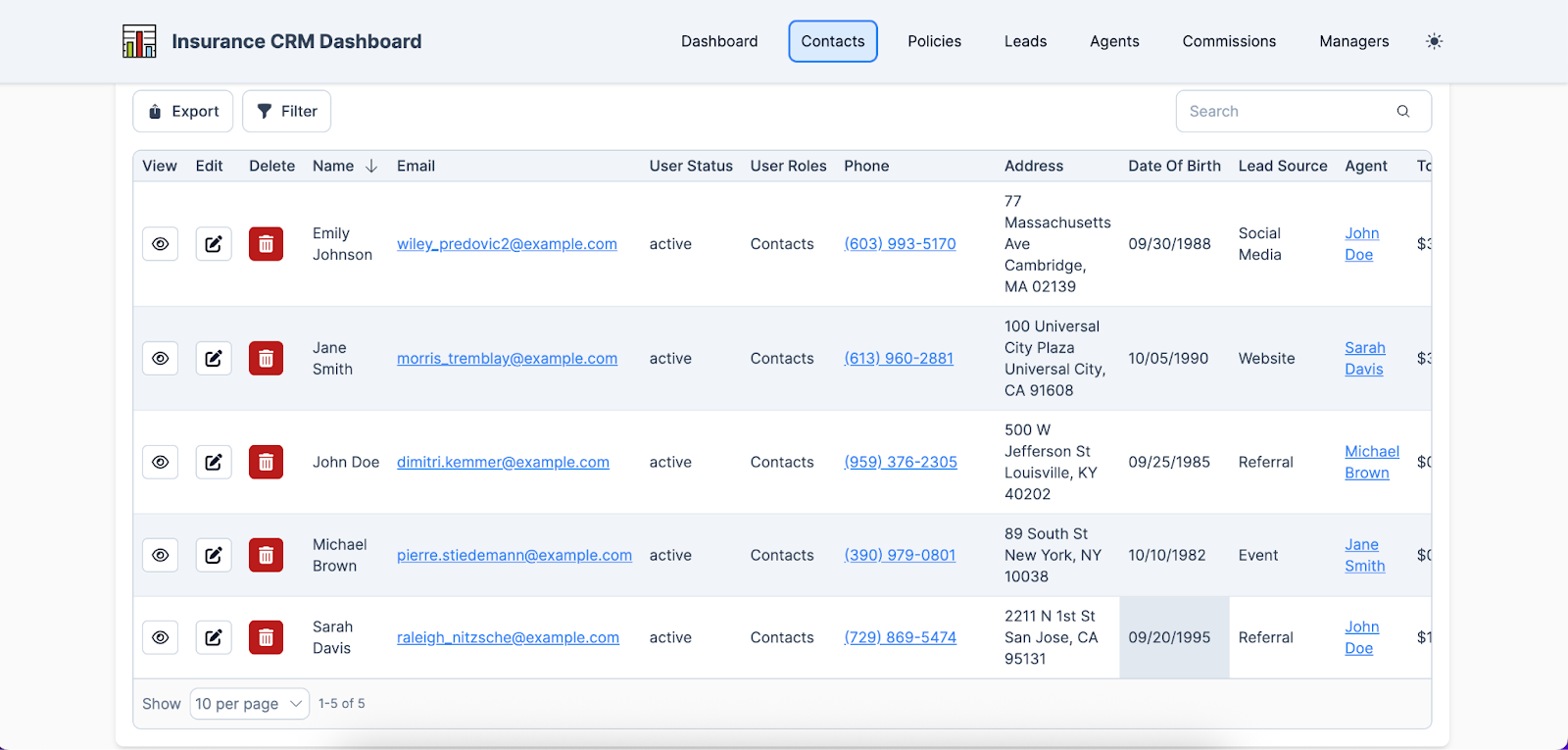
Contact and Policy Management
By capturing essential client information—such as contact details, demographics, and communication history—an insurance CRM creates a centralized hub for every insured individual. It links each client record to their associated policies, beneficiaries, and dependents, while maintaining a complete historical view of renewals, claims, and interactions. This structure allows agents to manage multiple policies for a single client, such as auto, home, and life insurance, all within one unified profile.
For instance, when a client calls about updating a beneficiary on their life policy, the agent can instantly view the relevant policy details, confirm dependent coverage, and record the change—all without switching between systems.
Lead and Opportunity Management
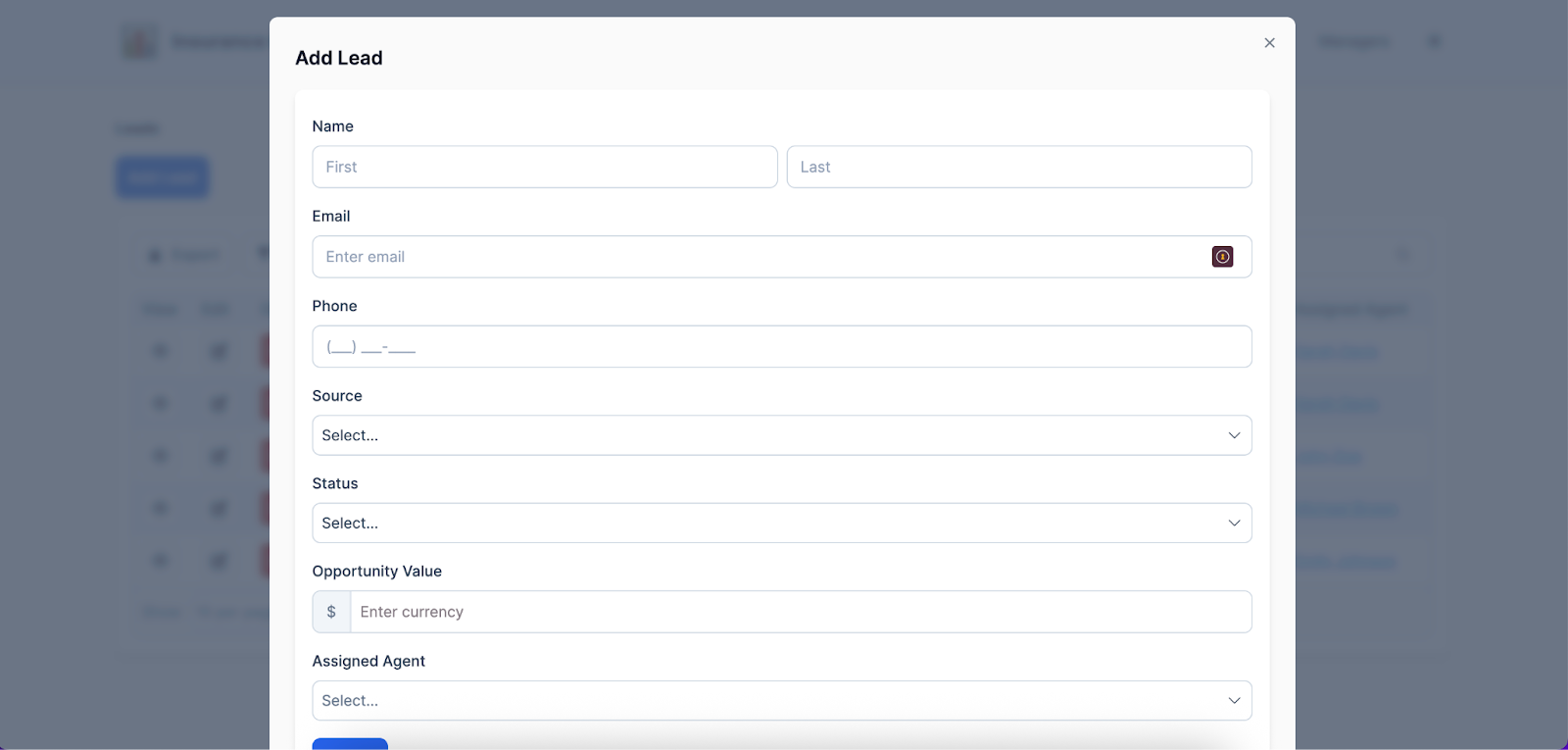
Capturing leads through web forms, referrals, and insurance aggregators, an insurance CRM organizes prospects into a structured pipeline with stages tailored to the industry, such as quote, underwrite, bind, and renew. This approach allows agents to track progress at each stage and follow up promptly to increase conversion rates.
With a clear view of the pipeline, agencies can improve forecasting, reduce missed opportunities, and provide a more personalized, efficient experience for clients.
Marketing Automation and Email Marketing
An insurance CRM streamlines marketing by automating email campaigns and targeted outreach, enabling agents to engage clients and nurture leads more consistently and effectively.
While it’s important to balance automation with a personal touch, these tools free agents from repetitive tasks, allowing them to focus on higher-value activities like personalized consultations and relationship building. By automating initial follow-ups and educational communications, agents remain readily available to connect directly with prospects during the later stages of the sales funnel, ensuring a seamless blend of efficiency and human interaction.
Renewal Management and Alerts
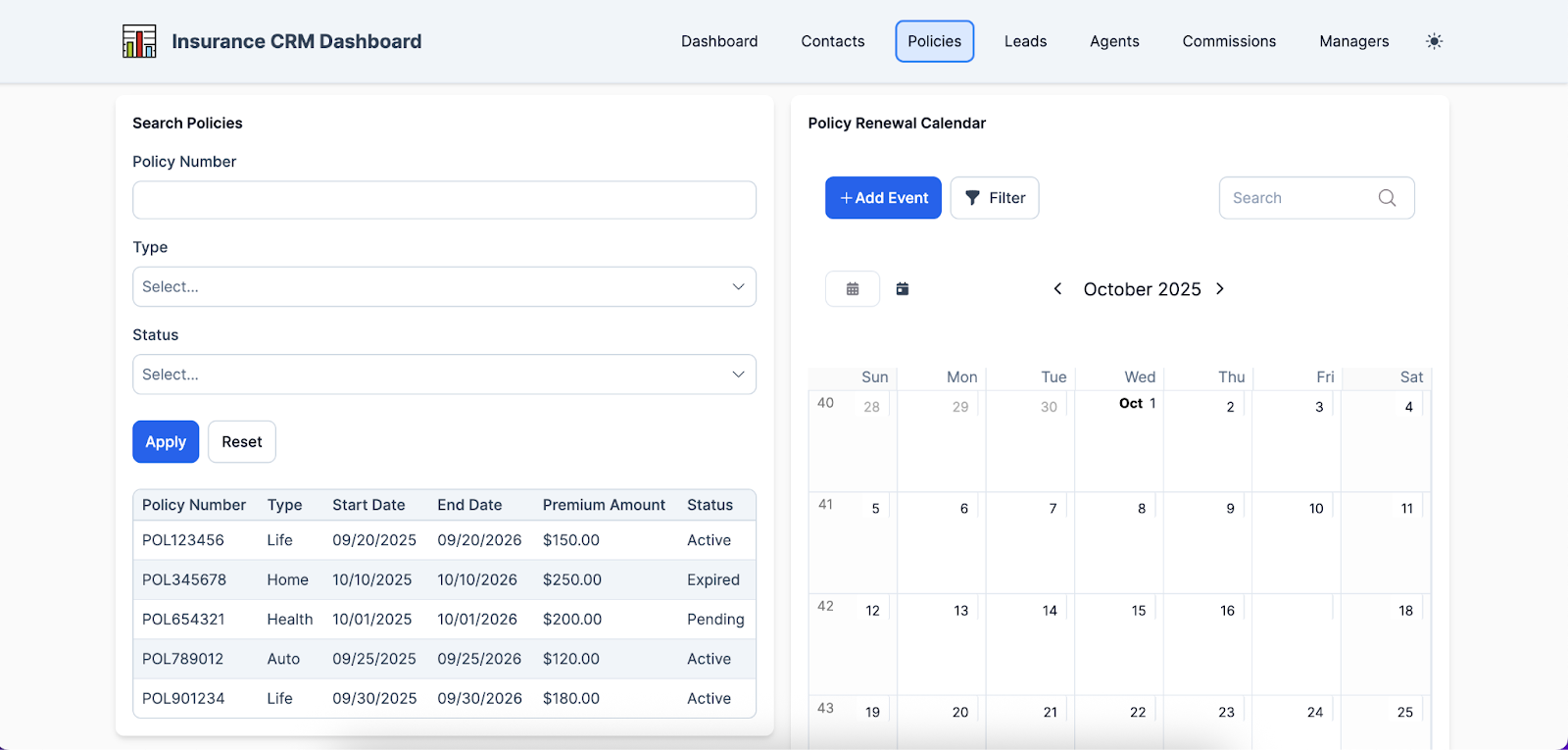
To ensure agents are proactively alerted to upcoming policy renewals and any urgent actions that require attention, most insurance CRMs offer the ability to automate renewal reminders and escalation workflows. Dashboards displaying renewal volume also offer a clear, real-time view of upcoming renewals, helping agencies prioritize tasks and reduce the risk of missed opportunities.
Without these features, agents may face overlooked renewals, delayed follow-ups, and lost revenue, while clients could experience lapses in coverage or inconsistent service, ultimately harming both retention and satisfaction.
Commission and Compensation Support
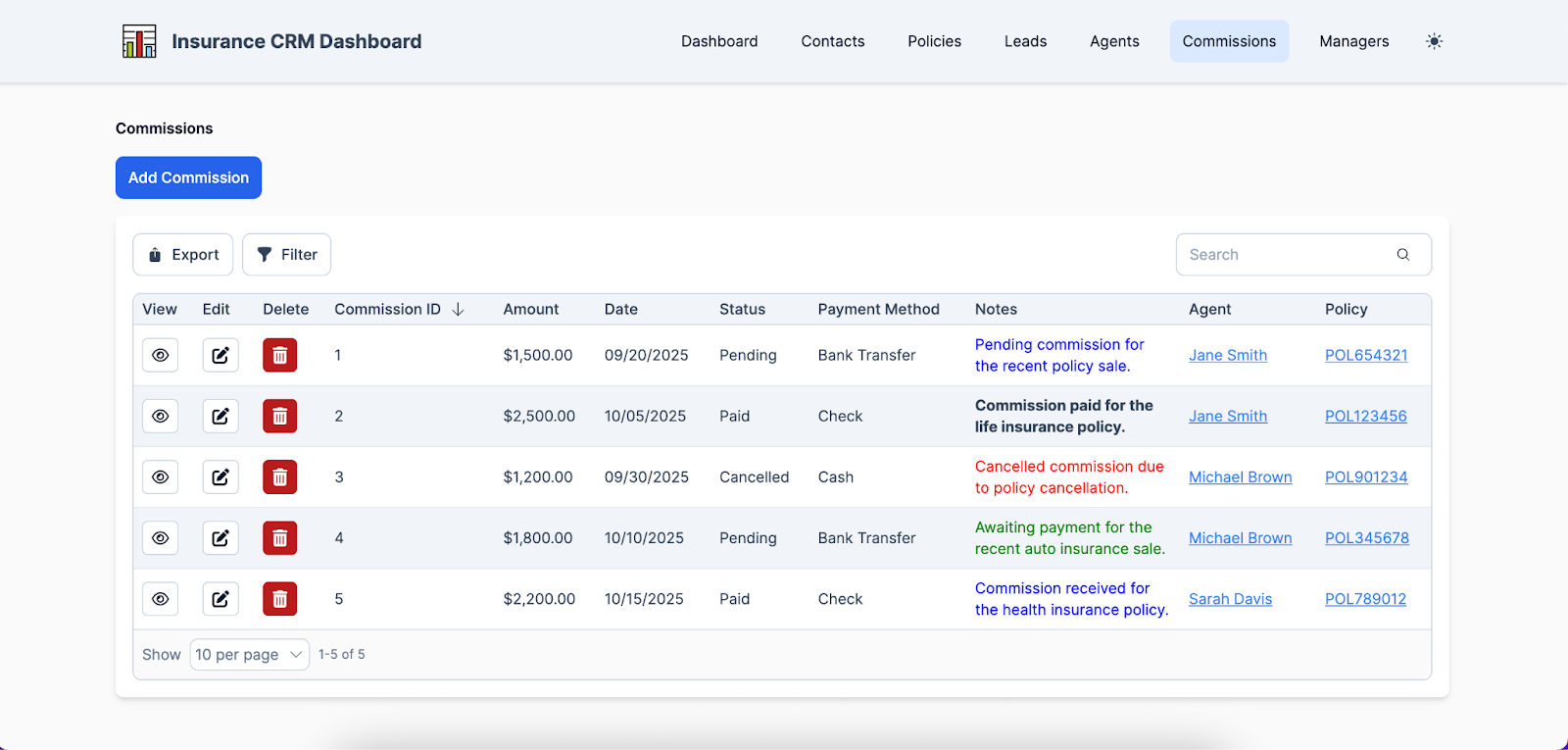
Since insurance agents are often compensated through commissions, many insurance CRMs include features that help track and monitor how much each agent is owed.
These systems can break down commissions by carrier and line of business, giving agents and managers a clear view of earnings across different products and policies. Many CRMs also offer integrations with carrier systems or the ability to mirror commission statements, ensuring accuracy and reducing the need for manual calculations, while providing a transparent, real-time view of each agent’s performance and compensation.
Carrier / Underwriting Integrations
APIs or connectors in insurance CRMs link directly to carrier quote and binding systems, allowing for seamless data exchange and automated status updates from carriers. For example, when a client’s auto insurance quote is submitted through the carrier’s platform, the CRM can automatically update the lead’s record to reflect whether the quote is in review, approved, or bound, without requiring manual input from the agent.
This integration streamlines workflows and ensures agents always have real-time visibility into the status of policies, enabling faster responses and more efficient client service.
Automation and Task Workflow
The automation capabilities of an insurance CRM handle follow-up tasks, reminders, and assignment rules, often using conditional logic—for instance, sending a notice if a quote is about to expire or reassigning a lead when an agent is unavailable. This ensures clients receive timely communication, minimizing missed opportunities or coverage lapses.
For policyholders, it creates a smoother, more responsive experience, while for insurance companies, it increases conversion rates and helps maintain strong client relationships without placing excessive manual demands on agents.
Mobile-Friendly Access
Mobile accessibility has become a standard in nearly all modern digital solutions, and insurance CRMs are no exception, enabling agents to manage sales, client interactions, and policy tasks from anywhere.
In the insurance industry, many policyholders need timely assistance—whether starting a claims process or accessing important policy information—and delays caused by waiting to return to the office can lead to frustration, dissatisfaction, or even client turnover. By providing mobile access, insurance CRMs ensure agents can respond quickly and deliver a seamless, efficient service experience no matter where they are.
Reporting and Analytics for Agencies
Monitoring key performance indicators (KPIs) is crucial for insurance agents, and CRM dashboards provide a centralized view of metrics such as new business, renewal rates, retention, and conversion. These insights help agencies assess individual agent performance and identify trends or areas needing improvement.
By keeping a close eye on KPIs, agencies can reward high-performing agents, offer additional training or support to those lagging, and make strategic adjustments to maintain competitiveness and drive growth over time.
Integration with Business Systems
Aside from providing all the internal features insurance agents need to manage their work, it’s equally important that an insurance CRM integrates seamlessly with external business systems. Connections with accounting software, email platforms, and other third-party tools enable efficient data flow, reduce duplicate entry, and create operational synergy across the agency.
Without these integrations, agencies may face data inconsistencies and slower response times, which can lead to errors, frustrated clients, and missed business opportunities.
CRM Features by Insurance Type: Life, P&C, Health & Travel
Even though the insurance industry as a whole requires specialized CRM solutions, different segments within the space have unique needs that demand an even more tailored approach. Whether you operate a life insurance agency or focus on property and casualty coverage, your chosen platform will likely need customization to address your specific workflows, challenges, and business goals.
Life Insurance CRM Features
Life insurance companies face specific demands, including long-term policy management, complex underwriting, and the need to maintain ongoing relationships with clients over many years, making it essential to tailor a CRM to these specific needs.
A life insurance–focused CRM includes features such as policy lifecycle management, tracking applications from initial quote through underwriting and issuance, as well as customizable client interaction modules to schedule follow-ups, reminders, and educational communications.
For example, an agent can use the CRM to automatically track a client’s policy milestones, send reminders for premium payments, and schedule periodic check-ins to discuss additional coverage options, ensuring the client feels supported and increasing the likelihood of policy renewals and cross-sell opportunities.
Property and Casualty Insurance CRM Tools
By offering specialized tools for claims management, client history tracking, and risk assessment, CRM systems help property and casualty insurance agencies streamline their operations and improve client service. These platforms allow agents to monitor claims from submission to resolution, maintain detailed records of client interactions and policy history, and assess potential risks to provide more accurate coverage recommendations.
Agencies can further customize their CRM by creating workflows tailored to specific lines of business and integrating with third-party risk assessment tools, maximizing efficiency and ensuring clients receive timely, informed support throughout the insurance process.
Health and Travel Insurance CRM Solutions
For health and travel insurance agencies, CRMs offer specialized functionalities designed to meet the fast-paced and often high-stakes needs of these sectors, including emergency response tools, claim resolution tracking, and automated policy renewal alerts.
Emergency response modules allow agents to quickly access client information and provide immediate support during urgent situations, while claim resolution tracking ensures that every step of a claim is monitored, documented, and communicated efficiently. Automated renewal alerts help agents stay proactive with policy updates, ensuring continuous coverage for clients.
Together, these features enable health and travel insurance agencies to deliver timely, reliable service and strengthen client trust.
How to Implement a CRM in Your Insurance Agency
While selecting a CRM with the right features is a critical first step, effective implementation is equally essential to ensure the system truly works for your agency. This process guarantees that data is accurately transferred, agents are properly trained, and necessary adjustments are made over time so the CRM delivers maximum benefits and supports long-term operational success.
Planning and Requirements Capture
Mapping your agency’s workflows, data model, and user roles is a crucial first step in the implementation process because it provides a clear blueprint of how information flows, who is responsible for each task, and how the system should support daily operations.
Engaging agents and staff early to gather their input also ensures the CRM is configured to meet real-world needs, addresses pain points, and aligns with existing processes. Involving users from the start also fosters buy-in and increases the likelihood that the system will be used effectively, ultimately maximizing the CRM’s value for the entire agency.
Data Migration and Cleanup
Consolidating existing client and policy data is a critical step when switching to a new CRM, as it ensures all information is accurate, complete, and accessible in a single system. Cleaning duplicates and verifying data quality also prevents errors, reduces confusion, and helps maintain trust with clients.
Failing to give this step sufficient attention can lead to incomplete records, miscommunication, missed renewals, and inefficiencies that undermine the benefits of the new CRM, thereby impacting both agent productivity and customer satisfaction.
Phased Rollout Strategy
When implementing a new CRM, it’s wise to roll out the system gradually rather than overwhelming users all at once.
Start with core modules such as contacts, policies, and renewals, and pilot the system with a single agent or team to gather feedback and make adjustments. This phased approach not only allows for iterative improvements based on real-world use but also helps isolate and address any issues before expanding the CRM across the entire organization, minimizing disruption and ensuring a smoother adoption process for all staff.
Change Management and Training
Providing thorough training and documentation is essential when introducing a new CRM to ensure that all agents and staff understand how to use the system effectively. Additionally, designating champion users—experienced team members who can guide others and answer questions—helps reinforce best practices and fosters peer-to-peer learning.
Monitoring adoption and usage is just as important, as low engagement can indicate gaps in training or system usability; agencies can address this by offering additional support, updating documentation, or adjusting workflows to better fit user needs, ensuring the CRM delivers its full value across the organization.
Ongoing Maintenance and Iteration
Once the initial CRM implementation is complete, the work doesn’t stop—ongoing review and adaptation are key to maximizing its value. Regularly analyzing metrics and KPIs allows agencies to identify trends and areas for improvement, informing adjustments to workflows, features, and integrations as business needs evolve.
For example, an agency may notice through CRM insights that certain policy types have lower renewal rates; in response, they could implement targeted automated reminders, adjust agent follow-up workflows, or integrate new tools to streamline client communications, thus improving retention and operational efficiency over time.
Choosing the Best CRM for Your Insurance Agency
If you’re convinced that transitioning to a new CRM is the right move for your agency, the next step is identifying the solution that best meets your unique needs. This involves assessing your specific requirements, weighing the pros and cons of each option, and evaluating how well different solutions align with your budget and long-term goals.
Off-the-Shelf Insurance CRMs vs Generic CRMs
Insurance agencies deciding between an off-the-shelf insurance CRM and a generic CRM should carefully weigh their specific needs and priorities.
Off-the-shelf solutions, like AgencyBloc or Zoho Insurance CRM, offer built-in insurance features such as policy lifecycle management, commission tracking, and automated renewal reminders, which can accelerate adoption and reduce customization time. Generic CRMs, while more flexible and adaptable to a variety of industries, often require significant configuration to meet the unique demands of insurance workflows.
Agencies favoring ready-to-use, insurance-specific tools benefit from specialized functionality out of the box, whereas those with unique processes or integration needs might prefer the flexibility of a generic CRM to tailor the system precisely.
Evaluating Custom/No-Code CRM Solutions
If neither a ready-made insurance CRM nor a generic CRM meets your agency’s unique needs, a custom no-code solution offers a powerful alternative.
Platforms like Knack provide enhanced flexibility, allowing you to create custom fields, manage relational data, and design the user interface to match your exact workflows—all without full-scale software development. This approach enables agencies to build a tailored CRM quickly, ensuring it aligns with specific processes, integration requirements, and reporting needs.
If your primary concerns are ease of use, flexibility, scalability, robust integration options, and security, a no-code CRM may be the ideal choice to deliver a solution built precisely for your agency’s operational demands.
Integration Considerations
Ensuring your chosen CRM connects seamlessly with your existing business systems is critical for maintaining efficient workflows and avoiding data silos.
Agencies should consider integrations with email and calendar platforms, telephony systems, document storage, and carrier quote engines to streamline communication and policy management. Beyond native integrations, tools like Zapier, APIs, and middleware solutions can bridge gaps between disparate systems, enabling automated data flow and operational consistency.
A well-integrated CRM minimizes errors and allows agents to focus on client service rather than juggling multiple disconnected platforms.
Cost and Return on Investment (ROI)
While upfront costs are an important factor when choosing a new CRM, your primary focus should be on the potential return on investment (ROI) the platform can deliver. Inexpensive solutions may seem appealing initially, but slightly higher-priced, more robust platforms often pay for themselves over time through increased efficiency, higher premiums, and improved client retention.
When evaluating options, consider both upfront and ongoing costs, as well as the broader benefits such as time saved, revenue growth, and retention uplift, to determine which CRM provides the best overall value for your agency.
Build a Custom Insurance CRM with Knack
Generic CRMs often fall short for insurance agencies because they are primarily designed to meet the standard needs of retail operations, marketing teams, and consulting firms. In contrast, a CRM tailored to insurance agent workflows provides specialized tools for policy management, renewals, and commissions, helping agents streamline operations and enhance client relationships.
For agencies seeking even more customization and a user-friendly design, Knack makes it simple to build a custom CRM quickly and cost-effectively without traditional software development.
Ready to see just how easy it is to build a tailored insurance CRM solution with Knack? Sign up for your free, no-risk trial today!
FAQs About CRMs for Insurance Agents
What is a CRM for insurance agents?
A CRM for insurance agents is a system designed to manage contacts, policies, renewals, and commissions in one place, specifically tailored to the workflows of insurance agencies. Unlike generic CRMs, it includes insurance-specific tools like policy lifecycle tracking, compliance management, and carrier integrations.
Do insurance agents need a specialized CRM?
Insurance agents benefit from a specialized CRM because of unique needs like tracking renewals, managing compliance, and integrating with carrier systems. A generic CRM may work for small agencies with simple workflows, but specialized solutions are better for agencies handling multiple policy types, commissions, and complex client interactions.
How much does a CRM for insurance cost?
With Knack, plans start at just $19 per month, while agencies have the option to scale up to higher-tier plans as their needs evolve.
How do you migrate existing client, policy, and renewal data?
Start by auditing and cleaning your data, removing duplicates and outdated records, then map fields to your new CRM before importing. Always verify imported data and keep backups, especially when dealing with legacy systems or multiple sources.
Can I integrate my CRM with carrier systems or quoting tools?
Yes! Most CRMs support integration via APIs, middleware, or import/export functionality, allowing real-time updates and automated workflows.
How long does it take to implement a CRM for an agency?
Implementation typically takes anywhere from a few weeks to several months, depending on the size of the agency, complexity of workflows, and the number of integrations required. Smaller agencies with simpler needs can often get up and running much faster.
How do I measure the ROI of a CRM in insurance?
Track metrics like increased client retention, cross-sell rates, time saved on administrative tasks, and agent productivity. Comparing these KPIs before and after CRM adoption gives a clear picture of the system’s impact on your agency’s performance.





