


 Log In






Add new PayPal transactions to Knack records
- Features & Benefits
- AI Powered App-Building

Build apps in minutes with AI
- Security and Infrastructure

Protect and control your data
- No-Code Database

Manage and connect your data
- Integrations

Connect tools and sync workflows
- Reports

Track and visualize performance
- User Access

Manage roles and permissions
- E-commerce

Run and automate online sales
- Front-End Experience

Customize your user interface
- Workflows

Streamline operations with automations
- Forms

Collect and manage data easily
- AI Powered App-Building
- Dive into Knack
- App Templates

Start fast with pre-built app templates
- Blog

Read insights and practical tips
- Case Studies

See how others use Knack
- Videos

Watch tutorials and user stories
- Glossary

Look up common no-code terms
- App Templates
- Additional Resources
- Compare Knack

See how Knack stacks up
- Hire an Expert Builder

Get hired to build or expand apps
- Help Center

Learn how to set up your app
- Developer Docs

Access technical guides and documents
- Community Forum

Connect with other Knack builders
- Compare Knack
- Partner Programs
- Become An Affiliate

Earn revenue by referring Knack
- Become an Expert Builder

Get hired to build apps
- Agency Program

Resell Knack to your clients
- Become An Affiliate
PayPal and Knack Integration
How Knack Flows Work
Seamlessly connect PayPal to Knack with Flows to automate your payment operations and keep your data in sync. This PayPal and Knack integration enables you to create, update, and track customers, subscriptions, transactions, invoices, and refunds directly from your app with Knack Flows—no manual entry required. Keep payment data in sync, streamline your billing process, and manage everything in one place without switching platforms. Build live dashboards, track payment activity, monitor failed or canceled transactions, and gain full visibility into every PayPal interaction, all from within your custom Knack portal.

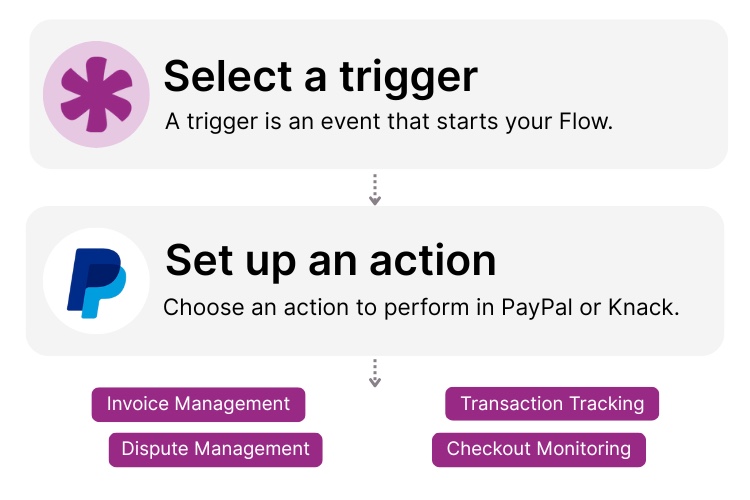
Step 1: Select a Trigger
A trigger is an event in your automation that starts your Flow. Begin by selecting a trigger event in PayPal that will initiate your workflow. For example, you might choose “New Successful Sale” or “Subscription Canceled” as the trigger. Knack monitors PayPal for the selected trigger.

Step 2: Set up an Action in Knack
Determine what happens in Knack once the PayPal trigger is activated. You could set up an action to “Create a New Record” in Knack when a new payment is processed or “Update an Existing Record” when a subscription is canceled.

Step 3: Connect and Automate
Add more actions or start running it now. Your PayPal and Knack apps are now seamlessly connected. With Knack Flows, you can automate payment processes, sync data effortlessly, and eliminate manual data entry. Your customer and payment information is accurate and secure.
Popular Knack + PayPal Automations
Effortlessly integrate Knack and PayPal with pre-built templates to save time and improve accuracy.
Top Use Cases for Integrating Knack with PayPal

Customer & Transaction Tracking
The PayPal and Knack integration syncs your Knack database with your PayPal account. Automatically log new customers and transactions in Knack to build live CRM views, sales dashboards, and payment histories, no manual data entry required.

Subscription & Billing Management
Manage PayPal subscriptions and billing directly in your Knack app. Capture new subscription signups, plan changes, and payments in real time. Keep customer records up to date and flag cancellations or failed payments automatically, enabling smarter workflows and better visibility for your team.

Refund & Dispute Handling
Track refunds and disputes from PayPal as they happen. Automatically create or update records in Knack to monitor resolution timelines, trigger alerts, or assign tasks from a single system.

Checkout & Payment Link Monitoring
Bring payment insights into your Knack app. Log completed PayPal checkout sessions to track orders or signups, and catalog payment links for visibility into which services or campaigns are driving conversions.
Triggers and Actions
Knack Flows help you automate workflows by connecting your data and Actions. A Trigger starts a workflow, and an Action executes a task based on the Trigger.

Trigger
(PayPal) Successful Sale
Trigger
(PayPal) Subscription Canceled
Trigger
(PayPal) New Invoice Created
Trigger
(PayPal) Payment Refunded
Trigger
(PayPal) Dispute Created
About PayPal
PayPal is a digital payment platform that enables individuals and businesses to send and receive money online and in person. Acting as a secure digital wallet, PayPal facilitates transactions between bank accounts, credit cards, and merchants. Known for its ease of use, strong security features, and global reach, PayPal supports transactions in numerous countries and currencies.
Find Inspiration on the Knack Blog

PayPal and Knack: Set up Secure, Online Payments
Setting up online payments should feel empowering, not risky or...
Read
More
How To Transform Your Small to Medium-Sized Business with Knack
One of the biggest challenges leaders of small or medium-sized...
Read
More
How to Build an Inventory Manager App Without Code
Welcome to our detailed guide on “Building an Inventory Management...
Read
More





