


 Log In









Key Takeaway
Before diving in, here’s the quick answer: both no-code and AI app builders empower small businesses to innovate without hiring full-stack developers. No-code platforms like Knack focus on accessibility, scalability, and integration, while AI app builders emphasize automation and intelligent decision-making. The best choice depends on your goals, budget, and how much control you want over your build.
Why No-Code and AI App Builders Are Transforming App Development
The emergence of no-code and AI in app development has dramatically democratized software creation, enabling anyone—from solo founders to small teams—to build fully functional applications without relying on engineers.
Modern platforms offer intuitive drag-and-drop interfaces, powerful AI capabilities, or a combination of both, allowing businesses to launch sophisticated products faster than ever before. As these app-building solutions evolve, they bridge the gap between technical and non-technical users, making innovation more accessible across all industries.
In this article, we’ll break down the differences between a no-code and an AI-based approach, explore real-world use cases, and explain how no-code AI app builders blend the strengths of both, providing a simple, powerful, and scalable solution for small businesses.
No-Code vs AI App Builder: Side-by-Side Feature Comparison
| Feature | No-Code App Builder | AI App Builder |
| Ease of Use | Drag-and-drop interfaces | AI-driven automation |
| Customization | Manual flexibility | Model-based |
| Ideal For | Small teams & non-tech founders | Data-heavy workflows |
| Cost | $$ | $$$ |
| Scalability | Strong | Moderate (depends on AI model) |
What Is a No-Code App Builder?
A no-code app builder is a platform that enables users to create applications through visual tools—designing databases, workflows, and user interfaces without writing a single line of code—which empowers non-technical teams to build software on their own. These tools replace traditional development with drag-and-drop editors and modular components that make app creation fast, accessible, and scalable.
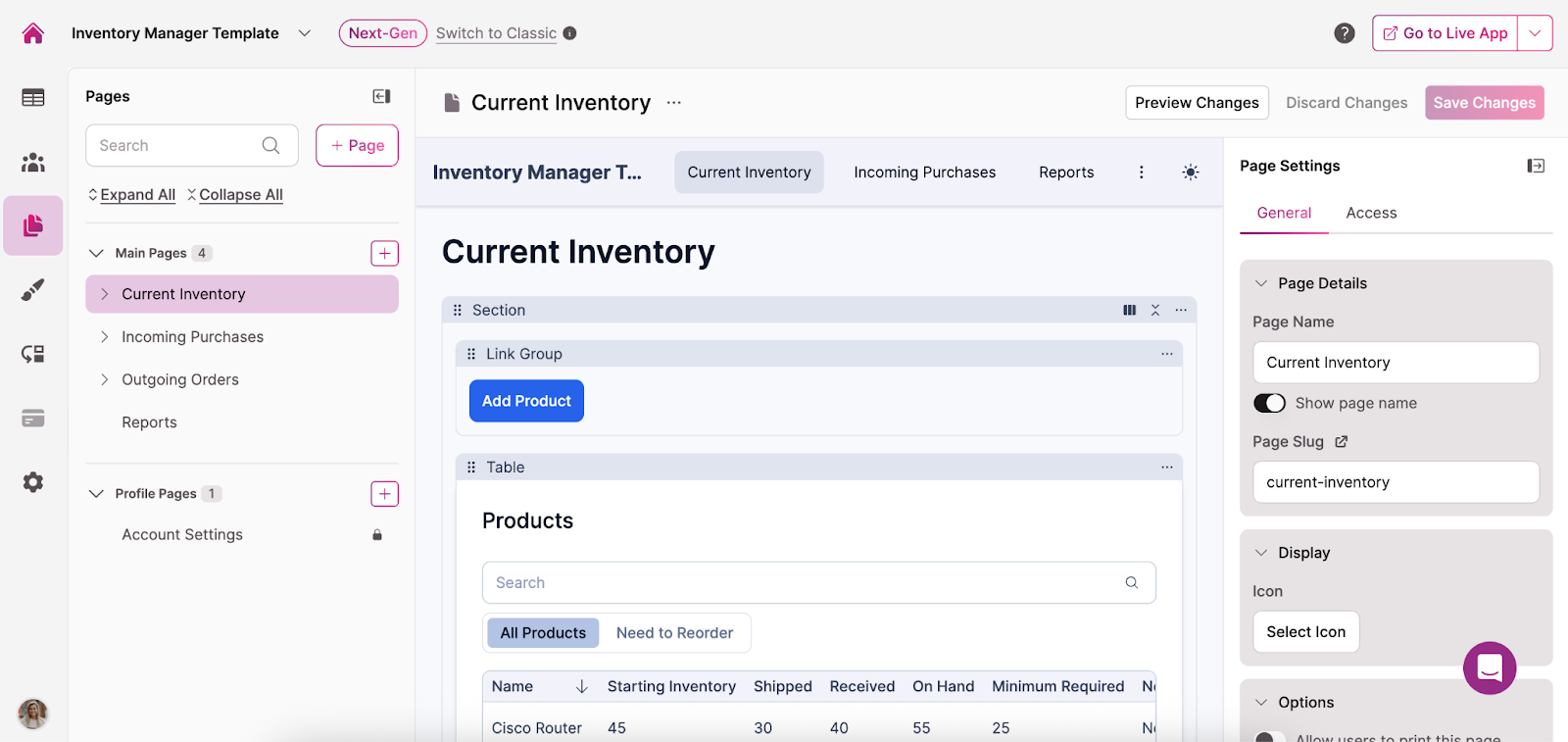
Knack is a leading example, specializing in business apps that help organizations manage data and launch new tools with ease. With Knack, many small teams have built customer portals, inventory systems, and project hubs tailored to their specific needs without hiring developers, thus increasing both cost-effectiveness and accessibility.
3 Easy Ways to Start Building For Free
1. Generate an App with AI
2. Use one of our templates
3. Import your own data

Free 14-Day Trial. No Credit Card Required
Benefits of No-Code App Builders for Small Businesses
Leveraging a no-code app builder can deliver major benefits for businesses, including faster deployment timelines and smoother integration with existing systems. These powerful, easy-to-use tools enable users of any technical skill level to bring their vision to life without relying on costly developers.
Key advantages of no-code app builders include:
- Rapid deployment and iteration: Teams can build, test, and update apps quickly without waiting for long development cycles.
- Lower development cost: Businesses reduce or eliminate the need for expensive engineering resources, saving significantly on labor.
- Visual logic and automation: Drag-and-drop logic builders and automation streamline complex workflows with minimal effort.
- Integration with CRMs, spreadsheets, and APIs: No-code tools easily connect to existing systems, ensuring smooth data flow across platforms.
Limitations of No-Code App Builders (What to Watch For)
As with any technology, there are some potential drawbacks to think through before committing to a no-code app builder. Fortunately, these minor challenges can typically be resolved with a bit of extra effort and problem-solving, allowing you to enjoy the significant benefits while keeping any issues well under control:
- Limited design flexibility for advanced needs: Some platforms may restrict highly customized layouts or complex UI elements; users can often overcome this by using available extensions, workarounds, or custom code options when supported.
- Reliance on the platform’s scalability and security: Performance and protection depend on your provider’s infrastructure; choosing a reputable platform and reviewing its uptime history and security policies can help ensure long-term reliability.
What Is an AI App Builder?
AI app builders, on the other hand, use artificial intelligence to generate application components—such as workflows or screens—based on natural language prompts or trained models.
Instead of manually dragging and configuring elements, users can simply type instructions like “create an inventory tracker,” and the system will build functional logic and interfaces automatically. While no-code platforms rely primarily on visual editors, AI-driven builders translate user intent directly into app structure, speeding up development even further.
Small businesses often operate with limited budgets and little to no in-house technical expertise, making traditional software development too expensive and slow. An AI app builder for small businesses removes these barriers by allowing owners or non-technical employees to create tools on demand using simple prompts instead of hiring developers.
Essential AI App Builder Features to Look For
To ensure your AI app builder has the power and flexibility to meet your unique needs, it’s important to verify that it includes a rich set of capabilities aligned with your specific requirements.
While the exact tools you prioritize will depend on your pain points and goals, there are certain AI features that are essential for any use case, including:
- Natural language prompting: Allows users to describe what they want in plain English, enabling the AI to generate screens, workflows, or logic automatically.
- Predictive analytics: Uses machine learning to surface insights, forecast trends, or recommend actions based on your app’s data.
- Automated database design: Automatically structures and optimizes the underlying data model, saving users from complex schema planning.
- Generative UI Design: Uses AI to produce visually appealing and functional user interfaces tailored to your app’s needs.
- AI-Powered Workflow Automation: Builds multi-step processes that trigger actions, send notifications, or update records without manual effort.
- Contextual Chatbots / AI Agents: Integrates intelligent bots that can interact with users, answer questions, or perform tasks within the app environment.
When evaluating the best no-code app builder AI features, small businesses should look for tools that not only automate tasks but also make app creation intuitive. Platforms like Knack offer a hybrid approach, blending automation with control—perfect for small teams looking to scale.
Visual Note: Insert a small table to quickly demonstrate key AI-powered functionalities and their impact on app development.
Example Table: AI Feature vs What It Does
| AI Feature | What It Does | Benefit for Small Businesses |
| Natural Language Prompting | Converts text prompts (e.g., “Create a CRM app with lead tracking”) into functional app structures. | Enables non-technical users to build apps instantly without coding. |
| Predictive Analytics | Analyzes existing data to forecast trends (e.g., customer churn, sales patterns). | Helps small businesses make data-driven decisions and automate follow-ups. |
| Automated Database Design | Automatically generates relational databases based on app goals or imported data. | Saves setup time and reduces human error in database structuring. |
| Generative UI Design | Uses AI to build and style user interfaces from plain-language prompts. | Delivers professional-looking apps quickly, ideal for startups. |
| AI-Powered Workflow Automation | Suggests or builds automated flows (e.g., notifications, approvals). | Improves efficiency and reduces manual tasks for lean teams. |
| Contextual Chatbots / AI Agents | Integrates conversational AI for customer support or internal requests. | Boosts user engagement and cuts support costs. |
Key Differences Between No-Code and AI App Builders
When deciding between the best AI app builders and the best no-code development platforms, it’s crucial to weigh the pros and cons of each across all key areas of functionality. To simplify this evaluation, we’ve outlined how they compare in terms of workflow control, customization, scalability, and more—see the table below for a side-by-side breakdown.
| Category | No-Code App Builder | AI App Builder |
| Workflow Control | Users manually design logic and workflows using visual builders (e.g., Knack’s drag-and-drop). | AI automates workflow creation and optimization using trained models or user prompts. |
| Learning Curve | Easy for beginners and non-technical users; minimal setup needed. | Requires understanding of AI prompts and fine-tuning; steeper curve initially. |
| Customization | High level of design and layout control. | Limited by model capabilities; customization often occurs through prompt adjustments. |
| Automation | Built-in rule-based automations triggered by data changes or form actions. | Predictive, AI-driven automations that evolve based on user behavior. |
| Use Cases | Internal CRMs, project trackers, booking apps, small-team dashboards. | AI chatbots, analytics dashboards, customer sentiment tools, recommendation engines. |
| Scalability | Scales easily with business data and integrations (ideal for SMBs). | Improving — often limited by AI compute costs or model integrations. |
| Speed of Deployment | Fast and predictable—templates make launching simple. | Rapid prototyping but dependent on AI accuracy; may require iteration. |
| Cost | Predictable subscription model; lower long-term cost. | Variable pricing tied to compute or API usage; higher initial experimentation cost. |
When to Choose No-Code vs AI App Builders (Use Cases)
There’s no one-size-fits-all answer to whether a no-code approach or an AI app builder is best for your specific use case. You’ll need to carefully assess the features and capabilities you require to determine how well each solution aligns with those needs.
Below, we’ve highlighted some specific scenarios and explained when each approach might be the better fit.
Best Use Cases for No-Code App Builders
A no-code app-building approach is ideal for startups and small businesses looking to create CRMs, booking systems, or inventory dashboards, as it provides faster time-to-market and greater control over the user interface. These features allow small teams to quickly launch tools that streamline operations and improve efficiency—which is especially valuable when resources and technical expertise are limited.
Additionally, the cost-efficiency of no-code solutions makes them a smart choice for businesses with tight budgets, enabling them to avoid the expense of hiring full-time developers.
With Knack, you can transform your small business, as the platform offers unrivaled ease of use without sacrificing a robust set of features, making it perfect for SMBs seeking a powerful, intuitive solution.
Best Use Cases for AI App Builders
Conversely, an AI app builder for small businesses is ideal for organizations that require intelligent data handling, advanced automation, and predictive capabilities beyond what traditional no-code tools offer. SMBs might choose an AI-powered approach when they need to generate workflows from natural language prompts or automate complex processes that would be time-consuming to configure manually.
While there are trade-offs—such as potentially less control over UI customization or reliance on the platform’s underlying AI models—businesses with more complex or specialized needs may find this approach to be best for use cases like dynamic inventory management, personalized customer engagement, or automated reporting and analytics.
Cost Comparison: No-Code vs AI App Builder ROI
Beyond ensuring that your chosen solution provides the functionality you need, cost-efficiency is another critical factor for small businesses—especially those operating on strict budgets.
No-code platforms typically offer predictable subscription pricing, allowing teams to plan expenses with confidence, whereas AI app builders often charge based on compute power or API usage. This makes understanding pricing models a crucial step when selecting the right solution for your business.
How AI App Builder Pricing Works (Compute Costs Explained)
Pay-as-you-go pricing in AI app builders charges businesses based on the actual usage of AI resources—such as processing workflows, generating predictions, or running automated tasks.
The main benefit of this model is that you only pay for what you use, making it flexible for projects with fluctuating demand—but it can become costly if usage spikes unexpectedly or if the app processes large volumes of data continuously. Businesses with variable workloads or short-term projects may benefit most from this approach, while those with predictable, high-volume needs might prefer a flat subscription or bundled plan to better control costs.
To reduce expenses here, users can optimize workflows, limit unnecessary API calls, batch processes when possible, and monitor usage closely to avoid unexpected charges.
How to Manage API Usage Costs in No-Code and AI Apps
Whether you choose a no-code or AI app builder, you’ll likely need to connect to existing business systems to enable seamless data sharing and automate business processes. This is often done through APIs, or Application Programming Interfaces, which act as bridges that allow different software systems to communicate and exchange data efficiently.
Here are some tips to help you forecast your budget and keep API integration costs low:
- Monitor usage regularly: Track API calls to avoid unexpected overages and identify high-usage endpoints.
- Set limits or quotas: Many platforms allow you to cap daily or monthly API calls to control costs.
- Optimize data requests: Fetch only the data you need rather than making large or frequent requests to reduce usage.
- Batch requests when possible: Combine multiple operations into a single API call to minimize the number of requests.
- Choose efficient endpoints or services: Evaluate alternative APIs that offer similar functionality at lower costs or with more predictable pricing.
Ease of Use: No-Code vs AI App Builder Learning Curve
No-code tools are highly regarded for their accessibility, making them ideal for beginners who may have little to no technical experience, while AI tools often require a basic understanding of prompt design and workflow logic to get the most out of their capabilities. The visual nature of no-code platforms—featuring drag-and-drop editors, pre-built templates, and intuitive workflow builders—allows users of all skill levels to create functional apps without developer assistance.
Knack reinforces this accessibility with a simple interface and comprehensive learning materials that guide users step by step. Even better, Knack offers the best of both worlds: the simplicity of a no-code solution combined with powerful AI functionality, enabling teams to build sophisticated applications quickly and efficiently.
Integration & Scalability for No-Code and AI App Builders
Scalability is another critical factor for SMB growth, as businesses need solutions that can expand alongside their evolving operations.
Both no-code and AI app builders offer the ability to connect to APIs and databases, enabling seamless integration with existing systems and supporting more complex workflows as your organization grows. Choosing a platform that doesn’t connect well can lead to data silos and costly workarounds, limiting your ability to scale effectively.
Many real-world businesses have already built successful, interconnected apps without writing a single line of code—and with Knack, your creation could be next.
Security & Compliance in No-Code and AI App Builders
Modern no-code and AI platforms prioritize data security, often offering features such as encrypted storage, secure user authentication, and compliance with industry standards like SOC 2 and HIPAA, which is especially reassuring for small businesses handling sensitive customer information. These measures reinforce trustworthiness, giving teams confidence that their data—and their customers’ data—is protected.
No-code AI app builders take security a step further by combining these safeguards with the ability to quickly and easily build AI-powered applications, allowing businesses to leverage advanced functionality without incurring the costs of custom development or compromising on safety.
Why Knack Combines No-Code and AI for Small Business App Building
If you’re unsure whether a no-code or AI-powered approach is right for your small business, there is a compelling alternative: Knack, a hybrid solution that combines the flexibility of no-code with the intelligence of AI-driven automation.
By leveraging the strengths of both approaches, small businesses can build advanced, scalable applications without being forced to make tradeoffs between ease of use and robust functionality. Knack also supports growth with customizable templates and powerful automation capabilities, while its API flexibility ensures smooth integration with existing systems, allowing teams to create fully connected, efficient workflows that can transform their operation.
Start building your first AI-enhanced app in minutes—sign up for your free trial today!
Conclusion: Choosing Between No-Code and AI App Builders
When it comes to the question of whether a no-code or AI app builder is better for your small business, the answer isn’t so straightforward.
No-code platforms are best suited for simplicity and control, while AI app builders excel at automation and predictive capabilities. Meanwhile, Knack bridges both worlds, offering the ease of no-code development combined with powerful AI functionality, making it simple for SMBs to create intelligent, scalable applications.
Discover how Knack blends no-code flexibility with AI power. Start your free trial now!
FAQ: No-Code and AI App Builders
Can I build an AI-powered app without coding?
Yes. Tools like Knack allow you to integrate AI automations within a no-code environment.
What are the best no-code app builder AI features to look for?
Features to seek out include prompt-based UI creation, predictive logic, and workflow automation.
Is an AI app builder for small businesses affordable?
Yes—many AI app builders offer flexible pricing tied to usage and team size.
How does Knack compare to others?
Knack stands out by offering a friendly balance of power and simplicity. It provides full customization, so you can design apps that truly fit your business needs, while also scaling effortlessly as your team and operations grow.





